First, check the connector, cable and charging specifications for your headphones or charging case. If a suitable charger you already own meets these requirements, you don’t automatically need a new adapter. One port is enough if you’re only charging your headphones. Two compatible ports are useful if you also regularly plug another device into the same socket, but a higher wattage doesn’t automatically mean faster charging. In the Netherlands, mains-powered USB chargers must carry the CE marking, according to the Netherlands Food and Consumer Product Safety Authority.
Which option is right for you?
Student with one pair of headphones
If you want to avoid buying an extra adapter, first check whether your existing charger and cable are suitable. The Dutch government points out that reusing a charger can make a new one unnecessary; however, you’ll need to check the connector on an older device separately.
Student sharing a socket
If you also want to plug in your phone in the same place, check the number and type of ports. Belkin’s WCB009vfWH has USB-C and USB-A ports, according to the manufacturer, but check that they work with the cables for your devices.
Student charging by the bed
If you use a mains-powered charger, make sure there’s a clear space where the charger and device can sit freely. Fire Service Netherlands advises placing chargers in an open space, not charging under a pillow or duvet, and never using a damaged cable.
What should you look for when choosing?
First check whether your current charger and cable are suitable; only buy another adapter if they aren’t or you need extra ports. Then choose the ports you need based on the devices you’ll actually connect at the same time.
| What to consider |
What should you check? |
Who should prioritise this? |
| Connector and compatibility |
Check the connector on your headphones or case, both ends of the cable, and the charging specifications in the manual. |
If I want to check first whether my existing cable and adapter will work, I check them against my own model; around 33% of consumers say the connector is their main purchasing concern. |
| Safe charging |
Check that the mains-powered charger carries the CE marking. Place the charger and device in an open space while charging, and don’t use a damaged cable. |
If I’m charging by the bed and my main concern is finding a clear, safe spot, I’ll keep the charger and device away from pillows and duvets; around 27% of consumers prioritise safe charging. |
| Charging two devices at once |
Count the devices you’ll connect at the same time and check the connectors and output specifications for each port. |
If I want to plug in my headphones and phone at the same socket, I’ll look for two compatible ports; around 20% of consumers make simultaneous charging their main priority. |
| Avoiding an unnecessary purchase |
Check whether you already have a suitable charger and whether a cable is included with the new model. |
If I don’t want to buy an extra adapter or cable, I’ll first see what’s already in my room; around 20% of consumers want to avoid unnecessary purchases. |
Common buying mistakes
-
Confusing wireless audio with wireless charging
Headphones that play audio wirelessly may still only charge via a cable. A charging pad is an alternative only if the specific case supports wireless charging.
Check the specifications for the exact case before choosing a charging pad; otherwise, check which USB cable and charger are suitable.
A charging pad may also need its own power supply. Check what you already have before buying one.
-
Focusing only on the highest wattage
A higher stated power output doesn’t prove that your headphones will charge faster. Manufacturer specifications and fast-charging times may refer to other devices.
Compare the charging specifications for your exact headphones with the output of the port you’ll use. Only choose extra ports if you’ll actually connect devices at the same time.
-
Assuming a compatible cable is included
The cable you need depends on the connectors at both ends. Anker states that the cable for the Anker 511 Charger (Nano Pro) is sold separately.
Check what’s included with the exact version and whether your existing cable fits both the adapter and your headphones.
You may also need to source a compatible cable for the Anker version mentioned; Anker states that it’s sold separately.
Brands to consider
Anker
The Anker 511 Charger (Nano Pro) is an example of a compact, single-port USB-C charger.
- Anker states that this European model delivers up to 20 W and lists AirPods among compatible devices.
- According to Anker, the cable is sold separately. Check the cable and the charging specifications for your own headphones; the stated specifications aren’t based on an independent charging test.
Belkin
The BoostCharge versions mentioned differ in the number and type of USB ports, among other things.
- Belkin specifies one USB-C port with up to 20 W for the WCA009kqWH. For the WCB009vfWH, Belkin states up to 30 W via USB-C and 12 W via USB-A.
- The fast-charging times quoted are for phones, not headphones. Check the specifications for each port if you want to charge devices at the same time.
UGREEN
The Nexode 20W PD 3.0 PPS is a single-port USB-C model.
- UGREEN lists PD 3.0 and PPS, and includes AirPods among compatible devices.
- UGREEN’s stated fast-charging performance is for an iPhone and doesn’t indicate how quickly a specific pair of headphones will charge.
USB chargers at Joybuy
This selection includes mains-powered USB chargers with USB-A and/or USB-C ports for a wired connection. Before choosing a charger, check the cable, your headphones’ charging specifications and the CE marking on the exact model.
 No image available
OnePlus 80W Dual Ports SUPERVOOC adapter, USB-A + USB-C, white
The description mentions wireless earbuds; check that your headphones’ cable and charging specifications are compatible with this adapter.
The product name states 80 W and USB-A and USB-C ports.
Before buying, check that this mains adapter carries the CE marking required for the Dutch market.
View at Joybuy
 No image available
65W multi-port USB wall charger, 2 × USB-C + USB-A
Could be suitable if you want to connect other devices as well as your headphones; check which cable and port are right for each device.
The product name states 65 W, two USB-C ports and one USB-A port.
Before buying, check that this mains adapter carries the CE marking required for the Dutch market.
View at Joybuy
 No image available
30W USB wall charger, USB-A + USB-C
Could be suitable if you need one of the two ports for a compatible headphone cable and possibly a second device.
The product name states 30 W and USB-A and USB-C ports.
Before buying, check that this mains adapter carries the CE marking required for the Dutch market.
View at Joybuy
 No image available
20W USB wall charger, USB-C + USB-A
Could be suitable if your headphone cable connects to one of the two ports; check the charging specifications for your own model.
The product name states 20 W and USB-C and USB-A ports.
Before buying, check that this mains adapter carries the CE marking required for the Dutch market.
View at Joybuy
 No image available
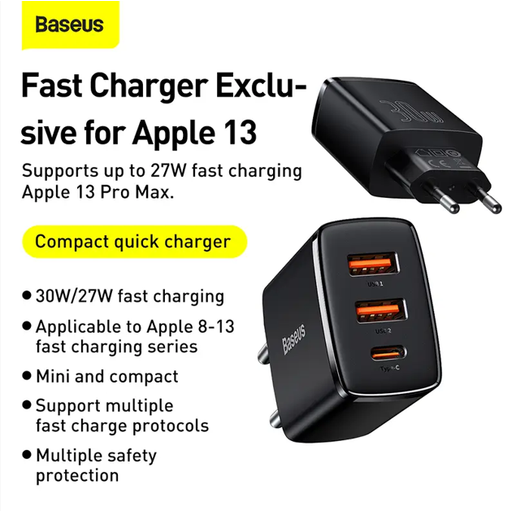
Baseus Compact Quick Charger, black
The listed USB ports can connect a compatible headphone cable and other devices; check the connectors on your own cables.
The product description lists one USB-C port, two USB-A ports and 30 W total. When all three ports are in use, it states 15 W total, shared between the ports.
Before buying, check that this mains adapter carries the CE marking required for the Dutch market.
View at Joybuy
Frequently asked questions
Do my wireless headphones need to charge via USB-C?
Not necessarily: check the connector on the pair you already own. Since 28 December 2024, EU rules have applied to certain products newly placed on the EU market, including headphones and earbuds that charge via cable; those rules don’t determine which connector an older device has. The Dutch government and the EU’s common charger directive explain the applicable scope.
Will a 42 W adapter charge my headphones faster than a 20 W one?
You can’t tell from the adapter’s maximum power output alone. Compare the charging specifications for your exact headphones with the output of the port you’ll use; manufacturers’ quoted fast-charging specifications may refer to other devices.
Where should I put the charger while it’s charging?
Place the charger in an open space so heat can escape, don’t charge under a pillow or duvet, and don’t use a damaged cable. This is the safety advice from Fire Service Netherlands.
Is the CE marking required for a mains-powered USB charger in the Netherlands?
Yes. The Netherlands Food and Consumer Product Safety Authority says the CE marking is compulsory for electrical consumer products. A CE logo is not, by itself, an independent performance test; check the marking on the specific mains adapter.
Can I charge my wireless headphones with a charging pad?
Only if the specific charging case supports wireless charging and is compatible with the pad. Wireless audio doesn’t automatically mean the case can charge wirelessly; check the product specifications for your model.


