
Someone with one charging case
You want a charger that works with your existing cable, so you check the case connection; a second charging port isn’t a priority. Samsung describes the Galaxy Buds case as the charger for the earbuds.


First, check that your cable’s plug fits both the charging case and the charger’s USB port. One port is enough for the earbuds alone; two ports are useful if you also want to charge another device at the same time. However, a higher stated wattage doesn’t prove that the case will charge faster. Keep the charging area dry and, for a mains charger sold in the Netherlands, check the CE marking on the specific product: it is required by the Netherlands Food and Consumer Product Safety Authority (NVWA).
You want a charger that works with your existing cable, so you check the case connection; a second charging port isn’t a priority. Samsung describes the Galaxy Buds case as the charger for the earbuds.
You sometimes want to charge a phone or another device in the same place, so you check the number of ports and the output from each one. Belkin lists one USB-C and one USB-A port for the BoostCharge WCB007vfWH.
You want a tidy, dry place to charge your devices and need to consider moisture, spills and cables. Samsung warns about moisture near Galaxy Buds connectors; Brandweer Twente recommends charging devices on a hard surface and, preferably, during the day.
| What to consider | What should you check? | Who is this important for? |
|---|---|---|
| Connection and cable | Check the port on the case, both plugs on the cable and whether the cable is included. | If I want to use my existing cable, the connections at both ends need to fit. Around 30% of consumers say the connection and cable are their main consideration. |
| A dry charging spot | Choose a stable spot away from water and spills; follow the case instructions. | On a worktop, I want to place the charger and case somewhere dry. Around 30% of consumers are mainly concerned with having a dry, safe place to charge. Samsung warns that moisture near Galaxy Buds connectors can cause corrosion. |
| Number of ports | Count the devices you’ll connect at the same time and check the output of each port. | If I want to charge another device as well as the case, a second compatible port is useful. Around 20% of consumers say charging multiple devices at once is their main consideration. |
| What’s included? | Check what comes in the box with both the charger and the earbuds. | If I don’t have a compatible cable, I want to know whether one comes with the charger. Around 20% of consumers are mainly concerned about a cable being missing. |
The stated output describes the charger, not the measured charging speed of your case.
First check your case’s charging requirements, then compare the chargers’ outputs.
The cable may be missing or may not fit the case or charger.
Compare the connections at both ends and check what comes with the charger and earbuds.
Moisture near the charging port can cause problems, and different models may have their own usage restrictions.
Choose a dry, stable spot and follow the instructions for the case and charger.
The 15W Power Adapter EP-T1510NWEGEU is a single-port USB-C mains charger for use with a compatible cable.
The European Anker 511 Charger (Nano Pro), model A2637, has one USB-C output for use with a compatible cable you already own.
The BoostCharge WCB007vfWH has one USB-C and one USB-A port for a shared charging point.
These are USB mains chargers for a charging case, with options offering one or more connections and, in some cases, an included cable. Before buying, check the CE marking on the specific mains charger; it is required for mains chargers sold in the Netherlands by the NVWA.
 No image available
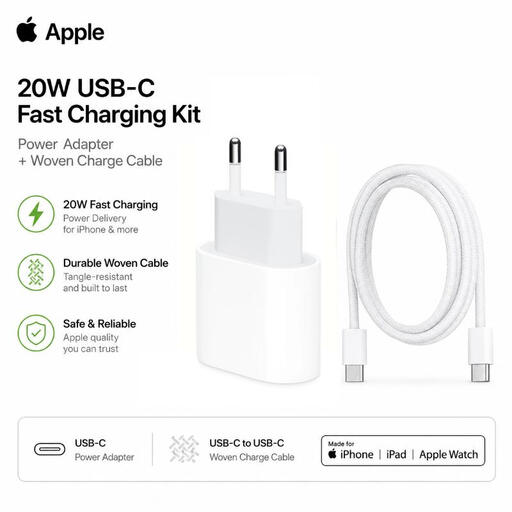
An option if you have a USB-C case and also need a compatible cable; the product description says it supports AirPods with a USB-C case.
According to the product information, the kit includes a 1-metre braided USB-C to USB-C cable. Apple says that a USB-C cable and power adapter are not included with AirPods 5 with Wireless Charging Case.
Do not expose to moisture or liquids.
 No image available
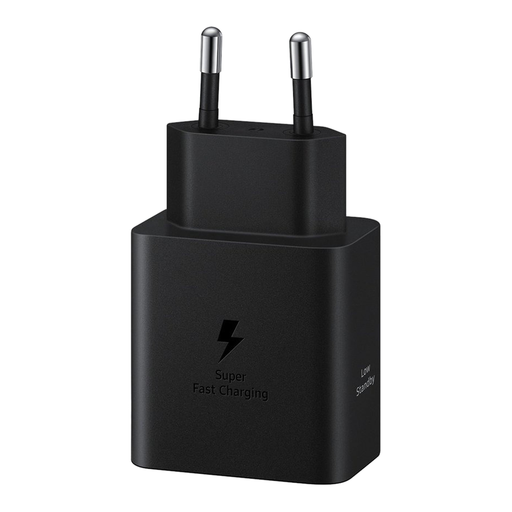
A single-port USB-C option if you already have a cable that fits both the charger and the case.
The product name states 45 W and says that the cable is not included. The stated power isn’t a measurement of your case’s charging speed.
 No image available
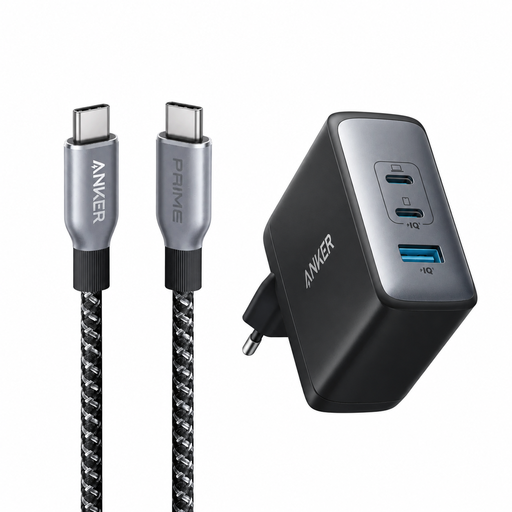
This bundle could suit you if you need a USB-C cable and the connections match your case.
The product name lists a 100W charger and a 90 cm braided USB-C cable with a stated cable rating of 240 W. The charger’s power rating alone says nothing about the charging speed of your case.
 No image available
An option if you sometimes want to charge another device at the same time as the case and both cables fit the ports.
The product name and description list USB-A and USB-C outputs and say that two devices can be used at once. Check which output you need for each cable.
 No image available
The built-in cable is an option if it fits your case; also check that the ports suit what you want to charge at the same time.
The product name lists 65 W, two USB-C ports and a retractable USB-C cable. The description says it is for indoor use only and warns against moisture and water.
No, it depends on the model and version. Apple says that AirPods 5 with Wireless Charging Case do not come with a USB-C cable or power adapter. Check what’s included with your earbuds and charger.
Keep the earbuds, case and charging area dry, and follow the instructions for your model. Samsung warns that moisture near Galaxy Buds connectors can cause corrosion. Set up your charger on the worktop, away from splashes.
Yes. According to the NVWA, CE marking is required for mains chargers sold on the Dutch market. Check the marking on the specific product; this requirement does not necessarily apply to a USB cable sold on its own.
No. The European Commission gives 28 December 2024 as the start date for common charging requirements for products covered by the rules, including earbuds. This does not determine which connection an older charging case has; check the connection on your own case.
No. According to the Dutch Government, the Netherlands has no fixed statutory warranty period. You are entitled to a product that works as it should, and if there’s a problem, the seller must provide a solution. Any period stated for a product does not automatically give a complete picture of your legal rights.