
Student with an existing torch cable
Just wants a charger that fits the plug on their current cable, without paying for features they don’t need.


First, check your torch’s charging port, both ends of the cable and the charging instructions. The port on the torch doesn’t automatically tell you which port the charger needs. Then choose a simple charger, or one with extra ports if you also want to charge another device. A higher stated wattage doesn’t, on its own, mean your torch will charge faster. Charge the torch on a hard, clear surface, not under bedding, as the Netherlands Fire Service advises.
Just wants a charger that fits the plug on their current cable, without paying for features they don’t need.
Wants to charge their torch and, for example, a phone from one mains charger, so they’re checking the number of ports needed and the power available from each port.
Wants to charge the torch on a hard, clear surface, away from pillows and duvets. The Netherlands Fire Service advises keeping the charger unobstructed and not using damaged cables.
Choose this when: the charger end of your cable has a USB-A plug and your torch’s instructions allow this charging method.
The trade-off: a USB-A-only model won’t connect directly to a USB-C-to-USB-C cable.
Choose this when: you have a suitable USB-C-to-USB-C cable and your torch’s instructions support this charging method.
The trade-off: check whether the cable is included. A fast-charging claim for a phone says nothing about how long a torch will take to charge.
Choose this when: you use cables with different types of plug, or want to charge your torch and another device from a single socket.
The trade-off: check the power available from each port, including when charging devices at the same time. The maximum total power doesn’t tell you how much each connected device will receive.
| Concern | What to look for when buying | Who is this important for? |
|---|---|---|
| Compatible port and cable | Check the port on the torch, the plug at the charger end, whether a cable is included and the instructions. | If I want to keep using my existing cable, both ends need to fit the torch and the charger. Around 42% of consumers prioritise cable compatibility. |
| Charging devices at the same time | Count the USB-A and USB-C ports you need, and check the power available from each port and when they’re used simultaneously. | With few sockets, I want to connect my torch and another device at the same time without guessing how much power each port provides. Around 25% of consumers prioritise charging multiple devices at once. |
| Suitable power output | Compare your torch’s charging instructions with the charger’s output specifications; don’t assume a phone’s charging time applies. | If I’m only charging my torch, I don’t want to pay for extra power or a phone-charging feature I don’t need. Around 17% of consumers prioritise a simple power supply that meets their needs. |
| Safe charging in a small room | Check the cable for damage, keep the charger unobstructed and don’t charge the torch under a pillow or duvet. | In a small room, I want to know in advance where I can place the torch on a hard surface with plenty of space around it. Around 16% of consumers prioritise safe charging. |
The cable determines which plug fits directly into the charger, so checking only the port on the torch isn’t enough.
Check both ends of your cable and follow your torch’s charging instructions before choosing a charger.
If the plugs don’t fit, you may need a different cable.
A phone’s advertised fast-charging performance doesn’t automatically apply to a torch. And the maximum power of a multi-port model doesn’t necessarily tell you how much power a single device will receive.
Use your torch’s charging instructions as your starting point. If you’re connecting other devices at the same time, check the power available from each port.
The Netherlands Fire Service advises keeping the charger clear so heat can escape, and not charging devices under a pillow or duvet.
Choose a clear spot on a hard surface and don’t use a damaged cable.
Offers models with two USB-A ports, as well as models with both USB-A and USB-C. These can work with different cables and let you charge a second device.
Model 00201960 has one USB-A port and one USB-C port, making it an option if you want to use both types of connection.
Model 90496 has two USB-C ports and one USB-A port, which may be useful if you also want to charge other devices.
The 20 W USB-C Power Adapter has one USB-C port. It’s an option to compare if your cable has a USB-C plug at the charger end.
These Joybuy products have USB-A and USB-C ports. Check that your torch cable’s plug fits and that the charging method is suitable according to the instructions.
 No image available
The two types of port let you connect a cable with a compatible plug.
Power: 80 W total. The description says it can charge up to two devices at once; check how the power is split between ports for your combination of devices.
 No image available
The three ports let you connect cables with compatible USB-A or USB-C plugs.
Power: 65 W. The product description says this charger is for indoor use only, in dry conditions.
 No image available
The two types of port let you connect a cable with a compatible plug.
Power: 20 W total. The product description says this charger is for indoor use only, in a dry place.
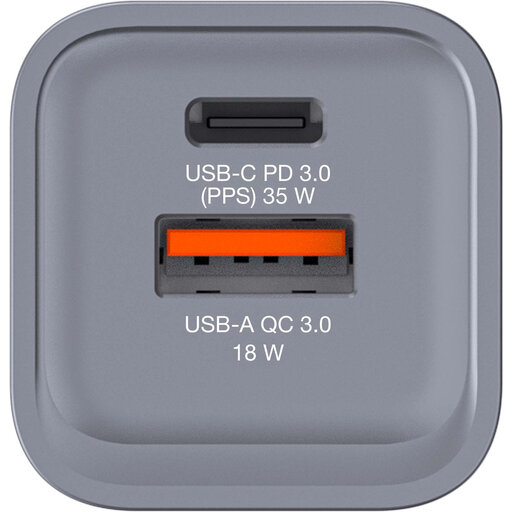 No image available
The USB-C and USB-A ports let you connect cables with compatible plugs.
Stated power: up to 34 W. The product description mentions USB-C PD and USB-A QC 3.0; check which charging method your torch supports.
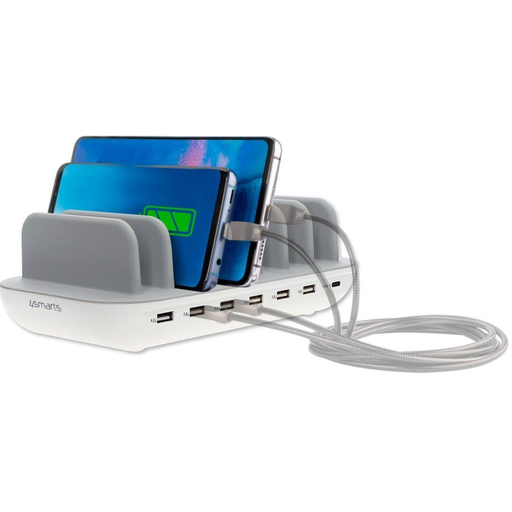 No image available
This charging station has several ports for cables with compatible USB-A or USB-C plugs, making it useful if you want to connect several devices in one place.
The product description lists six USB-A ports, one USB-C port, a maximum output of 60 W and a 1.5 m mains cable. Don’t cover the station while it’s in use and keep it away from moisture.
Not without checking the cable and your torch’s charging instructions. The plug at the charger end of the cable may be different, so follow the manufacturer’s charging instructions.
Place the torch on a hard, clear surface, not under a pillow or duvet. The Netherlands Fire Service also advises keeping the charger clear so heat can escape, and not using a damaged cable.
Check whether a suitable cable is included. Apple says the cable for its USB-C adapter is sold separately, and UGREEN says the same for model 90496. The Dutch Government says that, in many cases, online purchases come with a statutory 14-day cooling-off period. Check which terms and exceptions apply to your purchase.
Yes. A USB mains charger sold on the Dutch market as an electrical product must have a CE marking. The Netherlands Food and Consumer Product Safety Authority classifies chargers as electrical appliances; the marking doesn’t prove that an individual product has been independently tested.
Don’t assume so. The Dutch Government describes USB-C rules for certain categories of device from December 2024, but that information doesn’t confirm that torches fall into those categories. Check the port on your own torch and its charging instructions.