First, check how your toothbrush or existing charging station is powered. A USB-A charging station needs a compatible USB-A mains adapter, while direct USB-C charging is only possible if the manual confirms it for your model. A multi-port adapter is useful mainly if you also want to use the same socket for another device. Keep the charger and toothbrush clear of bedding, and don’t use damaged charging equipment.
Who is this for?
Users with a USB-A charging station
You already have a charging station that’s suitable for your toothbrush and need a mains adapter for its USB-A plug. Philips warns that not all Sonicare chargers are compatible with one another, so check the exact model.
Anyone who charges their toothbrush by the bed
You want to keep the charging area clear of pillows and duvets, and avoid using cables or chargers with visible damage. The Fire Service recommends leaving chargers uncovered so heat can escape.
Anyone sharing a socket
You want to plug in another device as well as your toothbrush, so you’re considering an adapter with multiple ports. Check that the ports match the cables for both devices.
What should you look for?
USB-A charging station with a mains adapter
Choose this if: you already have a charging station with a USB-A plug that’s suitable for your toothbrush.
Bear in mind: a mains adapter won’t replace a missing or incompatible charging station.
Multi-port USB adapter
Choose this if: you also need the socket by your bed for another device.
Bear in mind: extra ports aren’t necessary if you’re only plugging in your toothbrush.
Direct charging via USB-C
Choose this if: your toothbrush manual confirms that it can be charged directly via USB-C.
Bear in mind: a USB-C port on an adapter doesn’t prove that your toothbrush can be charged directly via USB-C.
| What to consider |
What should you check? |
Who is this important for? |
| Connection and model |
Check the model number, charging method and connector on the existing cable. Make sure the charging station is suitable for your toothbrush handle. |
If you don’t want to replace your existing charger without checking, start by finding out which connection you need. Around 36% of consumers say connection and model compatibility are their main concerns when buying. |
| A safe place to charge |
Keep the charger clear of pillows and duvets, and don’t use a damaged cable or adapter. The Fire Service recommends leaving chargers uncovered so heat can escape. |
If you charge by the bed, you’ll want to place the adapter and toothbrush somewhere clear. Around 29% of consumers give a safe place to charge their top priority. |
| Ports and space |
Decide how many devices you’ll charge at the same time, then check the port types and the stated distribution of output power. |
If you use the same socket for a second device, the right extra ports can come in handy. Around 21% of consumers say sharing a socket is their main concern when buying. |
| Cables included and support if something goes wrong |
Check which cables come with the adapter and keep the seller’s details. |
If you don’t want to buy a cable that won’t fit your toothbrush, check the packaging and connection beforehand. Around 14% of consumers prioritise included accessories and help if something goes wrong. |
Avoiding common buying mistakes
-
Assuming a USB port is all you need to charge a toothbrush
A USB-A mains adapter can power a compatible charging station, but it won’t replace the station itself. Philips also notes that not all Sonicare chargers are compatible with one another.
Check the toothbrush handle model, the original charging method and the connector on the charging cable separately.
-
Choosing a multi-port or fast charger for a shorter charging time
An adapter’s stated output power doesn’t prove that your toothbrush will charge faster.
Choose based on the connection and power requirements of your charging setup. Don’t assume the total power rating indicates how long your toothbrush will take to charge.
-
Placing the charger under bedding or continuing to use a damaged cable
The Fire Service says bedding can prevent heat from escaping, while damaged chargers or cables can pose a risk.
Set up a clear space for charging and don’t use damaged charging equipment.
Brands to consider
Philips Sonicare
Worth considering if you use a Sonicare with a compatible USB-A charging station or are looking for a model-specific power adapter.
- Philips describes the CP1713/01 as a USB-A power adapter for charging from a mains socket.
- Philips warns that not all Sonicare chargers are compatible with one another, so check that the charger is suitable for your toothbrush.
Belkin
Worth considering if you need a general USB-A mains charger for an existing, compatible USB-A charging station.
- Belkin says the WCB002 has two USB-A ports, with up to 12 W per port and 24 W in total.
- The product specifications don’t confirm that the charger is suitable for every toothbrush model. The WCA002 comes with a Lightning cable, which won’t necessarily work with a toothbrush charger.
4smarts
Worth considering if you want to connect several devices in one place. It’s a more extensive option if you only need to charge a toothbrush.
- The Dutch Joybuy product description for the Office 60W station lists six USB-A ports, one USB-C port and a 1.5 m cable.
- These seller-provided specifications aren’t an independent performance test and don’t confirm that the station is suitable for a specific toothbrush.
USB adapters at Joybuy
These adapters have USB-A and/or USB-C outputs. Before buying, check which connection and power supply your toothbrush or existing charging station requires.
 No image available
OnePlus 80W Dual Ports SUPERVOOC adapter, USB-A and USB-C
The USB-A output may be suitable for an existing charging station with a USB-A plug. Also check the power requirements of your charging setup.
The product name lists two ports, USB-A and USB-C, and an output of 80 W.
View at Joybuy
 No image available
65W adapter with three ports: USB-A and two USB-C
The USB-A output may work with an existing USB-A charging station. Check your toothbrush connection and power requirements.
The product name lists one USB-A port, two USB-C ports and 65 W. The product description says it’s for indoor use in dry conditions.
View at Joybuy
 No image available
30W adapter with USB-A and USB-C ports
The USB-A output may be suitable for an existing USB-A charging station. Check whether your toothbrush charging setup requires this power supply.
The product name lists two ports, USB-A and USB-C, and 30 W.
View at Joybuy
 No image available
20W adapter with USB-A and USB-C ports
The USB-A output may be suitable for an existing USB-A charging station. Check the toothbrush connection and power requirements.
The product name lists two ports, USB-A and USB-C, and 20 W.
View at Joybuy
 No image available
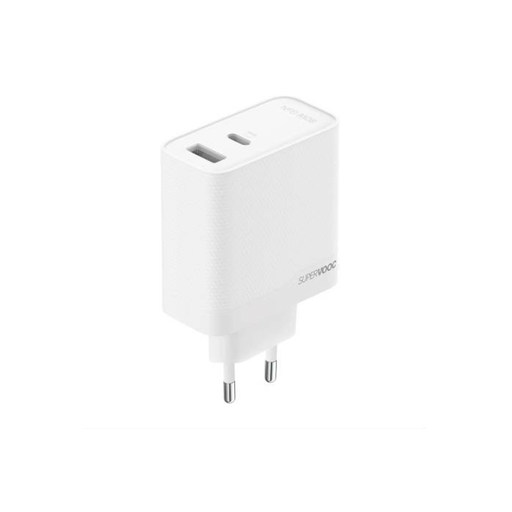
SUPERVOOC 80W GaN adapter with two ports
Check the port type and power requirements of your toothbrush or charging station before choosing this adapter.
The product name lists 80 W, GaN technology and two ports.
View at Joybuy
Frequently asked questions
Can I plug my USB toothbrush into any USB mains charger?
No. First check how your model is charged. Philips describes both model-specific chargers and charging setups with a USB-A connection and a separate mains adapter. A USB port won’t replace the charging station your toothbrush handle may need.
Where should I put the charger if the socket is by my bed?
Keep the adapter and toothbrush clear of pillows and duvets so heat can escape. The Fire Service advises against using damaged cables and chargers, and recommends charging devices with batteries in a room with a working smoke alarm.
Does a USB charger sold in the Netherlands need a CE mark?
Mains-powered USB chargers covered by the relevant European rules must meet product requirements, including a CE mark and an EU declaration of conformity from the manufacturer. A visible mark on its own doesn’t prove that an individual charger is safe; check the warnings for the exact model too.
Who should I contact about a faulty charger bought online?
Report the fault to the seller. The Dutch Government says that the seller must provide a solution if there’s a problem with a product. Any manufacturer’s guarantee is in addition to your statutory rights.


