
Student with one tablet
You’re looking for a suitable charger without unnecessary ports or charging capacity. Check your tablet model and cable. For example, Apple lists a 20W adapter as a single-port option.


Choose a USB charger based on your tablet’s connector and charging requirements; a higher wattage on the adapter alone doesn’t guarantee faster charging. One port may be enough if you mainly charge a tablet, while two ports can be useful for charging a tablet and phone at the same time. If you choose a two-port adapter, compare the power available per port and check that you have the right cable. Also check the product information and safety details for the specific version sold in the Netherlands.
You’re looking for a suitable charger without unnecessary ports or charging capacity. Check your tablet model and cable. For example, Apple lists a 20W adapter as a single-port option.
A charger with two ports could be useful. IKEA and Belkin specify how much power is available per port on their two-port models.
Check whether your iPad has a Lightning connector. Apple describes a USB-C to Lightning cable for this purpose, so a USB-C port on the adapter alone doesn’t determine which cable end fits your tablet.
Choose this if: you usually charge one tablet at a time and the adapter suits its charging requirements.
Bear in mind: you’ll need to charge a second device at another time or use a second adapter.
Choose this if: you regularly want to connect your tablet and phone at the same time.
Bear in mind: the power available per port may change when both ports are in use.
Choose this if: you already have a safe adapter and a suitable cable that meet your tablet’s charging requirements.
Bear in mind: check the connector, charging support and condition of both the adapter and cable.
| What to consider | What should you check? | Who is this important for? |
|---|---|---|
| Connector and charging requirements | Check the tablet model, connector, charging requirements and both ends of the cable. | If I’m charging one tablet, I want to know whether the adapter and cable really suit my model. Around 40% of consumers put compatibility first. |
| Charging at the same time | Check the power available per port when using the number of ports you need. | If I want to connect my tablet and phone to one socket at the same time, I check how the power is shared between the two ports. Around 30% of consumers prioritise simultaneous charging. |
| Electrical safety | Check the product information, usage restrictions and any warnings for the exact version. | If I’m using a mains adapter in my room, I want to be able to assess the safety information for that exact model. Around 20% of consumers make safety their first consideration. |
| Cable and after-sales support | Check what’s included, which cables you already have and who to contact if there’s a fault. | If I don’t want to buy another cable and want to know where to go if there’s a fault, I check what’s in the box and who the seller is. Around 10% of consumers prioritise cost and after-sales support. |
When charging multiple devices at the same time, the power available from each port may differ from what the total figure on the adapter suggests.
Check the specifications for the number of ports you plan to use at once and compare them with your tablet’s charging requirements.
An older iPad may have a Lightning connector, in which case you’ll need a cable that fits it.
Check the exact iPad model and the connector on the tablet before choosing a cable.
If you have an iPad with a Lightning connector, you may need a separate USB-C to Lightning cable.
What’s in the box varies by version. Belkin lists only the wall charger for the WCB006 version.
Compare the contents of the box with the cables you already have and check that the connectors fit.
If you don’t have a suitable cable, you may need to buy one separately.
A 20W single-port USB-C adapter to compare with your tablet’s charging requirements.
The SJÖSS is a two-port option if you want to connect two devices in one place.
The two-port BoostCharge WCB006 is an option to compare if you want to connect two devices at once.
The Galaxy Power Adapter EP-T2510NBEGEU is a single-port option to compare with your tablet’s charging requirements.
The Cube Pro CCXFK30CC is a compact model to compare as a single-port USB-C option.
This selection includes single-port USB-C adapters for one tablet, as well as multi-port models for connecting several devices in one place at the same time. Compare your tablet’s connector and charging requirements with the product information, and check the safety details for the specific version sold in the Netherlands.
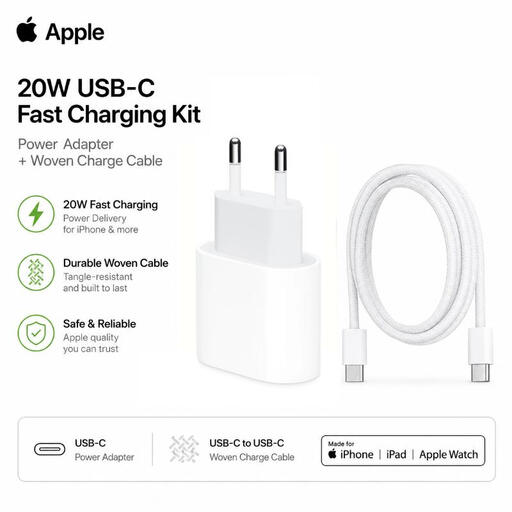 No image available
A set to compare if you’re charging a USB-C iPad and need a suitable cable.
The product description lists a 20W adapter and a 1-metre USB-C to USB-C cable. An iPad with Lightning needs a different cable.
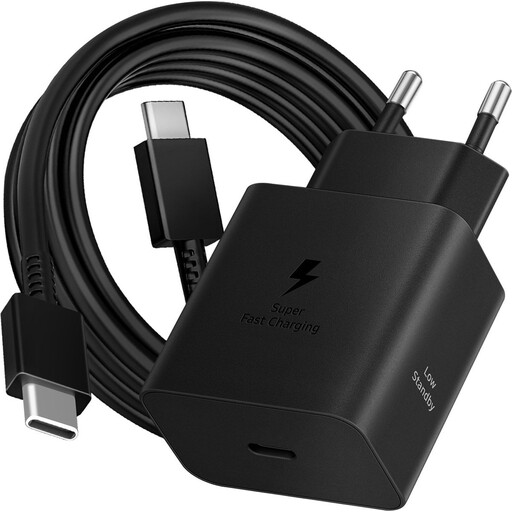 No image available
A single-port option to compare if your tablet supports USB-C charging.
The product description lists 45 W, one USB-C port and a 1.8-metre USB-C to USB-C cable. Compare the power with your tablet’s charging requirements.
 No image available
An option to compare if you want to connect several devices to one socket.
The product description lists two USB-C ports and one USB-A port. Charging cables aren’t included; check how the power is shared when charging multiple devices at once.
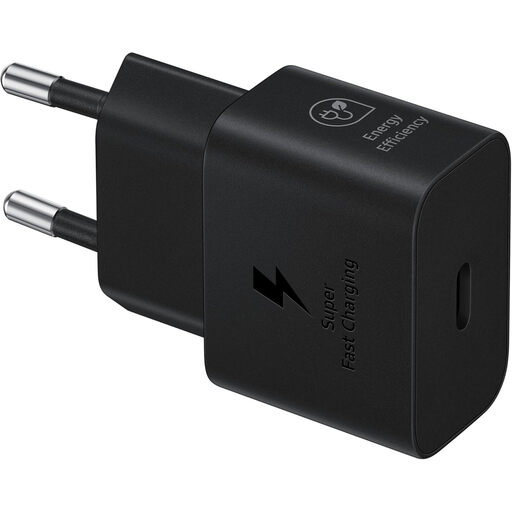 No image available
A single-port option to compare if your tablet supports USB-C charging.
The product description lists 25 W and one USB-C output. A cable isn’t included, so check your tablet’s charging requirements.
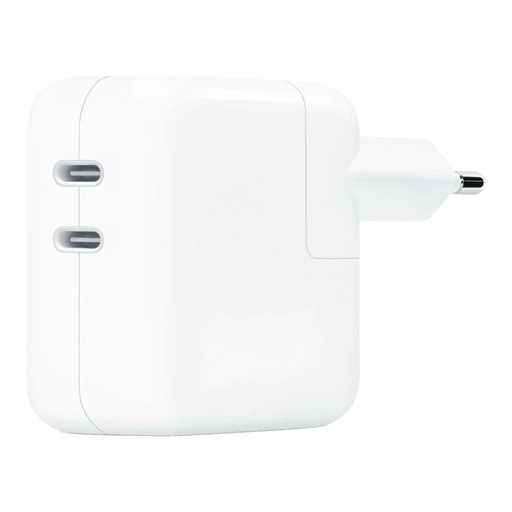 No image available
An option to compare if you want to connect a tablet and phone at the same time.
The product description lists two USB-C ports and a total output of 35 W. Cables aren’t included; check how much power is available to each device when charging both at once.
No. Check your tablet’s connector, cable and model-specific charging requirements. According to the European Commission, EU common-charger rules have applied since 28 December 2024 to the tablets covered by the rules that were placed on the market from that date. Older iPads may still have Lightning.
You can with an adapter that has two suitable ports, but check the power available per port when both devices are connected. IKEA lists 22 W per port for the SJÖSS when both ports are in use.
Compare your tablet’s charging requirements with the power the adapter provides when using the number of ports you need. A higher wattage on the adapter alone doesn’t guarantee faster charging.
It depends on the version and your tablet’s connector. Belkin lists only the wall charger for the WCB006 version. Check what’s in the box and whether a cable you already have fits at both ends.
According to the NVWA, the Low Voltage Directive 2014/35/EU applies to electrical equipment within the specified range of 50 V to 1000 V AC nominal voltage. The manufacturer is responsible for the applicable technical documentation and EU Declaration of Conformity; this doesn’t automatically prove that an individual item on sale meets the requirements.