What should you look for in a USB charger?
Start with your fan’s charging specifications and the connector at the adapter end of the cable. Then consider whether extra ports or another desk-friendly feature would be useful.
| What to consider |
What should you check? |
Who is this important for? |
| Connector and charging specifications |
Check the connector at the adapter end and compare the output voltage and current with your fan’s requirements. |
I want to make sure my fan cable fits the charger and that its output matches my model’s charging specifications. Around 33% of consumers prioritise connector type and electrical compatibility. |
| Safe charging |
Follow the manual, don’t use a damaged cable or charger, and make sure heat can dissipate. |
I want to charge my fan while working from home using undamaged equipment, in a place where heat can escape. Around 27% of consumers prioritise safe charging. |
| Charging multiple devices at once |
Check the number and type of ports, the power output per port, and the total output when they’re used at the same time. |
I share my desk charging setup with another device and want to know whether both cables can be plugged in at once. Around 20% of consumers consider simultaneous charging their main priority. |
| Cable and packaging |
Check whether your existing cable is compatible and whether a required cable is included with the charger. |
I want to know in advance whether I already have the cable or need to buy one separately, rather than paying for a higher maximum output I may not need. Around 20% of consumers focus on getting everything they need in one practical purchase. |
USB chargers and desk power strips on Joybuy
These Joybuy products are multi-port USB chargers and desk power strips for workspaces with several charging needs. Before choosing, check your fan’s charging requirements and make sure its cable is compatible with the adapter.
 No image available
6-in-1 Charging Station 320W with 2 retractable USB-C cables
Could suit a desk setup with several charging needs. Check whether your fan’s charging requirements are compatible with USB-C.
The product name lists 6-in-1, 320 W and two retractable USB-C cables. This doesn’t confirm which charging settings your fan uses.
Joybuy
 No image available
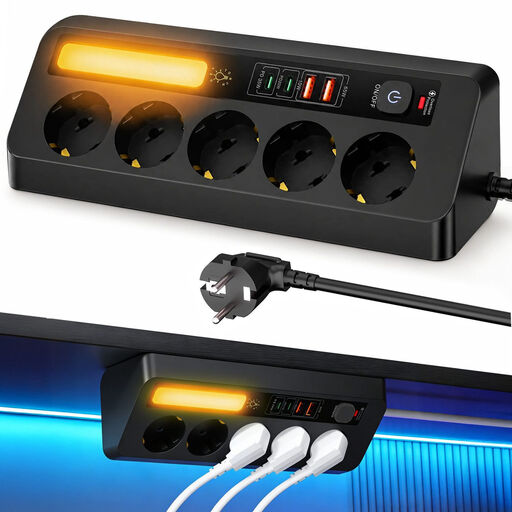
Corner Power Strip 9-in-1 with 5 sockets and 4 USB ports
An option for a desk where you need to connect both USB devices and plug-in appliances. Check which ports you need.
The product name lists 5 sockets, 4 USB ports, PD 35 W and a 2 m cable. The description mentions USB-C and USB-A ports.
Joybuy
 No image available
USB Multi Charger with 10 ports
An option for a setup with several USB devices. Check that the fan cable connector and charging specifications are compatible.
The product name lists 10 ports, including USB-C and USB-A connections. Check the product details for the connection you want to use.
Joybuy
 No image available
Neomounts DS22-840BL6 desk power socket with clamp
Could suit a permanent desk setup if you also need power sockets. Check whether the available USB port is compatible with your fan.
The product description lists two 20 W USB-C ports, one 18 W USB-A port and three Schuko sockets.
Joybuy
Frequently asked questions
Can you use any USB-C charger for your fan?
No. First check which cable, input voltage and other charging specifications your fan requires. For example, Tristar states that the VE-5776P charges via the supplied USB cable at 5 V; this isn’t a specification that applies to all fans.
How can you set up a safe charging space at your desk?
Follow your fan’s manual, don’t use a damaged cable or charger, and make sure the equipment can dissipate heat. The Dutch Fire Service advises placing chargers in a clear space and not charging devices under a cushion or duvet.
Are rechargeable fans in the Netherlands legally required to have a USB-C port?
The common charger USB-C rule doesn’t automatically apply to fans. The European Commission lists the device categories covered, including mobile phones, tablets and headphones, for application from 28 December 2024; fans aren’t included in that list.
What can you do if a charger bought online breaks quickly or doesn’t fit?
If a product is faulty and breaks sooner than expected under normal use, the seller must offer a suitable solution, according to ACM ConsuWijzer. Online purchases also generally come with a 14-day cooling-off period, subject to conditions and exceptions.


