
Readers with an existing reading light
You want a charger that works with the cable you already have and meets the charging specifications in your light’s manual. In particular, check the plug at the charger end.


First, make sure the charger matches the plug at the charger end of your cable and the charging specifications in your reading light’s manual. Knowing whether the light uses USB-A or USB-C isn’t enough on its own. One port is all you need if you’re only charging the light; a second port is useful only if you also want to connect another device at the same time. Charge it in a clear space away from pillows and duvets, and don’t use a damaged cable.
You want a charger that works with the cable you already have and meets the charging specifications in your light’s manual. In particular, check the plug at the charger end.
You’re looking for a practical place to charge your light within easy reach. The Fire and Rescue Service advises against charging devices under a pillow or duvet.
You may want to charge another device as well as your reading light. If so, the number of ports and the right connection for each cable matter.
| What to consider | What to look for | Best suited to |
|---|---|---|
| Connection and charging specifications | Check the plug at both ends of the cable and compare the charger’s output specifications with your light’s manual. | I want to use my existing cable and make sure the connection and charging specifications are right first. Around 36% of consumers put compatibility first. |
| Safe charging near bedding | Choose a clear charging spot away from pillows and duvets, and check that the cable and charger are undamaged. | When charging beside my bed, I want to keep the charger in the open, not under bedding. Around 29% of consumers put safe charging first. |
| Cable and reach | Check whether a cable is included, which plugs it has and whether it’s long enough to reach your clear charging spot. | I want to charge the light somewhere the cable can reach from the socket. Around 21% of consumers focus mainly on the cable and its reach. |
| Multiple devices | Count the devices you want to connect at the same time and check that the ports suit their cables. | If I want to connect another device as well as my reading light, an extra compatible port matters. Around 14% of consumers prioritise charging multiple devices at once. |
A USB-C connection on the light doesn’t automatically tell you which plug is at the other end of the charging cable. IKEA says the SMÅHAGEL set comes with a USB-A-to-USB-C cable; the USB-C cable for the SJÖSS 20 W is sold separately.
Check both ends of the cable and the charger connection before you choose.
A charger’s maximum power output doesn’t, on its own, tell you how quickly your reading light will charge. The charging specifications of your particular light and the charger need to match.
Compare the output specifications with your light’s instructions. Choose extra power or ports only if you need them for other devices too.
Bedding can restrict heat from escaping. The Fire and Rescue Service advises against charging devices under a pillow or duvet.
Choose a clear charging spot first, then check that the right cable can reach it. Don’t use a damaged cable or charger.
IKEA lists, among other options, a basic USB-A charger and a single-port USB-C charger. What’s included in the way of cables varies by model.
Belkin describes wall chargers with different port combinations, including options for anyone who wants to connect another device as well as a reading light.
According to Anker, the Anker 511 Charger (Nano Pro) has one USB-C output, making it an option if your cable has a USB-C plug at the charger end.
This selection includes USB chargers and adaptors with USB-A and/or USB-C ports. Match the port at the charger end to your cable and check your reading light’s charging instructions.
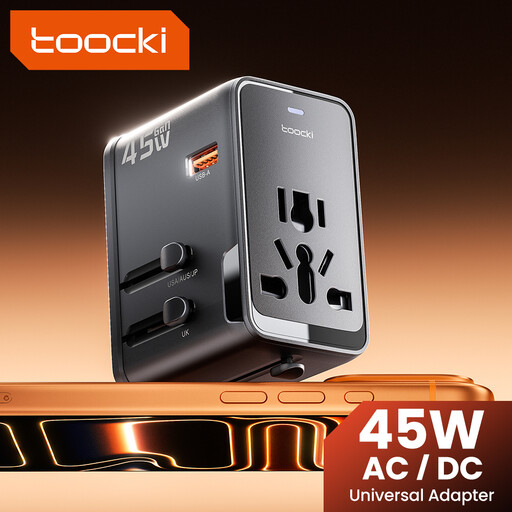 Image unavailable
The USB-A port may suit a cable with a USB-A plug at the charger end. Also check that the charging specifications match your light’s instructions.
The product name lists 45 W PD, one USB-A port, two USB-C ports and an international adaptor with an EU plug option. The maximum power output doesn’t prove that the reading light will charge faster.
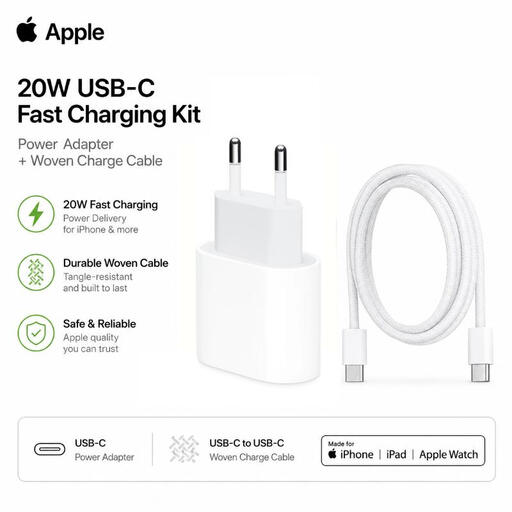 Image unavailable
This set may be suitable if your light’s manual specifies a USB-C cable at the charger end and the connection is compatible.
The product information lists a 20 W USB-C adaptor and a 1-metre USB-C-to-USB-C cable. Check that the cable fits your light and that its charging instructions allow this adaptor.
 Image unavailable
The different port types give you a choice if your cable has a USB-A or USB-C plug at the charger end. Check your light’s instructions before choosing a port.
The product name lists three ports in total: two USB-C and one USB-A, with a total power output of 65 W. This figure alone doesn’t tell you how quickly a reading light will charge.
 Image unavailable
This charger may suit a cable with a USB-A or USB-C plug at the charger end. Follow your reading light’s charging instructions when choosing a connection.
The product name lists two ports, USB-C and USB-A, and a total power output of 30 W. The power output alone doesn’t determine how quickly the light will charge.
 Image unavailable
The two port types give you a choice of compatible cable plugs. Check the connection and charging specifications recommended by the light’s manufacturer.
The product name lists USB-C and USB-A, with a total power output of 20 W. This stated output doesn’t prove that the reading light will charge faster.
European rules on common chargers don’t automatically require every reading light to have USB-C. The European Commission lists specific categories of devices, so check the connection and manual for your particular light.
The Fire and Rescue Service advises against charging devices under a pillow or duvet. Put the charger in a clear space where heat can escape, and don’t use a damaged cable or charger.
Electrical equipment sold in the Netherlands must meet the relevant European requirements. Business.gov.nl states that the manufacturer must apply the required CE marking and draw up and sign an EU Declaration of Conformity. The Consumers’ Association notes that a CE logo alone is not an independent safety test.
In the Netherlands, statutory consumer rights apply alongside any manufacturer’s or seller’s guarantee. If a product doesn’t meet what you could reasonably expect under normal use, the seller is responsible for providing an appropriate remedy free of charge, in accordance with the applicable terms.