Start by checking your radio’s manual: look at the connection, the required voltage and current, and which end of the cable fits the charger. A USB-A charger may be sufficient if you have the right cable. Choose USB-C or a combination charger if your radio and cable are compatible, or if you also want to connect a second device. A higher wattage on the charger does not, by itself, mean the radio will charge faster. Keep the charger and cable in a dry, clear space.
Who is this relevant to?
USB radio owner
You’re looking for a charger that suits your radio’s connection and power requirements. Check the manual and both ends of the cable. For example, Roberts Radio specifies a 5 V, 1 A USB power supply for the Revival Petite 2. This applies to that model only.
Listener with limited worktop space
You want to position your radio, cable and adapter so they’re unobstructed, stay dry and aren’t covered. Brandweer Nederland advises placing a charger in an open space so it can dissipate heat.
User with just one kitchen socket
You may sometimes want to connect a second device too, so you’re checking the number of ports and the power available from each one. Belkin Nederland specifies a maximum of 12 W per port for one of its two-port USB-A models.
What should you look for when choosing?
USB-A mains charger
Choose this if: your cable has a USB-A connector at the charger end and the output matches your radio’s manual.
Bear in mind: a charger with USB-A only won’t have a USB-C port for a second cable.
USB-C mains charger
Choose this if: the manual says your radio can charge via USB-C and the cable fits the charger.
Bear in mind: a single-port model won’t let you connect a second device. Claims about fast-charging phones don’t tell you how quickly a radio will charge.
Combination charger with USB-A and USB-C
Choose this if: you want to connect both types of cable, or use one socket for your radio and a second device.
Bear in mind: check the output of the port you’re using and the power available when charging multiple devices at once.
| What to consider |
What should you check? |
Who is this important to? |
| Connection and power |
Compare the manual with the charger output and check that both ends of the cable fit. |
I want to check first that the cable fits both the radio and the charger, and that the output I use meets the requirements. Around 45% of consumers prioritise compatibility with their radio. |
| Safe location |
Choose a dry, clear space and don’t use a damaged cable. |
I want to charge my radio on the worktop without covering the adapter or exposing it to moisture. Around 36% of consumers prioritise a clear, dry place to charge. |
| Second device |
Check the number and type of ports, and the output from each port when they’re used at the same time. |
I sometimes want to connect another device as well as my radio, and I want to know what the ports can supply when used together. Around 19% of consumers prioritise this extra connection. |
Common mistakes
-
Assuming a higher wattage means faster charging
Power requirements vary from radio to radio. For example, Roberts Radio specifies 5 V and 1 A for the Revival Petite 2; this isn’t a specification for other radios.
Compare your model’s manual with the output of the port you’ll actually use.
-
Assuming the supplied USB-C cable will fit every radio
A cable may fit the charger but not your radio’s connection.
Check both ends of the cable before choosing a charger that comes with one. For example, Philips specifies a USB-C-to-USB-C cable with model DLP5321NB/12.
-
Placing the adapter somewhere damp or covered
Moisture, damaged cables and poor heat dissipation are all important considerations when charging. Brandweer Nederland advises placing a charger in an open space and not using a damaged cable.
Choose a dry, clear space on the worktop and check the cable before use.
Brands to consider
Belkin
The models mentioned include USB-A chargers with one or two ports, as well as USB-C and combination models.
- According to Belkin’s product specifications, model WCB002vfWH delivers up to 12 W per USB-A port, while model WCA009kqWH is a single-port USB-C charger with a maximum output of 20 W.
- Check your radio’s manual and the cable before choosing a model. These power ratings don’t confirm that it can charge any radio.
Philips
Model DLP5321NB/12 combines USB-A and USB-C and, according to Philips, comes with a USB-C-to-USB-C cable.
- Philips specifies a maximum total output of 45 W for this model.
- The total output isn’t the same as the output from each port, and the supplied cable may not fit your radio.
Hama
The models mentioned include a USB-A and USB-C combination charger and a separate six-port USB-A charging station.
- According to Hama, model 00201960 has a maximum output of 30 W and includes protections such as overload and short-circuit protection.
- Check which output you’ll use and whether the specifications match your radio.
USB chargers on Joybuy
The Joybuy products below are combination chargers with USB-A and USB-C ports. Before buying, check that the output of the port you’ll use and the cable are suitable for your radio. These product listings don’t confirm that a model meets the applicable conformity requirements.
 No image available
OnePlus 80W Dual Ports SUPERVOOC Adapter, Type A + Type C, White
May be suitable if you want to connect a USB-A or USB-C cable; check your radio’s power requirements.
The product name specifies 80 W and Type A and Type C ports.
View on Joybuy
 No image available
65W Fast Charging Wall Charger, 2 USB-C ports and USB-A
May suit a cable with a USB-A or USB-C connector at the charger end; check the output you’ll use for your radio.
The product name specifies 65 W, two USB-C ports and one USB-A port.
View on Joybuy
 No image available
30W Fast Charging Wall Charger, USB-A + USB-C
May be suitable if you need either type of port; compare the output you choose with your radio’s manual.
The product name specifies 30 W and USB-A and USB-C ports.
View on Joybuy
 No image available
20W Fast Charging Wall Charger, USB-A + USB-C
May be an option if you need a USB-A or USB-C connection; check that the port you use is suitable according to your radio’s manual.
The product name specifies 20 W and USB-A and USB-C ports.
View on Joybuy
 No image available
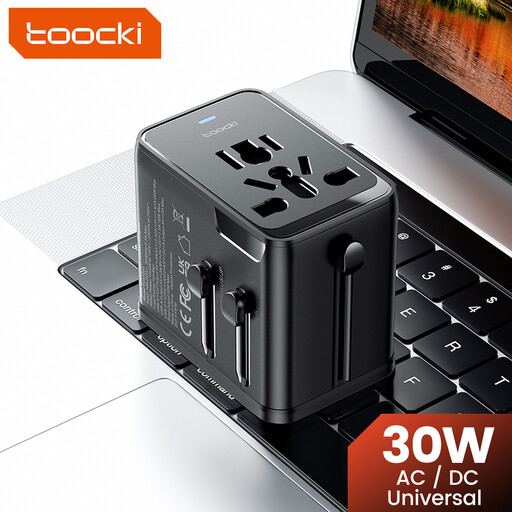
toocki Universal Travel Adapter 30W PD, 1 USB-A + 2 USB-C
May be suitable if you need one of the port types listed; also check that the adapter is suitable for the place where you plan to use it.
The product name specifies 30 W PD, one USB-A port and two USB-C ports.
View on Joybuy
Frequently asked questions
Can I choose a 5 V, 1 A charger for any USB radio?
No. That power specification applies to the Roberts Revival Petite 2, not automatically to other radios. Check your model’s manual and the output of the port you’ll use.
Do European rules mean that every new kitchen radio must have USB-C?
Not simply because it’s a radio. The European Commission lists specific categories of devices covered by the common charging solution; kitchen radios aren’t listed as a general category. So check the connection on your radio.
How can I position a charger safely on the worktop?
Keep the charging area dry and clear, don’t cover the charger and don’t use a damaged cable. Brandweer Nederland advises placing a charger in an open space so it can dissipate heat.
Am I entitled to exactly two years’ statutory guarantee on a mains charger in the Netherlands?
No. The Netherlands doesn’t have a fixed statutory guarantee period. According to the Dutch government, a product must last for as long as you can reasonably expect it to; if a product is faulty, the retailer is your point of contact. A manufacturer’s guarantee is separate from this statutory right.
What product information should come with a new mains charger in the Netherlands?
For a mains charger covered by the applicable European requirements, the manufacturer must affix the required CE marking and draw up an EU declaration of conformity. Ondernemersplein, the Dutch government’s business information portal, describes these obligations. A CE marking alone doesn’t prove that an individual product is safe.


