
Trimmer with a USB-A cable
You’re looking for an adapter that works with your trimmer’s cable. Check the connector and charging specifications for your model; Philips specifies 5 V and a minimum of 1 A for the USB grooming products described.


First, check the cable and charging specifications for your exact trimmer model: simply saying ‘USB’ doesn’t tell you which port or adapter will work. Then choose between a single USB-A adapter and a charger with extra ports, and charge your trimmer in a clear space away from pillows and bedding. The 5 V and minimum 1 A specified by Philips apply to the Philips grooming products described that come with a USB charging cable; they don’t automatically apply to every trimmer.
You’re looking for an adapter that works with your trimmer’s cable. Check the connector and charging specifications for your model; Philips specifies 5 V and a minimum of 1 A for the USB grooming products described.
You want to charge your trimmer nearby and need a clear, hard surface away from pillows and bedding. The Netherlands Fire Service advises placing chargers in an open space so heat can dissipate.
You want to plug in another device alongside your trimmer. Check the number and type of ports, as well as the output of the port you’ll use for the trimmer. Belkin and Hama describe chargers with different combinations of ports.
Start by checking your trimmer’s connector and charging requirements. Then consider whether extra ports or the available space by the socket will affect your choice.
| What to consider | What should you check? | Who is this important for? |
|---|---|---|
| Is the charger compatible with your trimmer? | Check the power connector on the cable and compare the required voltage and current with the instructions for your exact model. | I want to make sure my existing cable and adapter work with my trimmer. Around 40% of consumers put compatibility first. |
| Safe charging by the bed | Choose a clear space away from pillows and bedding; don’t use a damaged cable or adapter. | I want to charge my trimmer within easy reach without placing it on or under bedding. This matters to around 30% of consumers who put the charging location first. |
| Connecting multiple devices | Check how many USB-A and USB-C ports there are, and what output is available from the port you’ll use for the trimmer. | I want to connect a second device to the same socket, so I need several suitable ports. Around 15% of consumers put this first. |
| Cable and placement | Check that the original cable is included and undamaged, and that the charging spot is accessible and clear of bedding. | I want a usable cable and a place where the trimmer can sit in the open. Around 15% of consumers put the cable and practical placement first. |
The power end of your original trimmer cable may be USB-A. If so, a different port won’t connect directly to that cable.
Check both ends of the cable and confirm your exact trimmer model before choosing an adapter.
A higher advertised wattage doesn’t, by itself, confirm that the output is suitable or that your trimmer will charge faster. Charging requirements vary by model.
Compare the output with your trimmer’s instructions, and follow the manufacturer’s guidance on charging time.
The Netherlands Fire Service advises placing chargers in an open space so heat can dissipate, and not using damaged cables or chargers.
Choose a clear charging spot away from bedding and check the cable and adapter for damage.
Philips describes USB charging for certain grooming products and offers the HQ87 CP0909/01 as a USB-A adapter for products with a USB charging cable.
Belkin describes USB-A wall chargers for anyone who wants to connect several USB-A cables to one socket.
Hama describes the 00201960 as having one USB-A port and one USB-C port.
This selection features wall chargers with USB-A and USB-C connections. Check that your trimmer’s cable fits an available port and that the output meets the instructions for your model.
 No image available
Consider this adapter if the power end of your trimmer cable fits Type A; check the instructions for your trimmer to confirm the required output from the port you’ll use. The product name lists two ports, Type A and Type C, and 80 W.
 No image available
Consider this charger if your trimmer cable fits the USB-A port and you’d also like USB-C ports. The product name lists two USB-C ports, one USB-A port and 65 W; check the required output from the port you’ll use for your trimmer.
 No image available
Consider this charger if the USB-A port fits the power connector on your trimmer cable and you’d also like a USB-C port. The product name lists USB-A and USB-C; the product information specifies two ports and up to 30 W combined. Check the output of each port for your model.
 No image available
Consider this charger if your trimmer cable fits USB-A and you’d also like a USB-C port. The product information lists two ports and up to 20 W combined; check that the output from the port you’ll use meets your trimmer’s requirements.
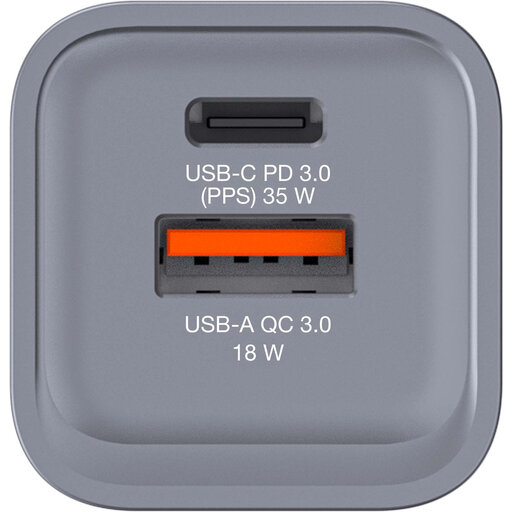 No image available
Consider this charger if the USB-A port fits your trimmer cable and you’d also like a USB-C port. The product information lists USB-C PD, USB-A QC 3.0 and up to 34 W; check the output your trimmer needs, and don’t use the charger in a damp environment.
No, simply saying USB isn’t enough to tell you. Check the original cable and the charging specifications in the instructions for your exact model. For the Philips grooming products described that come with a USB cable, Philips specifies a 5 V adapter with a minimum of 1 A; other models have their own instructions.
Don’t put your trimmer under a pillow or duvet. The Netherlands Fire Service advises placing chargers in an open space so heat can dissipate, and not using damaged cables or chargers. Follow your trimmer’s instructions too.
No, this isn’t required under the current EU rules for common chargers. The European Commission lists specific categories of devices that must have USB-C, but hair trimmers aren’t included. So check the actual connector on your model.
In the Netherlands, you can contact the seller about your statutory guarantee. According to the Dutch Government, there’s no fixed statutory guarantee period; what you can expect from a product depends, among other things, on the product itself and the sales information. An additional manufacturer’s warranty doesn’t affect your statutory rights.
No, a CE mark on its own isn’t an independent practical test of a specific product. For electrical equipment covered by the relevant rules, Business.gov.nl describes the CE mark and EU declaration of conformity as part of the manufacturer’s obligations. Check the product information and don’t use a damaged charger.