What should you look for when buying?
Start by checking how your controller charges. Then see whether you need an extra adapter and how many devices you want to connect at once.
An existing USB power source
Choose this option: if your controller’s manual confirms it can charge from that source.
Consider: PlayStation warns that charging via some other USB devices may not work.
A single-port wall charger
Choose this option: if you want a dedicated charging spot for one controller at a time.
Consider: Check whether the required cable is included and fits both connections.
A multi-port wall charger
Choose this option: if you regularly want to charge a second device alongside your controller.
Consider: Check the power available when charging multiple devices at once; the maximum output doesn’t tell you how much each port will deliver.
A controller-specific battery or charging dock
Choose this option: if your controller uses removable AA batteries or can only be charged using a suitable dock.
Consider: The battery or dock must be compatible with your exact controller version.
| What to consider |
What to check when buying |
Who should consider this? |
| USB charging |
Look up the full controller model and check its battery, charging method and connection in the manual. |
If I’m not sure whether my controller’s battery charges via USB, I want to find out first so I don’t choose the wrong charging solution. Around 36% of consumers prioritise compatibility with their controller. |
| Safe use |
Check the exact adapter variant, its conformity information and any safety warnings. |
Anyone using a mains adapter in their room will want to know which information applies to that exact model; according to the Dutch government, a CE logo alone is not an independent quality mark. Around 29% of consumers give safe charging top priority. |
| Adapter and cable |
Check whether you already have a suitable power source and whether the cable ends fit the adapter and controller. |
If I want a dedicated charging spot by my bed or desk, I want to know in advance whether the required cable is included. Around 21% of consumers prioritise a simple, complete charging setup. |
| Multiple devices |
Count the USB-A and USB-C ports you need and check the specifications for simultaneous use. |
Anyone who regularly wants to charge another device alongside their controller will benefit from having suitable ports. Around 14% of consumers give simultaneous charging top priority. |
USB chargers at Joybuy
These Joybuy picks are USB wall chargers, from USB-C kits with a cable to adapters with multiple connections. Before buying, check that the charging method works with your controller and that the applicable conformity information relates to the exact adapter variant. According to the Dutch government, CE is not an independent quality mark.
 No image available
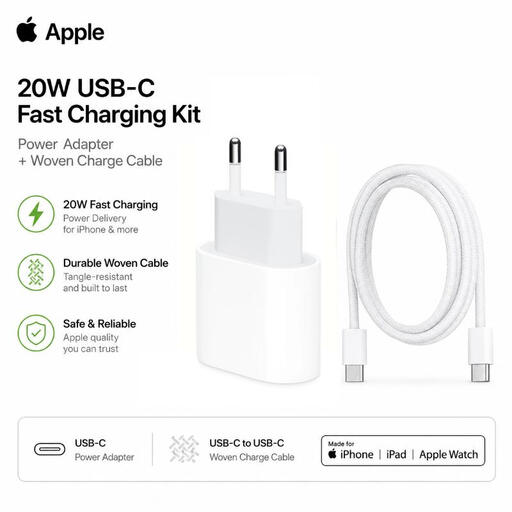
Apple 20W USB-C charging kit with braided cable
An adapter and cable in one kit for a USB-C charging setup; check that this charging method works with your controller.
USB Power Delivery; 20 W; 1 m USB-C to USB-C cable.
View at Joybuy
 No image available
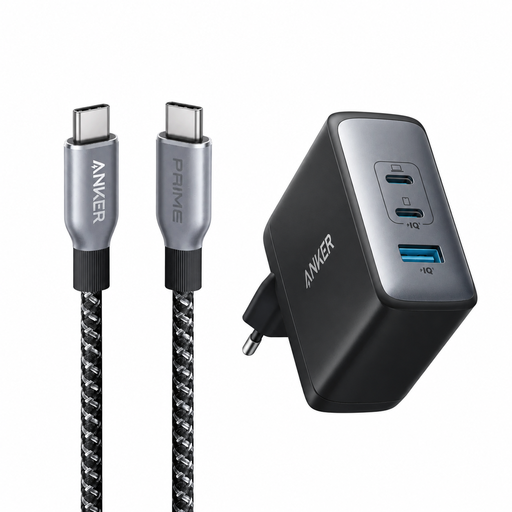
Anker 736 Nano II 100W charger with Prime USB-C cable
A bundle with an adapter and USB-C cable; check that the cable works with your controller and the charging setup you want.
Stated adapter output: 100 W; included USB-C to USB-C cable: 90 cm, rated for up to 240 W.
View at Joybuy
 No image available
65W USB-C wall charger with two ports and an integrated cable
The two USB-C ports may suit a charging spot where you need more than one USB-C connection; check the output when both are in use.
Stated maximum output: 65 W; two USB-C ports; integrated retractable USB-C cable.
View at Joybuy
 No image available
65W wall charger with two USB-C ports and one USB-A port
The mix of USB-C and USB-A ports may suit a charging spot for devices with different connections; check how the power is distributed when charging multiple devices.
Stated maximum output: 65 W; two USB-C ports and one USB-A port.
View at Joybuy
 No image available
30W wall charger with USB-C and USB-A ports
The two ports give you one USB-C and one USB-A connection; check which one works with your controller’s cable.
Combined maximum output: 30 W; one USB-C port and one USB-A port.
View at Joybuy
Frequently asked questions
Will an Xbox controller with rechargeable AA batteries charge if I connect a USB cable?
No. Xbox says rechargeable AA batteries don’t charge inside the wireless controller in question. Check which type of battery your exact controller uses; a suitable Xbox battery pack has different instructions.
Can I charge a PlayStation controller while the console is in Rest Mode?
Yes, if the controller, console and USB port power settings support it. PlayStation also describes charging from some other USB sources, but warns that this won’t work with every device.
Do separate Joy-Con controllers just need a standard USB wall charger?
No. Nintendo describes charging Joy-Con controllers when they’re attached to the system or a suitable charging dock. Also check whether you have the original Joy-Con or Joy-Con 2.
What should I do if a controller or cable gets unusually hot?
Stop using it and unplug the cables. PlayStation’s Dutch DualSense manual gives this advice if the product behaves abnormally, makes unusual smells or sounds, or becomes too hot to touch.
Does a CE logo prove that a charger has been independently tested for safety?
No. According to Business.gov.nl and the Netherlands Enterprise Agency, CE is not an independent quality mark. For applicable electrical equipment, the manufacturer must meet the relevant requirements and provide the required conformity information. Check this for the exact adapter variant.


