What to look for in a USB charger
Single-port USB wall charger
Choose this when: you’re charging one controller and don’t need the socket for a second device at the same time.
Bear in mind: one port won’t let you connect a second device. The USB-C cable is sold separately for the IKEA SJÖSS 20W model we looked at. IKEA Netherlands lists the charger as providing up to 20 W, not a controller-specific charging speed.
Multi-port USB wall charger
Choose this when: you want to connect a controller and another device at the same time at your shared desk.
Bear in mind: check whether your cables use USB-C or USB-A at the charger end. IKEA Netherlands describes the SJÖSS charger we looked at as having two USB-C ports; Hama lists one USB-C port and one USB-A port on model 00201992. The stated total power doesn’t tell you how quickly a controller will charge.
Controller-specific charging station
Choose this when: you want to charge and store up to two DualSense or DualSense Edge controllers in one place. Sony lists these models as compatible with station CFI-ZDS1.
Bear in mind: this compatibility doesn’t automatically extend to Xbox, Nintendo or other USB controllers. A separate USB charger is more versatile if you use different devices and cables.
Existing suitable power supply or USB port
Choose this when: your controller’s manufacturer says the existing connection can be used for charging. Nintendo lists the dock’s USB port for the Switch Pro Controller, and a suitable power supply with the supplied cable for the Switch 2 Pro Controller.
Bear in mind: follow the charging instructions for your exact controller model. Charging at a shared desk doesn’t automatically mean you need a new wall charger.
| Concern |
What to look for |
Who this matters most to |
| Charging via USB |
Check the exact controller model and battery type. Microsoft says loose rechargeable AA batteries do not charge inside a standard Xbox controller. |
If I’m not sure whether my controller charges via USB, I’ll check the model and battery type first. Around 29% of consumers put compatibility at the top of their list. |
| Sharing a power socket |
Count the devices that need power at the same time and check whether their cables have USB-A or USB-C plugs for the charger. |
If we want to connect a controller and another device to one socket at the same time, I’ll look at the number and type of ports. Around 29% of consumers prioritise simultaneous use. |
| Cable and desk space |
Check the plugs at both ends, what’s included in the box and whether you can position the cable neatly out of the way. |
If my cable doesn’t fit or gets in the way, I want to sort out the connection and cable placement first. Around 24% of consumers prioritise the cable and practical positioning. |
| Dedicated charging spot |
Check that the charging station explicitly supports your exact controller model and how many controllers it can hold. |
If the same controllers are put back in one place after use, I want a station that supports my models. Around 18% of consumers prioritise a dedicated charging and storage spot. |
The applicable CE marking is required for a USB wall charger intended for sale in the Netherlands. The NVWA distinguishes this conformity marking from a separate assessment.
Joybuy products for your charging setup
This selection includes USB wall chargers with different port configurations, a fixed desk socket and a charging station for DualSense controllers. Check how your own controller charges and which cable it uses before choosing.
 No image available
OnePlus 80W Dual Ports SUPERVOOC Adapter
A good fit for a shared socket when you want to connect a USB-A cable and a USB-C cable at the same time.
80 W according to the product name; one USB-A port and one USB-C port. The product description says you can use it with up to two devices at once.
The two ports are different types; there aren’t two USB-C ports.
View at Joybuy
 No image available
Lenovo Dual USB-C 65W GaN Charger
A good fit for a desk where you need to connect two devices with USB-C plugs at the same time.
65 W according to the product name; two USB-C ports and a USB-C cable according to the product description.
When both ports are in use, the product description lists up to 45 W via USB-C1 and 18 W via USB-C2. There’s no USB-A port.
View at Joybuy
 No image available
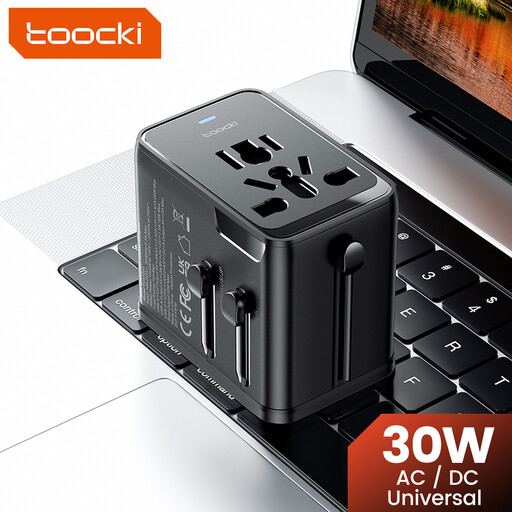
toocki Universal Travel Adapter 30W PD
A good fit for a setup where you need to connect several devices with different USB cables at the same time.
The product information lists two USB-C ports, one USB-A port and the ability to charge three devices at once.
The product name describes it as a travel adapter and lists EU, UK, US and AUS plugs. Before use, check which version and connection are right for your needs.
View at Joybuy
 No image available
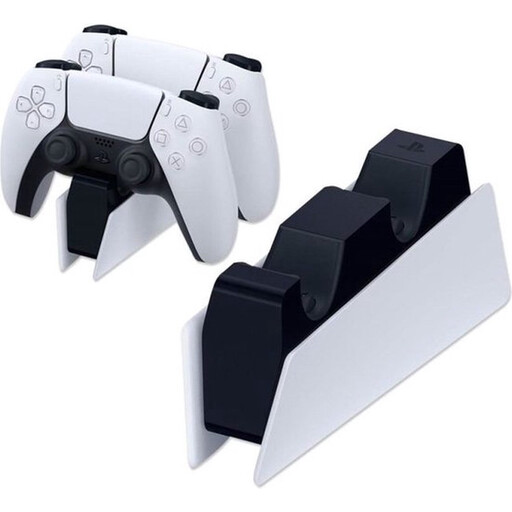
Sony PlayStation DualSense Charging Station (EU) (PS5)
A good fit for a dedicated spot for DualSense controllers. This charging station isn’t a universal USB charger for other controllers.
The product description lists a click-in dock, an AC adaptor and power cable, and space to charge up to two DualSense controllers at the same time.
The product information lists a CE marking.
View at Joybuy
 No image available
Neomounts DS22-840BL6 desk socket
A good fit for a permanent desk setup if you want USB ports built into a desk socket; this isn’t a standalone wall charger.
The product description lists two 20 W USB-C ports, one 18 W USB-A port, a clamp mount and cable management.
According to the product description, the power cable is 1.4 m long.
View at Joybuy
Frequently asked questions
Will a USB charger charge my Xbox controller with rechargeable AA batteries?
No. Microsoft says loose rechargeable AA batteries do not charge inside a standard Xbox controller. Check whether your exact controller has a built-in battery or uses a suitable rechargeable controller battery.
Do I need to buy a cable with a new charger?
Not always. First check whether your existing cable fits and what comes with the charger. For example, IKEA Netherlands says the USB-C cable is sold separately for the SJÖSS 20W model we looked at.
How should I use a charger at a shared desk?
Position the cable so no one can trip over it, and follow the instructions for your chosen model. For the SJÖSS 20W model we looked at, IKEA’s instructions include using the charger indoors, cleaning it with a dry cloth after unplugging it and stopping use if it’s damaged.
Who should I contact about a faulty charger bought in the Netherlands?
The Dutch government says the seller must provide a solution if there’s a problem with a product; this is separate from any manufacturer’s warranty. Contact the seller if your charger is faulty.
Which marking is required for a USB wall charger in the Netherlands?
The applicable CE marking is required for an electrical USB wall charger intended for sale in the Netherlands. The NVWA says this is not proof of a separate independent assessment.


