
Reader with one reading light
Simply wants their existing charging cable and light to work with a basic mains charger, without paying for ports they won’t use.


Choose a charger with a port that fits the plug at the charger end of your cable, and an output that meets your reading light’s requirements. A basic compatible charger may be all you need; extra ports are mainly useful if you also want to charge other devices from the same socket. A higher maximum power rating does not, by itself, guarantee that your light will charge faster.
Simply wants their existing charging cable and light to work with a basic mains charger, without paying for ports they won’t use.
Uses the charger at their desk and wants to be able to check its origin, markings and instructions for use.
Wants to charge a reading light and another device from the same socket, so the number of ports and combined output power matter.
First, check the plugs at both ends of the cable and your light’s charging instructions. Then decide whether one port is enough or whether you want to connect several devices at once.
| What to consider | What should you check? | Who is this for? |
|---|---|---|
| Connection and output | Compare the plug at the charger end with the port, and check the output against your light’s charging instructions. | I want my existing cable to fit and the charger to meet my light’s requirements. That’s why around 40% of consumers prioritise a compatible connection and output. |
| Mains charger safety | Check the CE marking, clear product information, instructions for use, and the condition of the casing and plug. The NVWA explains the applicable safety requirements. | If my charger stays plugged in at my desk, I want to be able to check the product information and how to use it. Around 30% of consumers put safety ahead of other buying considerations. |
| Charging multiple devices | Check the number and type of ports, as well as the stated power per port and in total when used simultaneously. | I want to charge my reading light and another USB device in the same place, without assuming every port can deliver maximum power at once. Around 20% of consumers choose with shared charging in mind. |
| Charger and cable together | Check which cable is included and whether your existing cable fits. Also factor in the cost of any cable you may need. | I want to know whether I can use the cable I already have, so I don’t buy extra items unnecessarily. Around 10% of consumers focus mainly on the overall requirements and cost. |
The plug at the charger end of the cable determines which port you need. For example, the IKEA SJÖSS USB-C charger is supplied without a USB-C cable, while the specific SMÅHAGEL power adaptor includes a USB-A to USB-C cable.
Check both plugs and what’s included in the box before you buy.
For its three-port IKEA SMÅHAGEL charger, IKEA lists 17 W total and a maximum of 12 W per port. This doesn’t mean every port can deliver maximum power at the same time.
When using several ports at once, check both the limits for each port and the total power.
CE marking is compulsory for electrical products covered by the relevant regulations. The marking alone doesn’t prove that every individual item is safe.
Also check the product’s origin, information and instructions for use. Stop using a charger if its casing or plug is damaged.
The IKEA models mentioned here differ in port type, number of ports and whether a cable is included.
The BoostCharge model mentioned here has two USB-A ports.
The UGREEN range includes USB-C chargers with different numbers of ports and power ratings.
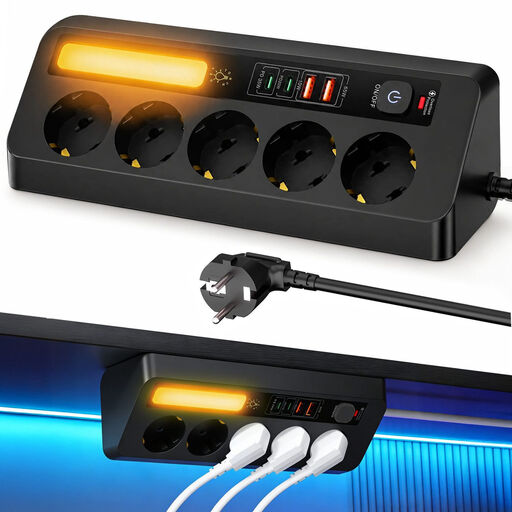
These Joybuy products are multi-port USB chargers or desk charging points. Before using one with a reading light, check that its port and output are compatible with your light’s cable and charging instructions.
 No image available
Could suit a desk where you connect several USB devices and also want extra sockets.
The product name lists 5 sockets, 4 USB ports and a 2 m cable.
 No image available
Could suit a dedicated charging point for several USB devices. Check which port configuration is right for your devices and cables.
The product name lists 10 ports, including both USB-A and USB-C.
 No image available
Could suit you if you want to mount a USB charging point on the edge of your desk. Check that a clamp fixing will work where you want to position it.
The product name lists USB-C and USB-A ports.
Yes, if the plug at the charger end of the cable fits the USB-A port and the output meets your light’s charging requirements. A USB-C port won’t accept a USB-A plug directly, so check the entire cable and your light’s instructions.
Not based on the maximum power rating alone. Check your light’s specified charging input and the charger’s output; a higher maximum doesn’t, by itself, prove that charging will be faster.
Follow the instructions for use and care for your specific charger. For the SJÖSS model mentioned here, IKEA specifies indoor use only and advises you to discard the charger if it is damaged. For the SMÅHAGEL charger mentioned here, IKEA recommends disconnecting it from the power source and cleaning the casing with a dry cloth.
According to ACM ConsuWijzer, the seller is responsible for the statutory guarantee. If the product doesn’t meet what you could reasonably expect, the seller must put things right free of charge under the applicable terms, for example by repairing or replacing it. A manufacturer’s guarantee doesn’t replace this statutory right.
Don’t assume so. The European Commission lists specific product categories covered by the common charger rules, including phones and e-readers; reading lights aren’t listed as a category. Check the connection in your light’s product specifications instead.