First, check whether your desk lamp or its cable uses USB-A or USB-C, and what power input the lamp requires. Then choose a charger with a suitable port and output. A single-port charger may be enough if you only want to connect the lamp, while multiple ports are handy if you also want to charge other devices at the same time. For multi-port chargers, check the output for each port and when ports are used simultaneously. Use an undamaged charger and cable, and leave them uncovered while in use.
Who is this guide for?
Users with a USB-A lamp
If you want to use the lamp and cable already in your holiday cottage, you’ll need a charger with a suitable USB-A port and an output that meets the lamp’s requirements. Belkin’s product specifications show that a charger with two USB-A ports is one option.
Users with a USB-C lamp
If you use a lamp or cable with USB-C, look for a compatible USB-C power supply. Check the lamp’s power requirements too: a charger’s maximum output does not mean the lamp needs that much power.
Travellers with multiple devices
If you want to connect other devices as well as your lamp, check the number and type of ports, along with the available output when they’re used simultaneously. For example, Baseus lists two USB-A and two USB-C ports on its GaN6 Pro 65W; check the output available for the combination of ports you plan to use.
What should you look for?
Start by checking the lamp’s connection and power requirements. Then decide whether you need a basic charger or one with extra ports.
Basic USB-A charger
Suitable for: a lamp or existing cable with a USB-A plug, provided the stated output meets the lamp’s requirements.
Bear in mind: a USB-A port won’t connect directly to a USB-C plug.
USB-C charger
Suitable for: a lamp or cable that connects directly to a USB-C power supply and whose required input matches the charger’s output.
Bear in mind: check that you have the right cable. A charger’s maximum fast-charging output doesn’t mean the lamp uses that much power.
Multi-port charger
Suitable for: anyone who wants to connect other devices as well as a lamp to the same charger and needs compatible ports.
Bear in mind: check the output for each port and when ports are used simultaneously. The total output doesn’t tell you how much power each port supplies.
| What to consider |
What should you check? |
Who is this important for? |
| Connection and power supply |
Check whether the connector on the power supply side is USB-A or USB-C, then compare the charger’s output with the lamp’s required input. |
If I only want to connect the lamp, I need to know whether my cable fits and whether the power supply is suitable. Around 50% of consumers put a suitable power supply for their lamp first. |
| Multiple devices |
Check the number of USB-A and USB-C ports, the output for each port and the specifications for simultaneous use. |
If you want to connect other devices at the same time as the lamp, look for suitable ports and enough output for the combination you’ve chosen. Around 33% of consumers prioritise using multiple devices. |
| Use on location |
Check the condition of the charger and cable, and make sure the charger can sit uncovered while in use. |
If I’m taking the charger to a holiday cottage, I want to use it without any damaged parts and allow heat to dissipate. Around 17% of consumers prioritise safe, practical use on location. |
Common mistakes
-
Looking only at the highest wattage
A higher maximum output doesn’t mean the lamp needs that much power or will work faster. The power supply required depends on your lamp’s specifications.
Check the lamp’s requirements first and compare them with the output of the port you’ll use.
-
Assuming the total output is available from each port
With a multi-port charger, the stated total output isn’t automatically available from every port. The combination of devices connected can also make a difference.
Check the specifications for each port and for simultaneous use.
-
Continuing to use a damaged charger or cable
The Fire Service warns that damaged chargers can cause short circuits or fires.
Check the charger and cable after travelling. Don’t use damaged parts, and don’t cover the charger while it’s in use.
Relevant brands
Belkin
The BOOST↑CHARGE WCB002 we looked at is a wall charger with two USB-A ports.
- Belkin lists an output of 5 V, 2.1 A and 12 W per port for this model, with 24 W in total.
- This model doesn’t have a USB-C port. Its product specifications don’t confirm that it’s compatible with every USB lamp.
UGREEN
The Nexode 20W version we looked at is a USB-C wall charger for lamps that use a compatible USB-C power supply.
- For this version, UGREEN lists a USB-C output of 5 V and 3 A, among other specifications, and a mains input of 100–240 V.
- These are UGREEN’s product specifications, not a statement that the charger is compatible with your lamp. Check which cable you need too.
Baseus
The GaN6 Pro 65W we looked at is a multi-port charger with USB-A and USB-C connections.
- Baseus lists two USB-A and two USB-C ports for this model.
- Check the output for the combination of ports you want to use. The stated total output of 65 W doesn’t in itself show that a USB lamp needs that much power.
Products at Joybuy
This selection includes multi-port chargers and extension leads with USB-A and/or USB-C connections. Before you buy, check that the port and output are suitable for your lamp and that the specifications meet your needs when connecting multiple devices at the same time.
 No image available
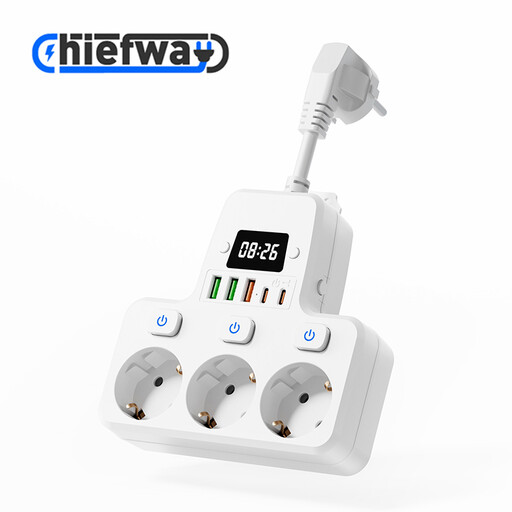
9-in-1 extension lead with 3 USB-A and 2 USB-C ports, 10 cm cable
Could be suitable if you want to connect your lamp and other devices to the same extension lead using USB ports.
The product title lists 3 AC sockets, 3 USB-A ports, 2 USB-C ports, individual switches, a digital clock and 4000W MAX.
The cable is 10 cm long, so check that it will reach where you plan to use it.
View at Joybuy
 No image available
7-in-1 cube-shaped extension lead with 3 USB-A and 1 USB-C port, 1.5 m cable
Could be suitable if you need AC sockets for other devices as well as USB ports.
The product information lists 3 USB-A ports, 1 USB-C port and 3 AC sockets; the product title lists 2500W MAX.
Some assembly is listed for this product. Check that the connection and available space suit your needs.
View at Joybuy
 No image available
OnePlus 80W Dual Ports SUPERVOOC Adapter, USB-A and USB-C, white
Could be suitable if your lamp uses one of these port types and the output meets the lamp’s power requirements.
The product information lists an output of 80 W, two ports of different USB types and a mains voltage range of 100–240 V.
Check the output of the port you plan to use. The stated output doesn’t show how much power your lamp needs.
View at Joybuy
 No image available
65W wall charger with 1 USB-A port and 2 USB-C ports
Could be suitable if you want to connect multiple devices with USB-A and USB-C plugs, provided the outputs meet their power requirements.
The product title lists three ports: one USB-A port and two USB-C ports, with a maximum output of 65 W.
Check the output for each port and when ports are used simultaneously.
View at Joybuy
 No image available
30W wall charger with USB-A and USB-C ports
Could be suitable if you want to connect two devices at once and the lamp’s requirements match the output of the port you use.
The product title lists USB-A and USB-C. According to the product information, a maximum combined output of 30 W is available across the two ports.
Check that the output available when both ports are in use is sufficient for the devices you’re connecting.
View at Joybuy
Frequently asked questions
Can I use any USB-C fast charger with my lamp?
Don’t assume so just because it has a USB-C plug or a high maximum wattage. Compare your lamp’s power requirements with the charger’s output specifications, and check which cable you need.
How can you use a charger safely in a holiday cottage?
Don’t use a damaged charger or cable, and leave the charger uncovered so heat can dissipate. This is the advice from the Fire Service. Follow the lamp’s instructions too; if it has a battery, the manufacturer’s charging instructions also apply.
What if a charger bought online doesn’t fit or breaks too soon?
For a standard online purchase, you generally have a statutory 14-day cooling-off period from delivery, with some exceptions. A product must also work as you can reasonably expect under normal use. If it’s faulty, the seller is responsible for putting things right. ACM ConsuWijzer explains these rights.
What Dutch safety requirements apply to mains chargers?
The NVWA lists chargers among the electrical appliances it oversees. According to Ondernemersplein, after checking an electrical appliance against the applicable requirements, the manufacturer must provide it with the required CE marking. A CE marking alone doesn’t tell you whether the charger is suitable for your lamp; check the connections and power specifications for that.


