What should you look for in a USB charger for a controller?
Start with your controller model and cable. Then decide whether you need extra ports and check the safety information for the mains charger.
This table is for anyone considering a USB charger to charge a game controller at a holiday home.
| What to consider |
What to look for |
Who should pay particular attention? |
| Controller, cable and port |
Compare your controller’s instructions with both ends of the cable and the charger port. Also check which charging method is right for your model. |
If I’m only taking my own controller, I want to be sure the cable and charging method are right; around 36% of consumers prioritise compatibility. |
| Sharing ports |
Check the type of each port and the total power, as well as the power available per port. The number of connections doesn’t tell you how much power each device gets when they’re used at the same time. |
If you’re taking several USB devices and sharing a plug socket, the number of compatible connections matters; around 29% of consumers put this need first. |
| Safety information |
Check the CE marking and details of the specific mains charger. Don’t use a damaged cable. |
If you want to check the mains charger and its accompanying information carefully, this could be the deciding factor; around 21% of consumers make this a priority. |
| Packing and accessories |
Check what’s included in the box and whether you’re already taking a suitable console, dock or power supply. |
If you want to limit your luggage and avoid buying extra items, check what you already have first; around 14% of consumers pay the most attention to this. |
Mains chargers covered by the Commodities Act Decree on Electrical Equipment must carry a CE marking. The Netherlands Food and Consumer Product Safety Authority explains that this means the manufacturer declares the product meets the relevant European requirements; the marking is not the result of an independent test of every individual item.
USB chargers at Joybuy
This selection includes USB mains chargers with USB-A and/or USB-C ports for controllers and other USB devices. Check which port is compatible with your cable.
 No image available
OnePlus 80W Dual Ports SUPERVOOC Adapter, Type A + Type C, white
USB-A and USB-C connections give you options for compatible cables if you also want to connect a second device.
The product information lists up to 80 W, two ports and a weight of 110 g. Check the CE marking on this specific mains charger before buying.
View at Joybuy
 No image available
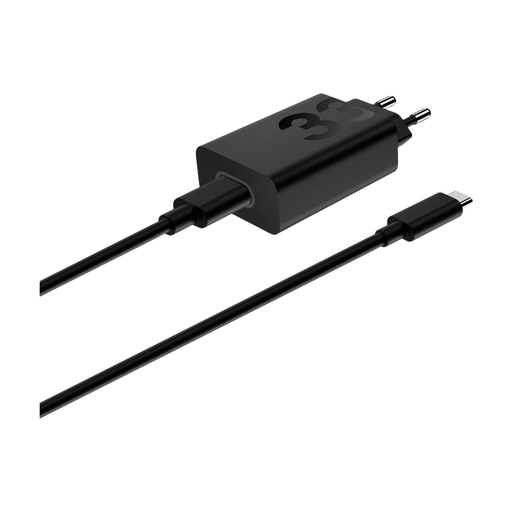
Motorola TurboPower USB-A Charger 33W Black
This USB-A charger is suitable for a controller cable with a USB-A connector at the charger end.
The product information lists up to 33 W, dimensions of 52 × 28 × 42 mm and a weight of 70 g. The description mentions a CE marking; check the marking on the product itself.
View at Joybuy
 No image available
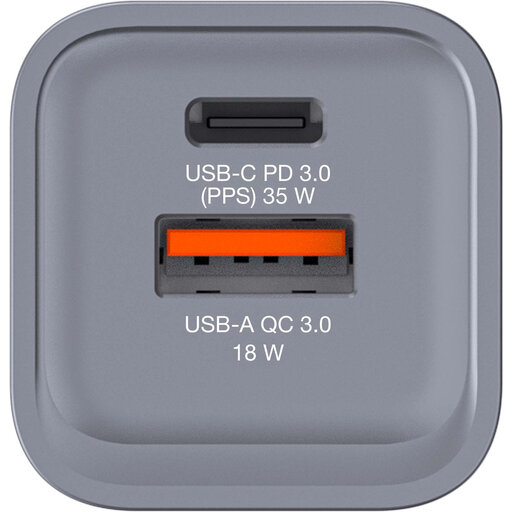
Verbatim GNC-35 GaN Charger
The USB-C and USB-A ports give you connections for compatible cables if you want to connect more than one device.
The product information lists up to 34 W, one USB-C PD port and one USB-A QC 3.0 port. Check the CE marking on this specific mains charger before buying.
View at Joybuy
 No image available
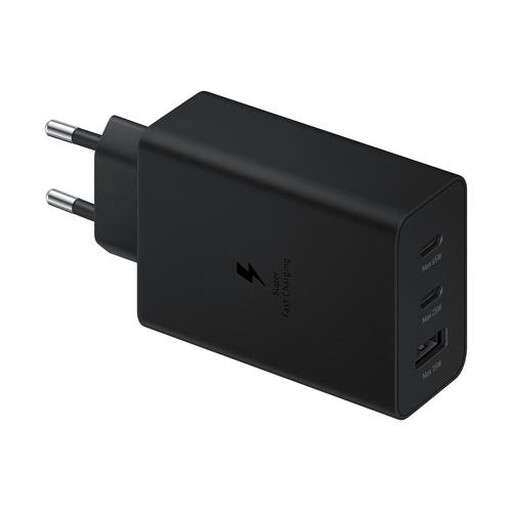
Samsung 65W Travel Charger Trio
USB-C and USB-A ports give you connections for different compatible cables and multiple devices.
The product information lists two USB-C ports, one USB-A port and up to 65 W total. Check the CE marking on this specific mains charger before buying.
View at Joybuy
 No image available
Xiaomi 33W Nano Power Adapter Charger
The USB-C connection is an option if your controller uses a compatible USB-C cable.
The product information lists up to 33 W and support for QC, PD and PPS. Check the CE marking on this specific mains charger before buying.
View at Joybuy
Frequently asked questions
Does every Xbox controller charge as soon as you connect a USB cable?
No. According to Xbox Support, rechargeable AA batteries don’t charge in the standard wireless controller. Follow the battery manufacturer’s charging instructions; Xbox describes an Xbox rechargeable battery pack separately.
Can you charge your controller without a separate USB mains charger?
Some controllers can be charged using a compatible system or power supply. PlayStation explains how to charge using a PS5 or PS4 system with the USB cable supplied; for the Switch Pro Controller, Nintendo describes using the dock or a compatible power supply. Check the instructions for your model.
What should you look for in a multi-port charger?
Check that your cables fit the ports, and compare the total power with the output listed per port. IKEA says that charging with the SJÖSS 805.744.38 may be briefly interrupted when you connect a second device. IKEA also recommends replacing a faulty cable.
What can you do if a charger you bought online is faulty?
If a product doesn’t meet reasonable expectations, the seller must offer a solution, according to the Dutch government; there is no fixed statutory warranty period in the Netherlands. Online purchases made remotely from a business also generally come with a 14-day cooling-off period. Check the terms that apply to your purchase.
Is a CE marking required for a USB mains charger in the Netherlands?
Yes. Mains chargers covered by the Commodities Act Decree on Electrical Equipment must carry a CE marking. According to the Netherlands Food and Consumer Product Safety Authority, this means the manufacturer declares the product meets the relevant European requirements; the marking is not the result of an independent test of every individual item.


