What should you look for?
Using an existing console power supply
A good fit if: the manufacturer says your controller can charge via the console or an existing compatible power supply.
Bear in mind: a USB port on a console isn’t always active. Check the power settings for rest mode.
A single-port plug-in charger
A good fit if: you want to connect one controller and the output and cable are suitable for your controller model.
Bear in mind: you can’t connect a second device to the same charger at the same time.
A two-port plug-in charger
A good fit if: you want to connect another device as well as your controller at the same charging spot.
Bear in mind: check which ports are available and how the stated power is shared when you use both.
The first thing to check is whether your battery can charge via USB. Then compare the cable and ports with the devices you actually want to connect.
| What to consider |
What should you check? |
Who is this important for? |
| Can the battery charge via USB? |
Check your controller model, battery type and the manufacturer’s charging instructions. |
I want to avoid buying a charger for batteries that don’t charge inside the controller. Around 31% of consumers first check whether their controller battery can charge via USB. |
| A safe place to charge |
Keep the charger uncovered and the controller and cable away from pillows and duvets. Don’t use damaged charging accessories. |
I want to charge my controller by the bed without placing it under the bedding. Around 31% of consumers prioritise a clear, safe place to charge. |
| Two devices at once |
Check the number of USB-C and USB-A ports and how the power is shared when both are in use. |
I want to connect another device in the same place and need the right ports to do so. Around 23% of consumers start with this need for two connections. |
| Cable and reach |
Check the connectors at both ends, what’s included and whether the cable reaches your charging spot. |
I want to know whether I already have a suitable cable and can put the controller in a clear space. Around 15% of consumers prioritise having a complete, compatible connection. |
USB chargers at Joybuy
These Joybuy products are USB plug-in chargers with one or more ports. Check that your controller model can charge via USB and that the connection and cable suit your needs.
 No image available
OnePlus 80W Dual Ports SUPERVOOC Adapter, Type A + Type C, white
An option if you need both a USB-A and a USB-C connection. Check whether your controller cable fits either port.
The product name specifies 80W and two ports: Type A and Type C. It doesn’t specify how power is shared between the ports.
View at Joybuy
 No image available
Lenovo Dual USB-C 65W GaN Charger, EU plug, with 1.5 m USB-C cable
Could be suitable if your controller charges via a USB-C cable. Check your controller model’s requirements before choosing a connection.
The product name specifies two USB-C ports, 65W, an EU plug and an included 1.5 m USB-C cable.
View at Joybuy
 No image available
65W power adapter with two USB-C ports and retractable USB-C cable
Worth considering if a USB-C connection is suitable for your controller. Also check whether the integrated cable reaches your charging spot.
The product name specifies 65W, two USB-C ports and a retractable USB-C cable.
View at Joybuy
 No image available
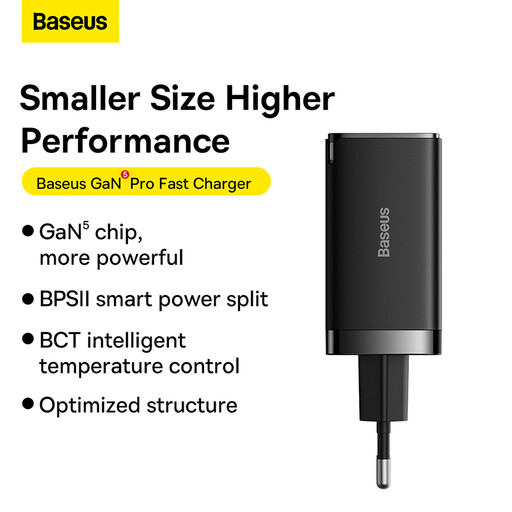
BASEUS GaN5 Pro 65W C+C+U, EU, with 1 m USB-C cable
Could suit a charging spot where you need USB-C and USB-A ports. Check which connector your controller cable uses.
The product name specifies C+C+U, 65W, an EU version and a 1 m USB-C to USB-C cable. It doesn’t state how power is shared between the ports.
View at Joybuy
 No image available
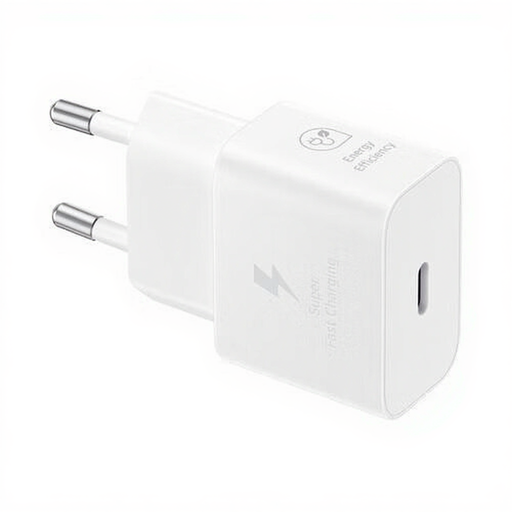
Samsung 25W Efficiency Adapter with 1 m USB-C cable, white
An option if you need a suitable 1 m cable. Check that the connection and your controller’s charging requirements match.
The product name specifies 25W and an included 1 m USB-C cable.
View at Joybuy
Frequently asked questions
Will a USB cable charge the AA batteries in my Xbox controller?
No. The rechargeable AA batteries described by Xbox don’t charge inside the controller. Xbox also describes a compatible rechargeable battery pack for controllers with USB-C. Check which type of battery is actually in your controller.
Can I charge my controller via the console instead of buying a plug-in charger?
You can with models for which the manufacturer describes this charging method. PlayStation mentions charging via the console and points to the USB power setting for rest mode. Nintendo describes charging the Switch Pro Controller via the charging grip or a compatible power supply.
Can my controller charge while it’s on the bed?
Don’t charge the controller under a pillow or duvet. The Fire Service advises keeping the charger uncovered and not using damaged cables, so choose a clear charging spot away from the bedding.
Does a USB plug-in charger include the cable I need?
It depends on the product. IKEA says the USB-C cable is sold separately for the 20 W SJÖSS charger reviewed here. Apple also states that the cable for the adapter reviewed is available separately. Check the product packaging and the cable you already have.
Does a USB plug-in charger for a Dutch socket need a CE mark?
USB plug-in chargers connected to the mains must carry a CE mark if the applicable CE requirements apply to them. The NVWA sets out the relevant requirements for electrical products. A CE mark isn’t proof of a mandatory independent inspection.


