
Photographer with a separate camera battery
Wants to charge a removed battery without leaving the camera at a shared workstation. The exact battery type determines which charging method is suitable.


First, check the exact battery type and whether it needs to be charged directly, in the camera or with a separate battery charger. A USB desktop charger is no substitute for a charger designed for a specific model. Also check which ports are available and how much power they can supply when colleagues are charging at the same time.
Wants to charge a removed battery without leaving the camera at a shared workstation. The exact battery type determines which charging method is suitable.
Wants to connect other devices as well as a camera battery, so pays attention to the available ports and power when several devices are in use at once.
Wants to leave the battery in the camera body and needs to check whether that particular combination supports USB charging. For example, Canon describes this option for compatible EOS cameras with the LP-E6NH.
Start by checking how your battery and camera need to be charged. Then work out how many connections you need at once and how to position the charger safely at a shared workstation.
| What to consider | What should you check? | Who is this important for? |
|---|---|---|
| Battery and charging method | Check the full battery type and camera model. Find out whether it can be charged directly, in the camera or with a suitable battery charger. | I want to make sure the charger is right for my battery and camera first; the wrong charging method won’t help. Around 33% of consumers prioritise compatibility. |
| Safe charging | Check the condition of the battery, charger and cable. Choose a clear spot where heat can dissipate, and follow the manufacturer’s instructions. | If I’m charging a separate battery at a shared desk, I want to position the charger in the open and avoid using damaged parts. Around 27% of consumers prioritise safe charging. |
| Ports and power | Check the number of USB-A and USB-C ports and, if your camera or charger requires it, USB-PD. Check the available power when several devices are connected. | I want to connect camera equipment and other devices at the same time, without assuming that every port can deliver the maximum total power. Around 20% of consumers choose mainly based on the connections and power distribution. |
| Desk setup | Consider where the socket is, the length of the cable and whether there’s enough room to set down the charger and separate battery without obstruction. | If I share a charging station with colleagues, I want cables and devices to be easy to reach without wedging the charger between other items. Around 20% of consumers focus mainly on their workstation setup. |
A USB desktop charger won’t automatically charge a separate battery. The battery needs to have a supported USB charging connection or require a suitable battery charger. Charging in the camera only works with supported combinations.
First, note down the battery and camera models, then check the charging method with the manufacturer.
Desktop chargers with multiple connections. According to Belkin, the BoostCharge Pro P-WCH010 has two USB-C and two USB-A ports, while the WCH015vfWH has four USB-C ports.
According to SmallRig, the SmallRig 4084 is a dual battery charger for LP-E6NH, with a USB-A cable and USB-C input.
Canon describes charging options for the LP-E6NH, including the LC-E6E and in-camera charging via USB PD in compatible EOS cameras.
Sony provides compatibility information for the NP-FZ100 when used with certain camera bodies or the BC-ZD1 battery charger.
Nikon describes a USB-C power supply option with PD for supported combinations, including the EH-8P.
These Joybuy products are extension leads and USB chargers for multiple devices at a shared workstation. Always check that your camera battery or camera body supports the charging method being used.
 No image available
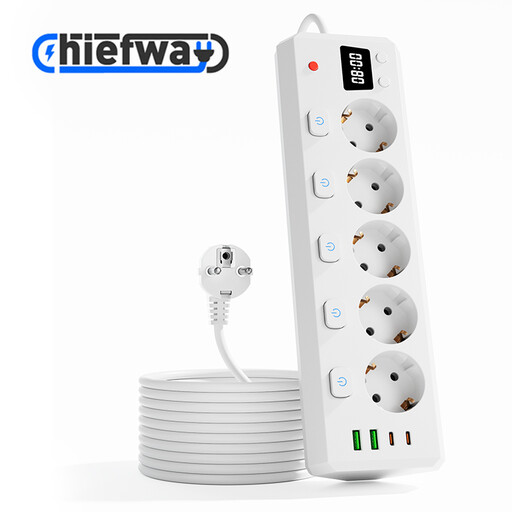
An option for a shared desk where several USB devices and mains-powered appliances need to be connected. Check whether your camera battery supports USB charging.
The product name lists 3 USB-A ports, 2 Type-C ports, a 3 m cable, a digital clock and 2500W MAX.
 No image available
Could suit a shared workstation with several USB devices and mains-powered appliances. You’ll need to check separately that the camera battery can be charged this way.
The product name lists 2 USB-A ports, 2 Type-C ports, individual switches for the AC sockets, a digital clock, a 3 m cable and 2500W MAX.
 No image available
A compact option for a workstation where several USB devices need to be connected. Check whether your camera or battery charger supports the USB charging available.
The product name lists 3 USB-A ports, 1 USB-C port, an on/off switch, a 1.5 m cable and 2500W MAX.
 No image available
A USB-C charger for a shared space where up to two compatible devices can be connected at once. Check whether your camera or battery charger supports this charging method.
The product name lists two USB-C ports and 65W. The description mentions a 1.5 m USB-C cable.
 No image available
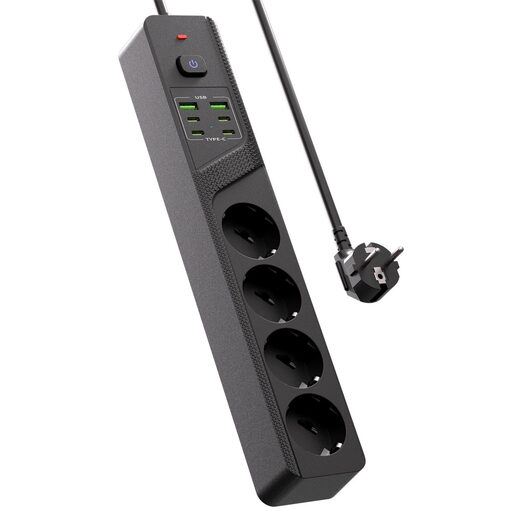
An option for a shared desk where several USB devices are also in use. The ports are only a suitable charging option if your camera or battery charger is compatible.
The product name lists 4 USB-C ports, 2 USB-A ports and an on/off switch.
Only if the battery itself has a supported USB charging connection. If it doesn’t, you’ll need a suitable battery charger. For example, Canon lists the LC-E6E for the LP-E6NH, as well as charging in compatible camera bodies.
The power available from one port can vary when several devices are connected. Check how power is distributed across the ports and what your camera and battery require. Sony notes that the requirements for the NP-FZ100 depend on the combination of camera, charger and other devices.
Follow the manufacturer’s instructions and place the charger in the open so heat can dissipate. The Dutch Fire Service advises keeping chargers clear of obstructions. Don’t use damaged cables, and check the battery for damage or distortion.
No. Those rules don’t confirm that an existing separate camera battery has a USB-C charging port. The Dutch Government’s announcement concerns new devices placed on the Dutch market from 28 December 2024. Check the stated charging method for your own battery and camera.
Take it to a battery collection point and don’t put it in your household waste. The Dutch Government specifically includes camera batteries and refers, among other places, to shops and supermarkets that sell batteries.