What should you look for in a USB charger?
First decide where the battery will be while it’s charging. Then check compatibility, the requirements for each port and which components you’ll need.
| What to consider |
What should you look for? |
Who is this important for? |
| Camera and battery compatibility |
Check the manual to see whether your camera can charge the battery via USB, which charging mode is required and whether a separate charger is compatible with the exact battery type. |
If I want to charge the battery in my camera, the charging method needs to suit my model and battery type; around 33% of consumers prioritise compatibility. |
| Sharing ports |
Check how many ports you need and the output of each port. According to Belkin, the Belkin WCB006 provides up to 20 W per USB-C port and 40 W combined. |
If I want to connect another device as well as my camera or battery charger, I need two usable connections; around 27% of consumers prioritise connecting devices simultaneously. |
| Charging protocol and power output |
Compare the required protocol and power output with the specifications of the port you’ll use. For two NP-FZ100 batteries in the BC-ZD1, Sony specifies a USB-PD power supply of at least 30 W. |
If my charging equipment requires a particular protocol or minimum power output, I want the port I use to meet those requirements; around 20% of consumers prioritise charging requirements. |
| Charging location and cable |
Don’t use a damaged cable, and don’t cover the charging setup with items such as a cushion or blanket. VeiligheidNL includes these points in its charging advice. |
If I’m charging at a shared desk, I want an undamaged cable and a clear space for my equipment; around 13% of consumers prioritise using their desk responsibly. |
| Components required |
Check which power supply and cable are included with the battery charger, and whether you’ll also need a suitable USB power supply. |
If I want to complete my charging setup, I want to know in advance which power supply or cable I still need; around 7% of consumers prioritise choosing the right components. |
Products for charging at a shared desk
These products are USB power supplies and desk sockets for a USB charging setup, if your camera or battery charger supports it. They aren’t model-specific chargers for removed camera batteries.
 Image unavailable
Lenovo Dual USB-C 65W GaN Charger
Suitable for a desk setup with a USB-C camera or charger and a second device, if the camera supports USB charging.
Maximum total output of 65 W. When charging simultaneously, the product description lists up to 45 W via USB-C1 and 18 W via USB-C2. Includes a 1.5 m USB-C cable.
Joybuy
 Image unavailable
Neomounts DS22-840BL6
Suitable for a shared desk where you need USB connections and power sockets within reach, provided your camera can charge via USB.
The product description lists two 20 W USB-C ports, one 18 W USB-A port and three Schuko sockets. A clamp is required for mounting; the cable is 1.4 m long.
Joybuy
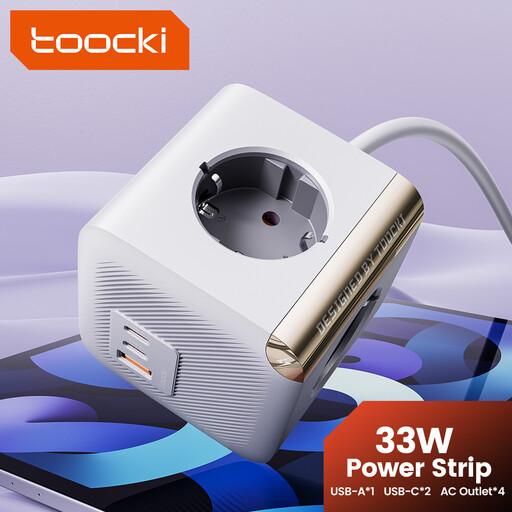 Image unavailable
toocki Power Strip Surge Protector PD33W
Suitable for a desk where you want to connect other devices as well as a supported USB camera.
The title lists four AC outlets and two USB-C ports. The product description states 35 W and says you can connect two devices at the same time. No cable is included.
Joybuy
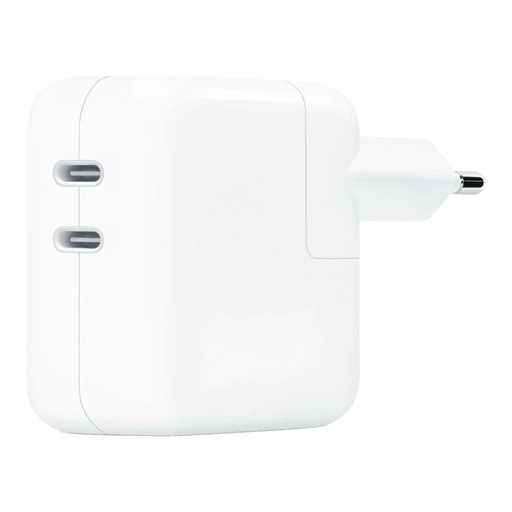 Image unavailable
Original Apple 35W Dual Power Adapter
Suitable for a desk setup with multiple devices, if your camera can charge via USB and the adapter meets its charging requirements.
The product name lists two USB-C ports and four AC outlets; the description specifies 33 W USB-C charging. For indoor use only; don’t connect this power strip to another power strip.
Joybuy
Frequently asked questions
Can I use any USB-C mains adapter to charge my camera battery?
No. First check whether your camera model supports USB charging, and which charging mode and cable are required. For the charging method it describes, Sony says the camera must be switched off. Canon specifies USB-PD charging of the LP-E6NH only for compatible camera bodies.
Will a USB charger with a combined output of 40 W deliver 30 W through one port?
Not necessarily: the combined output doesn’t tell you how much power an individual port delivers. Belkin lists a maximum of 20 W per port for the WCB006, so compare your camera or battery charger’s requirements with the specifications of the port you’ll use.
How can I charge a camera battery safely at a shared desk?
Use an undamaged cable and don’t cover the charging setup with items such as a cushion or blanket. VeiligheidNL recommends these precautions; also follow the instructions for your camera and charger.
Does a USB-C connection mean my camera will work with any USB-C charger?
No. A USB-C connection doesn’t confirm that your camera can charge its battery via USB or that the power supply meets the required specifications. The Dutch Government states that, from 28 December 2024, certain new devices placed on the Dutch market must have a USB-C connection. Check your camera model’s charging options separately.


