What should you look for?
First check that the cable, port and charging output are suitable for your light. Then decide whether you need extra ports and check the information for the exact charger model.
| What to consider |
What should you check? |
Who is this important for? |
| Connection and charging output |
Compare the cable ends, the charger port and the permitted output with your light’s instructions. Spanninga specifies a maximum adapter output of 5 V for its USB lights; don’t assume this applies to a light from another brand without checking. |
If you want to keep using your existing cable, you’ll want to make sure that the connection and output are suitable for your light. Around 36% of consumers put compatibility first. |
| Two devices at once |
Check that the ports fit both cables and find out how much power is available per port when both are in use. |
At a shared desk, you may also want to connect a second device. Around 29% of consumers put simultaneous charging first. |
| A practical desk set-up |
Check whether the required cable is included and follow the instructions for use and connection. For the SJÖSS 805.744.38, IKEA states that a USB-C cable is not included and that the charger is for indoor use only. |
If you move your charger between workstations, you’ll want to know in advance which cable you need and how to connect it there. Around 21% of consumers prioritise a practical set-up that’s easy to carry. |
| Product safety information |
Check the product identity and CE marking for the exact model. The Netherlands Food and Consumer Product Safety Authority states that electrical products covered by the applicable rules must carry a CE marking. |
You’ll want to be able to check which charger you’re buying and what product information comes with it. Around 14% of consumers prioritise verifiable safety information. |
USB chargers at Joybuy
These products offer a range of set-ups with USB-A and USB-C ports, including desk chargers and a desk-mounted socket. Before buying, check that the connection and output are suitable for your light, and review the product information and CE marking for the exact model; the brand name alone doesn’t confirm this.
 No image available
OnePlus 80W Dual Ports SUPERVOOC Adapter, Type A + Type C, White
An option if you want to use cables with USB-A and USB-C connections at the same workstation. Check your bike light’s instructions before connecting it.
The product name specifies 80 W, two ports and Type A + Type C.
View at Joybuy
 No image available
Lenovo Dual USB-C 65W GaN Charger
Worth considering if your light’s cable has a USB-C connection and you also want to connect a USB-C device to the same charger. Check your light’s required output.
The product name specifies two USB-C ports and 65 W.
View at Joybuy
 No image available
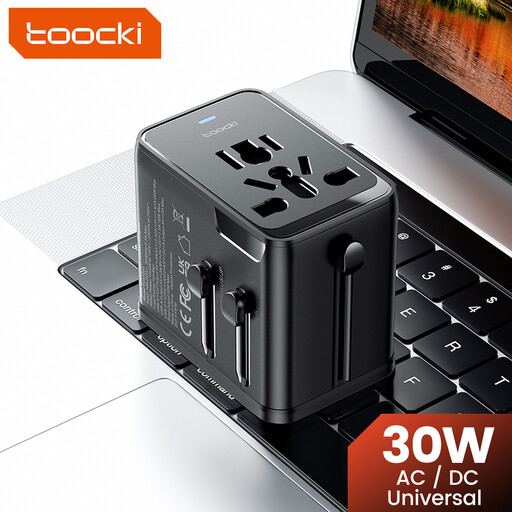
toocki Universal Travel Adapter 30W PD, 1 USB-A + 2 USB-C
This travel adapter may suit a set-up that needs both USB-A and USB-C connections. Check the connection to the local mains supply and the instructions for the exact model.
The product name specifies 30W PD, 1 USB-A port and 2 USB-C ports. Use the adapter within the stated voltage and power limits.
View at Joybuy
 No image available
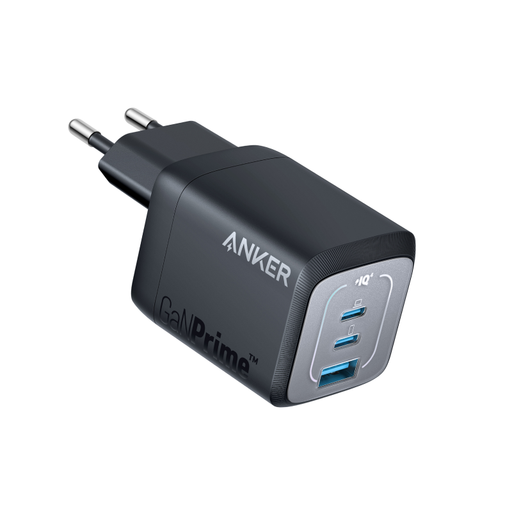
Anker Prime 735 Universal Wall Charger, 67W, 1A/2C, EU Plug
Worth considering if you need both a USB-A and a USB-C connection at your workstation. Check that the output is suitable for your bike light.
The product name specifies 67 W, one USB-A and two USB-C ports, an EU plug and indoor use.
View at Joybuy
 No image available
Neomounts DS22-840BL6 Desk Socket with Clamp, USB-C and USB-A
A desk socket to consider if you want to attach the connections to your desk. Bear in mind that this model is fitted with a clamp.
The product name specifies USB-C and USB-A ports.
View at Joybuy
Frequently asked questions
Can I use any USB charger for my bike light?
No. Don’t assume it’s compatible just because it says ‘USB’. Check your light’s instructions, the ends of the cable and the permitted output. Spanninga generally specifies a micro-USB cable and a CE-marked mains adapter with a maximum of 5 V for its USB lights; this isn’t a universal specification for other brands.
What should I look for when charging two devices at once?
Check the output when both ports are in use at the same time. For the SJÖSS 805.744.38, IKEA specifies a maximum of 22 W per USB-C port when using both ports. So the figure for one port isn’t the same as the output per port when charging two devices at once.
Should I check the CE marking on a mains USB charger?
Yes. Check the CE marking and product information for the exact model. The Netherlands Food and Consumer Product Safety Authority states that electrical products covered by the applicable rules must carry a CE marking; the brand name alone doesn’t show that a specific item complies.
What should I do with my charger when I leave my desk?
Follow the instructions for the exact model. For the SJÖSS charger, IKEA says to use it indoors, choose an easily accessible socket, never use a damaged cable and unplug the charger when it’s not in use.
What can I do if a charger I’ve bought is faulty?
Contact the retailer if the product isn’t as it should be. According to the Dutch government, the retailer must provide a solution for a faulty product. There is no fixed statutory warranty period in the Netherlands; what you can expect from a product depends, among other things, on the product itself and the information you received when you bought it.


