
Lamp with a USB-A connection
You need a power supply or cable with a connector that fits your lamp. Also check which input the lamp requires.


First, check your lamp’s plug and specified input, and see whether it has a battery or needs a constant USB power supply while in use. Then choose a charger with a compatible port and sufficient output for the lamp. Extra ports are useful mainly if you also want to connect another device. Place the charger and cable in an open space, away from pillows and duvets.
You need a power supply or cable with a connector that fits your lamp. Also check which input the lamp requires.
You want to connect a lamp and a second device. Check the number and type of ports, as well as the output available from each port.
Your lamp connects directly via USB-C. Check that the charger has a compatible USB-C port and that its output matches the lamp’s input.
Start by checking the connection and the lamp’s required input, then decide whether you need one port or more. The Netherlands Fire Service advises placing chargers in an open space so heat can escape, and not charging devices under a pillow or duvet.
| What to consider | What should you check? | Who is this important for? |
|---|---|---|
| Connection and input | Compare the plug, any cable and the lamp’s specified input with the charger port. | I want to make sure the plug fits and the power supply matches what my lamp requires. Around 33% of consumers are primarily concerned about connection compatibility. |
| Safe use by the bed | Check for damage and keep the charger and device clear of bedding. | I want to use my lamp by the bed without covering the charger or cable. Around 27% of consumers prioritise safe use in this setting. |
| Multiple devices | Check the type and number of ports, and the output from each port when used at the same time. | I want to connect a phone as well as my lamp, and know what each port can deliver when in use. Around 20% of consumers prioritise using devices at the same time. |
| A simple solution | Compare the connection you need with what you already have, and don’t pay for extra ports you won’t use. | I just need a suitable power supply for one lamp and don’t want to buy unnecessary connections. Around 20% of consumers prefer a simple solution for a single lamp. |
A lamp with USB-C on the power supply side needs a different charger port from a lamp with a USB-A connection.
Check your lamp’s plug and specified input first. Then choose a charger or cable.
If the connections don’t match, you may still need a compatible cable or a different charger.
The available output can vary from port to port, and may differ when multiple devices are connected at the same time.
Compare the specifications for the exact ports you want to use simultaneously.
The Netherlands Fire Service warns that chargers need to be able to release heat, and that damaged cables should not be used.
Place the charger in an open space, don’t charge devices under a pillow or duvet, and replace any damaged parts.
Belkin offers USB-A chargers with two ports, as well as a combined USB-A/USB-C wall charger for different connections.
The Nexode variant mentioned here combines a built-in USB-C cable with USB-C and USB-A ports.
This selection includes USB chargers with USB-A and/or USB-C ports, plus a night light with a dual USB charger. Compare your lamp’s connection and input with the charger’s port and output.
 No image available
May be suitable if your lamp’s connection and input match one of the ports.
The product title lists 65 W, two USB-C ports and one USB-A port. The product description mentions charging three devices at the same time.
 No image available
An option if your lamp is compatible with one of the ports and you may also want to connect a second device.
The product information lists USB-A, USB-C, two ports and a maximum combined output of 30 W. The output available per port isn’t specified in the product information provided.
 No image available
May be suitable if your lamp’s plug and input requirements match one of the connections.
The product information lists USB-A, USB-C, two ports and a maximum total output of 20 W. It also mentions charging two devices at the same time.
 No image available
An option if you want to connect several devices as well as your lamp, and the plug configuration suits your needs.
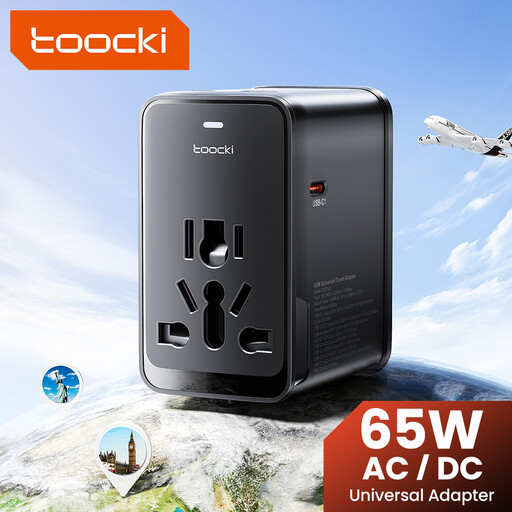
The product title lists 65 W, one USB-A port and three USB-C ports. The product description mentions interchangeable plugs, including an EU plug. Check which plug suits your socket.
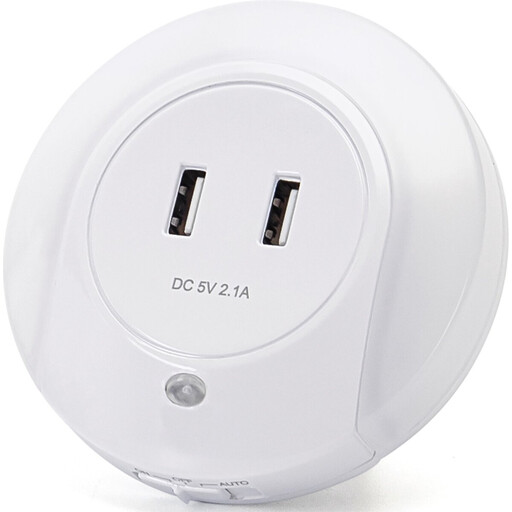 No image available
This is a night light with USB charging ports, not a standalone wall charger for your existing lamp.
The product title lists two USB charging ports, 0.4 W and warm light. The USB port output isn’t specified in the product information.
No, not necessarily. Check your lamp’s plug and the input specified by the manufacturer, then choose a charger port that matches.
Don’t just look at the highest wattage: compare your lamp’s required input with the output of the port you’ll be using. If you connect several devices, the output available from each port may change.
The Netherlands Fire Service advises placing a charger in an open space so heat can escape. Don’t charge devices under a pillow or duvet, and don’t use damaged cables.
According to ACM ConsuWijzer, you have a statutory guarantee in addition to any manufacturer’s or seller’s guarantee. If a product breaks earlier than you could reasonably expect during normal use, the seller must offer an appropriate solution at no extra cost; what is reasonable depends on the circumstances.
Yes. The Netherlands Food and Consumer Product Safety Authority states that CE marking is compulsory for electrical products such as chargers sold on the Dutch market. The marking is a declaration by the manufacturer, not proof that each individual product has been independently tested.