What should you look for when choosing?
Start with the power instructions for your exact recorder. Then compare the cable and port, and decide whether you need extra connections.
| What to consider |
What should you check? |
Who is this important for? |
| Power or charging |
Check the manual for your exact model for separate information about USB power and battery charging. |
If you want your recorder to keep working at your desk, check whether USB is intended for this and whether it charges the batteries too; around 34% of consumers prioritise this charging function. |
| Connection and power |
Compare the cable ends and the adapter output with the requirements for your recorder model. |
If you already have a recorder cable, you’ll want to know whether it connects to the adapter and can supply the specified power; around 33% of consumers give this connection and power the highest priority. |
| Two devices at once |
Check the number of USB-A and USB-C ports and the stated output of each port. |
If you want to connect your recorder and another device to the same desk charger, the available ports and their individual outputs matter; around 20% of consumers prioritise being able to use both at once. |
| Cable included |
Check whether a cable is included and compare its connectors with your recorder and existing cable. |
If you want to avoid an extra purchase, first check whether your current cable will do and whether the adapter comes without one; around 13% of consumers focus primarily on this. |
USB chargers and connection options on Joybuy
This selection includes USB chargers and power solutions with USB-A and/or USB-C connections for a home office. Before choosing, check your recorder’s power instructions and the safety information and required CE marking for the exact adapter variant.
 No image available
USB mains charger with two USB-C ports and one USB-A port
The different port types may suit a workspace where you connect more than one device. Check that the port you choose matches your recorder’s cable and power requirements.
The product name lists two USB-C ports and one USB-A port. The product description limits use to indoors and dry conditions.
Check the applicable safety requirements and required CE marking for this exact variant.
View on Joybuy
 No image available
USB mains charger with USB-A and USB-C ports, 30 W combined
The two ports let you connect a recorder and another USB device. Check that the adapter’s output from each port matches your recorder’s power instructions and cable.
The product information states up to 30 W combined. The description recommends indoor use in dry conditions.
Check the applicable safety requirements and required CE marking for this exact variant.
View on Joybuy
 No image available
Fairphone Dual USB-C + USB Fast Charger 65W Black
The multiple ports may be useful if you want to connect more than one USB device at your desk. Having a suitable port doesn’t prove that your recorder will charge faster.
The product information lists two USB-C ports, one USB-A port and up to 65 W. Cables are not included.
Check the applicable safety requirements and required CE marking for this exact variant.
View on Joybuy
 No image available
10-port USB charging station
A charging station may suit a workspace with several USB devices. First, check that the specific port configuration works with your recorder cable.
The product name lists 10 ports. The product description mentions different configurations of USB-A and USB-C ports, so check which version you’re choosing.
Check the applicable safety requirements and required CE marking for this exact variant.
View on Joybuy
 No image available
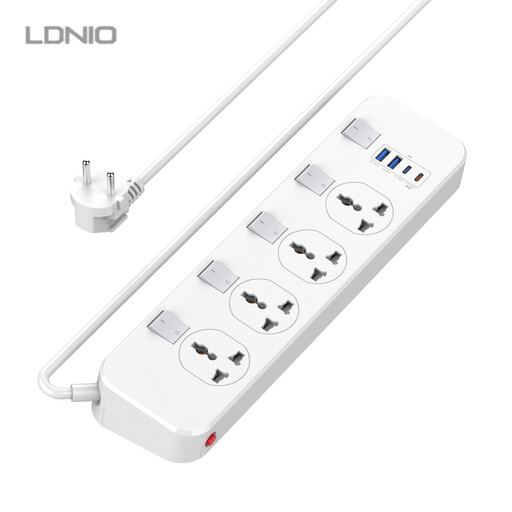
LDNIO extension lead with 4 sockets and 3 USB ports
This extension lead is an option for a desk where devices are plugged into mains sockets as well as USB ports. Check that the size and connections suit your workspace.
The product name lists four sockets, two USB-A ports, one USB-C port and a 20 W USB-C output. The product name states that the cable is 6.5 ft long.
Check the applicable safety requirements and required CE marking for this exact variant.
View on Joybuy
Frequently asked questions
Will a USB mains adapter charge the batteries in your audio recorder?
Not necessarily. The Zoom H1essential documentation describes USB as a power source alongside disposable batteries; this doesn’t mean that the batteries inside the recorder will charge via USB. Check the manual for your exact model for information about charging.
How do you connect your recorder while using it at your desk?
Follow the connection and power instructions for your recorder model. For the H1essential, Zoom specifies power via the USB-C port using a suitable adapter or another stated USB power source. This instruction doesn’t automatically apply to other recorders.
Which safety rules apply when buying in the Netherlands?
A mains adapter covered by the applicable rules for electrical equipment must meet the relevant safety requirements and carry the required CE marking. The European Commission explains that CE marking is only mandatory for products covered by applicable EU rules; the marking doesn’t confirm that an adapter has been tested with your recorder model. Check the exact variant.
What can you do if the adapter develops a fault sooner than expected during normal use?
In the Netherlands, your statutory guarantee applies alongside any manufacturer’s warranty. According to ACM ConsuWijzer, the seller must resolve a fault that develops sooner than expected during normal use free of charge, for example by repairing or replacing the product.
Can you return an adapter bought online if the connection doesn’t fit?
For distance purchases by consumers, there is usually a 14-day cooling-off period, although exceptions apply. The Dutch government provides information about this period; check the terms that apply to your specific purchase.


