
Recorder user who wants to charge batteries
Wants to know whether connecting via USB actually charges the batteries or simply powers the recorder. The ZOOM and Tascam manuals show why this distinction matters for the recorder models they mention.


First, check the manual for your exact recorder model to see whether USB only powers the recorder or also charges its batteries. ZOOM’s Quick Tour mentions USB power for the H1essential, while Tascam describes USB bus power for the DR-05X; these examples do not prove that other models can charge batteries. Then choose a charger that suits the cable and permitted power supply, and check the product information and relevant safety warnings.
Wants to know whether connecting via USB actually charges the batteries or simply powers the recorder. The ZOOM and Tascam manuals show why this distinction matters for the recorder models they mention.
Looking for a mains charger that matches the connector at the end of the cable and the recorder’s power supply instructions. ZOOM names the AD-17 for the H1essential; UGREEN describes the Nexode 30W as a USB-C charger, but that alone does not confirm it is suitable for a specific recorder.
May want to connect another device as well as the recorder, so should check the number of ports and the output per port. Belkin lists one USB-C port rated up to 30 W and one USB-A port rated up to 12 W for the WCB009vfWH.
The ZOOM and Tascam manuals show why you should not assume that USB power also charges a recorder’s batteries. Next, work out which connector and ports suit your cables and the way you travel.
| What to consider | What should you check? | Who is this important for? |
|---|---|---|
| Charging batteries or powering the recorder | Check the manual for the exact model to see whether batteries in the recorder are charged via USB. | If you want to charge the batteries after a day of recording, check this function separately; around 36% of consumers say this is their main buying question. |
| Cable, port and power supply | Check both ends of the cable and compare the permitted power supply with the charger’s specifications. | If you want to connect your existing cable and recorder without guesswork, focus on the correct plugs and power supply; around 29% of consumers say this connection is their top priority. |
| Several devices from one socket | Check the number of USB-A and USB-C ports and the stated output per port. | If you want to connect a second device in your hotel room too, the number of suitable ports matters; around 21% of consumers prioritise sharing the charger. |
| Portability and checking your purchase | Check what is included and verify the product identity and relevant safety information. | If you want a handy charger and to check the product information in advance, this is your main concern; around 14% of consumers prioritise travel convenience and checking the details. |
A recorder can run via USB without the connection charging its batteries. The information for the ZOOM H1essential and Tascam DR-05X lists USB as a power option, but does not establish that they can charge batteries.
Look in the manual for your exact model for explicit instructions on charging batteries while they are installed. If you want to charge batteries separately, check which charging solution is intended for them.
If USB does not charge the batteries, you may also need a separate, suitable charging solution.
The connector type and maximum power of a charger do not automatically confirm that it is suitable for your recorder or that the recorder will run faster with it.
Compare the plugs at both ends of the cable with the manual, and check the output specifications for the exact charger.
Electrical devices placed on the market in the Netherlands must meet the applicable European requirements. The marking alone does not prove that an individual product is safe. On 27 August 2026, the NVWA warned of a risk of electric shock from the plastic TravelCharge Pro RCS travel charger, item number P821.0203.
When buying, check the product’s identity and relevant safety warnings. Do not use the TravelCharge Pro RCS mentioned here.
Worth considering if you are looking at USB-A, USB-C and combined wall chargers for different cables and numbers of devices.
Worth considering if you are looking for a compact USB-C mains charger and your cable has a USB-C connector at the charger end.
A model-specific adapter option for owners of a recorder for which the manufacturer recommends the AD-17.
Worth considering if you need several USB-A outputs to power devices with USB-A cables.
This selection includes USB mains chargers with one or more ports for use with an audio recorder. Before buying, check that the connection and power supply suit your recorder; the listed ports or wattage alone do not confirm that the charger can charge batteries.
Electrical devices placed on the market in the Netherlands must meet the applicable European requirements. Ondernemersplein explains that the manufacturer must affix the required CE marking when the device meets those requirements. A visible marking alone does not prove that an individual product is safe; also check the product information and relevant warnings.
 No image available
Worth considering if you use cables with different connectors at the charger end.
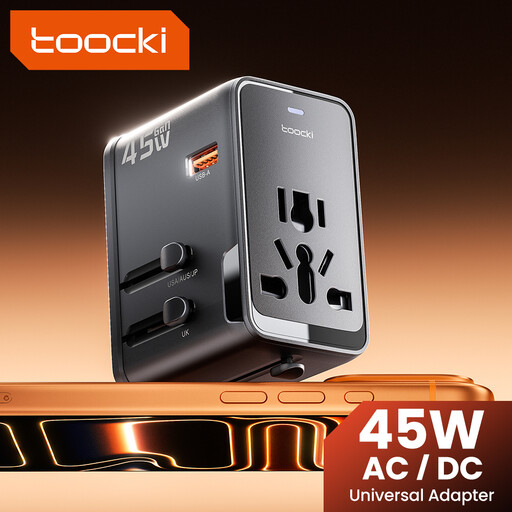
The product description lists three USB ports: one USB-A and two USB-C, with a maximum output of 45 W. It also mentions interchangeable EU, UK, US and AUS plugs.
 No image available
Could be relevant if your recorder cable or a second device uses one of the listed port types.
The product title lists 65 W and three ports: two USB-C and one USB-A. Check the product information to find out what power supply your recorder requires.
 No image available
Worth considering if you need one charger with both a USB-C and a USB-A connection.
The product title lists two ports and a total output of 30 W. Check that the connection and power supply match the instructions in your recorder’s manual.
 No image available
Could be worth considering if you want to power several devices from one mains socket.
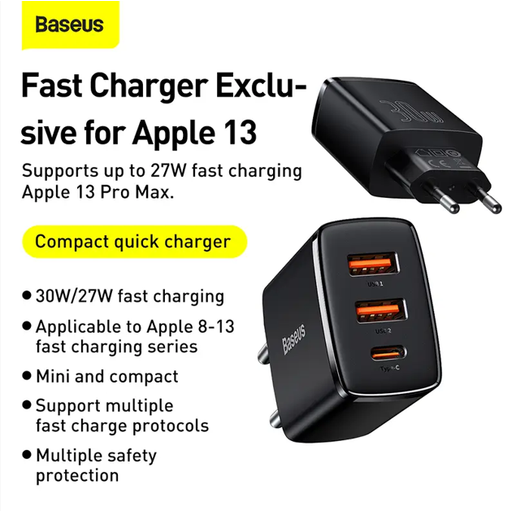
The product description lists one USB-C port and two USB-A ports, with a maximum total output of 30 W. The power distribution changes when multiple ports are used at the same time. The description also lists an input of 100–240 V.
 No image available
Worth considering if your recorder cable has a USB-C connector at the charger end.
The product description lists a USB-C output, a maximum of 33 W and output profiles of 5 V, 9 V, 11 V and 12 V. It also lists an input of 100–240 V. Compare these specifications with your recorder’s manual.
Not necessarily: the USB connection alone does not confirm this. The information for the ZOOM H1essential and Tascam DR-05X describes USB as a power option. Check the manual for your exact model separately to see whether batteries installed in the recorder are charged.
That depends on the cable you use: check the plug at the charger end and the one at the recorder end. The shape of the connector on the recorder does not automatically tell you which plug is at the other end of the cable.
Check that the charger and cable suit your recorder model, see what is included with the charger, and look up any relevant safety warnings. For example, ZOOM says that a USB cable is not included with the AD-17.
Electrical devices placed on the market in the Netherlands must meet the applicable European safety requirements. According to Ondernemersplein, the manufacturer must affix the required CE marking to a device that meets those requirements; the marking alone is not an independent safety test of an individual product.