
Traveller with one USB light
You want to charge your light in a hotel room with as little extra charging equipment as possible, and mainly need to find the right cable and output.


If you’re only charging the light, a compact USB wall charger with a port and output that match your light’s specifications will usually do the job. If you want to charge other devices at the same time, compare the ports and the power available from each one; a high total wattage won’t automatically charge the light faster. A power bank is most useful if you also want to charge without a mains socket. For a mains charger, check that it’s the version intended for the Netherlands and has the relevant CE marking.
You want to charge your light in a hotel room with as little extra charging equipment as possible, and mainly need to find the right cable and output.
You want to charge your light and, for example, a phone from the same mains socket, so you need to compare the ports and how the power is shared.
You want to charge your light without a mains socket after leaving the hotel, so you’re considering a power bank.
Choose this if: you have access to a mains socket and want to charge one light, possibly alongside a second device.
Bear in mind: there are fewer ports, so make sure the USB port and cable are suitable for your light.
Choose this if: you want to connect several USB devices at once in your hotel room, and the port types and power distribution suit your devices.
Bear in mind: extra ports may be unnecessary if you’re only charging a small light, and the total power won’t necessarily be available from every port.
Choose this if: you want to charge your light outside the hotel room or somewhere without a mains socket.
Bear in mind: the power bank needs charging too, and its capacity in mAh doesn’t tell you how many full charges your light will get.
| What to consider | What to look for | Who should pay particular attention? |
|---|---|---|
| Port and cable | Check your light’s input, the compatible USB output and whether you have the right cable with you. | When I want to charge my light while travelling, I want to be sure my cable and the charger’s output will work with it. Around 36% of consumers prioritise this connection. |
| Charging devices at the same time | Check the number and type of ports, and the available power when several devices are connected. | If I want to charge a phone as well as my light, I check how the power is shared between the ports rather than assuming each one supplies the full output. Around 29% of consumers prioritise charging devices at the same time. |
| Charging without a mains socket | Check that the USB output and cable are suitable for your light, and remember that the power bank itself will need charging. | If I want to charge without a mains socket after leaving the hotel, I look for an option I can use on the go. Around 21% of consumers prioritise charging without a mains socket. |
| Avoiding unnecessary extras | First check whether your existing charger and cable have the right connection and charging output. | If my current charger and cable already work with my light, I don’t want to take extra charging equipment with me unnecessarily. Around 14% of consumers prioritise avoiding unnecessary purchases. |
A light’s charging input may be lower than the output shown on a multi-port charger. The power distribution may also change when you connect more devices.
First compare the light’s charging specifications with the output of the port you plan to use, even if you’re charging other devices at the same time.
A light with, for example, a micro-USB input needs a compatible cable; having a USB-C port alone won’t make it suitable for a different connection.
Check both ends of your cable and what’s included with the charger before choosing a model.
A power bank can power the light without a mains socket, but its battery will run down and need recharging.
Choose a power bank mainly if you need to charge on the go, and plan when you’ll be able to recharge it.
Belkin’s Dutch product information includes USB-C and USB-A wall chargers, as well as models with two USB-C ports.
Samsung says the EP-T6530NBEGEU Power Adapter Trio is designed to connect up to three USB devices at once.
Xtorm offers, among other products, a wall charger with USB-C and USB-A, as well as power banks for use away from the hotel.
Trust’s Dutch product information includes a two-port USB-C wall charger and the Primo 24678 power bank.
These products are mains-powered USB chargers and multi-port charging solutions for anyone who wants to connect a light and possibly other devices in a hotel room. Before buying, check your light’s connection and charging specifications, that the product is the version intended for the Netherlands, and that it has the relevant CE marking.
 No image available
Suitable if you want to connect several USB devices to one mains socket.
The product description lists three USB-A ports, one USB-C port, a 1.5-metre cable and an EU plug. Check your light’s required charging output and the marking on the version intended for the Netherlands.
 No image available
Suitable if you want to connect a light and a second USB device at the same time.
The product name lists two ports, Type A and Type C, and an output of 80 W. It doesn’t say how much power each port supplies when both are in use. Check that you have the right cable and that the charger matches your light’s charging specifications.
 No image available
Suitable if you want to connect a USB light and another compatible device to a single charger.
The product name lists a 30 W output and USB-A and USB-C ports. Check which port type and charging output your light needs; the product details don’t confirm a specific charging speed.
 No image available
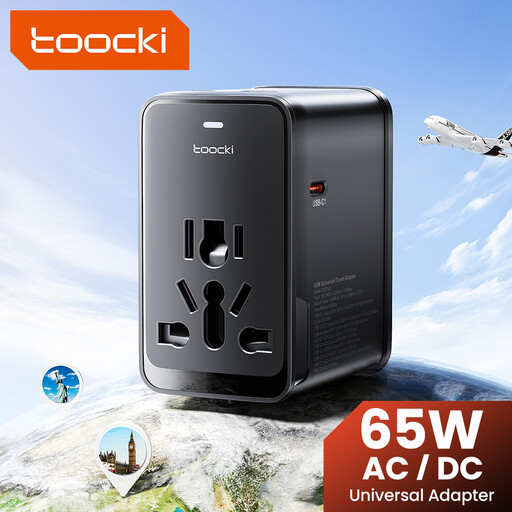
Suitable if you want to connect several USB devices while travelling and need a compatible plug.
The product name lists three USB-C ports, one USB-A port and interchangeable plugs, including an EU plug. Check your light’s charging specifications and that the version is suitable for your intended use.
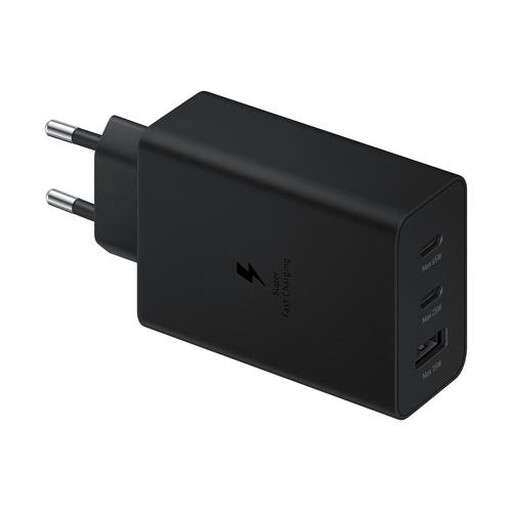 No image available
Suitable if you want to connect several USB devices to one charger while travelling.
The product description lists two USB-C ports, one USB-A port and a total output of up to 65 W. Check how much power is available when charging multiple devices, whether a cable is included and whether the version intended for the Netherlands has the relevant marking.
No. Check your light’s connection and use a compatible cable. For example, BioLite describes the AlpenGlow 250 as charging via micro-USB, so don’t assume your light uses USB-C based on general advice about chargers.
Not on the basis of that figure alone. Compare your light’s charging specifications with the output of the port you’re using. Samsung also states that the power distribution of the EP-T6530NBEGEU changes when several devices are connected.
Place the charger somewhere with room around it so heat can escape, and don’t charge the light under a pillow or duvet. The Fire Service also advises against using damaged cables and chargers. Follow your light’s instructions too.
Check the specific product for the relevant CE marking. The Netherlands Food and Consumer Product Safety Authority explains that CE marking is required for electrical products covered by the relevant regulations. A brand name or general product description doesn’t confirm that a particular version complies.
If you’ve used the product normally and it doesn’t meet what you could reasonably expect, the seller is responsible for the statutory guarantee in the Netherlands. Online purchases generally also come with a 14-day cooling-off period from delivery, subject to exceptions. ACM ConsuWijzer explains these consumer rights.