First, check whether your camera can charge its installed battery via USB, or whether you need a USB-powered battery charger that matches the battery code. Only then choose the number of ports and the power required per port for simultaneous use. A higher total output won’t make an incompatible camera or battery charger suitable.
Who is this relevant for?
Charging your camera via USB
You want to charge the battery while it’s in the camera. Check your camera’s manual to see whether this is possible and what power supply is required. Sony Netherlands emphasises that USB-PD support and the required power can vary by model.
Charging a spare battery separately
You want to charge a removable battery while keeping your camera available to use. Look for a USB-powered battery charger that supports the full battery code. Sony specifies the BC-ZD1 for NP-FZ100 batteries.
Connecting several devices at one desk
You want to connect other devices as well as your camera or a compatible battery charger. If so, consider how many USB ports you need and how much power is available when you use devices at the same time.
What should you look for when choosing?
Charging the battery in the camera
Choose this option: if the manual confirms that your camera can charge its installed battery via USB.
Bear in mind: the battery stays in the camera, and the required USB power supply varies by model.
Charging a spare battery in a USB charger
Choose this option: if you want to keep using your camera while a compatible spare battery charges.
Bear in mind: you’ll need a battery slot designed for your battery code. For the charging performance specified by Sony for the BC-ZD1, a USB-PD power supply of at least 30 W is required.
Multi-port desk charging station
Choose this option: if you also want to connect other devices at your desk at the same time.
Bear in mind: check how the power is distributed between the ports and how much is available per port. The stated total output doesn’t necessarily apply to every connection.
| What to consider |
What should you check? |
Who is this important for? |
| Camera compatibility |
Check the manual to see whether the camera can charge its installed battery via USB, and which power supply and port are required. Sony Netherlands says requirements vary by model. |
If I want to leave the battery in my camera, I want to be sure my camera model supports this charging method. Around 33% of consumers put camera compatibility first. |
| Removable spare battery |
Compare the full battery code with the charger’s compatibility information and check the required USB-PD power supply. |
I want to use my camera while the spare battery charges, so the battery code needs to match the separate charger. Around 25% of consumers prioritise charging a removable spare battery. |
| Multiple devices |
Count the USB-A and USB-C ports you need, and check how much power is available per port when you connect devices at the same time. |
If I connect several devices at my desk, I want enough suitable ports without confusing the total wattage with the power available per port. Around 25% of consumers prioritise charging several devices at once. |
| Safe use |
For a mains-powered charger, check the relevant product information and CE marking. Keep the charger unobstructed and don’t use damaged cables, as advised by the fire service. |
I want to use my charging area safely, so I pay attention to product information, cables and space for heat to dissipate. Around 17% of consumers prioritise safe use with mains power. |
Common buying mistakes
-
Confusing a USB power supply with a charger for removable camera batteries
A multi-port USB charger doesn’t have a battery slot. To charge a removable battery, you’ll also need a charger designed for its battery code. For example, the Sony BC-ZD1 is specifically for NP-FZ100 batteries.
Before you buy, decide whether you want to charge the battery in or out of the camera, and check the full battery code.
-
Assuming the total wattage is the power available per port
The stated total output of a multi-port charger isn’t the same as the power delivered by an individual port when several devices are connected.
Check how power is distributed for the number of devices and combination of ports you actually want to use at the same time.
-
Confusing the manufacturer’s warranty with your statutory rights
A commercial manufacturer’s warranty is in addition to your statutory consumer rights. The Dutch government states that the Netherlands has no fixed statutory warranty period.
Keep your proof of purchase and contact the retailer if a product is faulty.
Brands to compare
Belkin
Desk-focused multi-port chargers, including the BoostCharge Pro WCH010.
- Belkin specifies four ports for the WCH010: two USB-C and two USB-A connections, up to 108 W total and a 2 m power cable.
- It’s a USB power supply without a battery slot. These specifications alone don’t confirm that a particular camera or battery can be charged with it.
Anker
Multi-port chargers, including the Prime A2683.
- Anker specifies six ports for the A2683, up to 200 W total and up to 100 W for individual USB-C ports.
- These are manufacturer specifications, not an independent test or confirmation that a specific camera model can charge via USB.
Sony
Camera-specific, USB-powered battery chargers, including the BC-ZD1 for NP-FZ100 batteries.
- Sony lists two battery slots and requires a USB-PD power supply of at least 30 W for the stated simultaneous charging performance.
- The BC-ZD1 is designed for NP-FZ100 batteries and isn’t a general-purpose charger for other battery codes.
Nikon
The EH-8P is a USB-C mains charging adapter for camera and battery combinations supported by Nikon.
- Nikon specifies output of up to 45 W and lists supported battery types in the product information.
- The adapter charges a compatible battery in the camera; it isn’t a separate battery charger or a multi-port desk charging station.
UGREEN
Multi-port USB-C wall chargers, including the Nexode 65 W.
- UGREEN specifies two USB-C ports and one USB-A port for this model.
- The port specifications don’t confirm that a specific camera model can charge via USB.
USB charging stations on Joybuy
This Joybuy selection features multi-port USB chargers and desk charging stations for connecting several devices. Check separately whether your camera can charge via USB and whether the power supply is suitable for your camera model or battery charger.
 No image available
6-in-1 Charging Station 320W Fast Charger with 2 retractable USB-C cables
An option to consider if you want to connect several USB devices at one charging point. Check separately whether your camera supports the USB charging method you’ve chosen.
The product title mentions two retractable USB-C cables, as well as additional USB-C and USB-A connections.
View at Joybuy
 No image available
USB Multi Charger with 10 Ports, USB-C and USB-A
Worth considering if you want to connect several USB devices in one place. Check that your camera and the required power supply are compatible with this charging solution.
The product title mentions ten ports, including USB-C and USB-A. According to the product information, charging speed depends on the port, the device and the available power.
View at Joybuy
 No image available
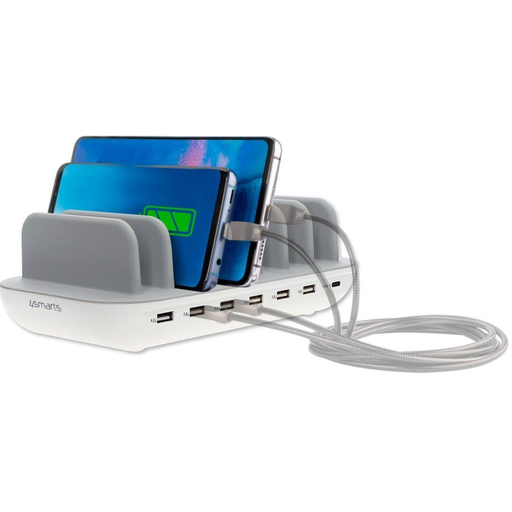
4smarts Charging Station Office 60W White
A desk-friendly option if you want to connect several devices via USB at the same time. Check which type of connection your camera or battery charger requires.
The product information lists six USB-A ports, one USB-C port and up to 60 W total output.
View at Joybuy
 No image available
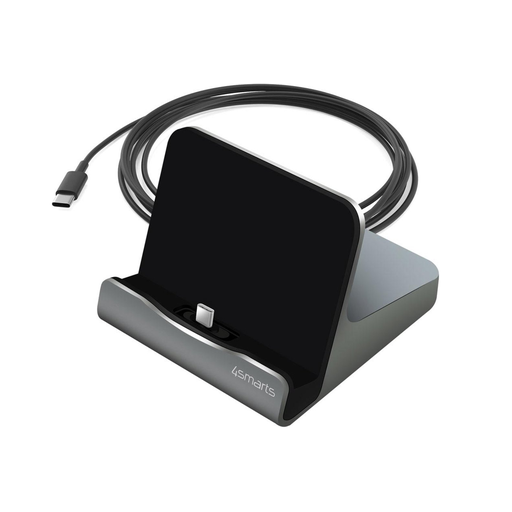
4smarts Charging Station VoltDock Tablet USB-C 60W gunmetal
Worth considering if you want a USB-C charging point with a stand for a connected device on your desk. Check your camera’s charging requirements separately.
The product information lists USB-C charging up to 60 W, data transfer up to 480 Mbps and a stand.
View at Joybuy
 No image available
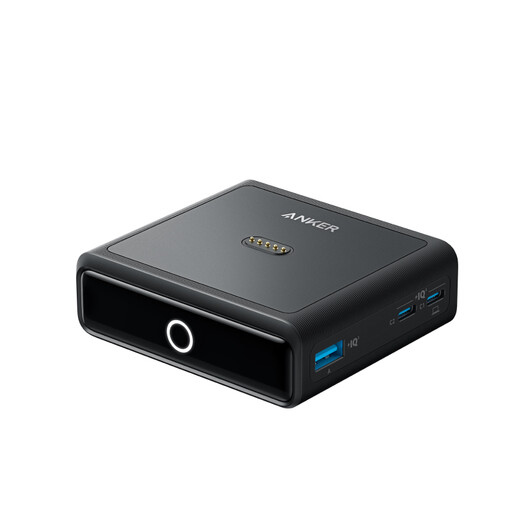
Anker Charging Station for Anker Prime Power Bank, 100W, 4 Ports
An option to compare if you want to connect several devices at your desk. Check that the ports and charging method are right for your camera.
The product title mentions four ports and 100 W. The Anker Prime Power Bank is sold separately.
View at Joybuy
Frequently asked questions
Can I plug any camera battery straight into a USB port?
No. First check whether your camera model can charge its installed battery via USB. For a removable battery, you’ll need a charger that supports its battery code. Sony specifies the BC-ZD1 for NP-FZ100 batteries.
What should I check if charging via the camera doesn’t start?
Check your camera manual, the correct charging port, cable and power supply. For the cameras covered by its support article, Sony also recommends checking that the camera is switched off and the charge light is on. Don’t apply this advice to every camera model without checking its manual.
How can I set up a safe charging area at my desk?
Follow the instructions and leave the charger unobstructed so heat can escape. Don’t use damaged cables. The fire service recommends charging devices with batteries in a room with a working smoke alarm.
In the Netherlands, am I only entitled to the stated manufacturer’s warranty?
No. Your statutory consumer rights are in addition to a commercial manufacturer’s warranty. The Dutch government states that the Netherlands has no fixed statutory warranty period. Contact the retailer if a product is faulty.
Is CE marking required for a mains-powered charger in the Netherlands?
For electrical products covered by the applicable requirements, the Netherlands Food and Consumer Product Safety Authority (NVWA) states that CE marking is mandatory. Check the product information for the specific charger. The requirements that apply depend on the product and its scope.


