First, check the battery code and your camera’s manual: having a USB port doesn’t prove that the battery can be charged in that camera. Charge it in the camera if your combination supports this and you don’t need a spare battery out of the camera. Choose a separate charger if you want to keep the camera free, and a dual charger only if you have two compatible batteries. Canon Netherlands specifies USB-PD charging for the LP-E6NH only with compatible EOS bodies. Also check the required power supply, what’s included and that you have a clear, safe place to charge.
Who should consider these charging options?
Student looking for a replacement charger
You want to charge a camera battery you already own, so the main things to check are the exact battery code, charging method and USB power supply. Canon Netherlands and Nikon Netherlands explain that charging options depend on the battery and, for in-camera charging, the camera body.
Student with two camera batteries
You want to charge one battery outside the camera while keeping another ready to use. A dual charger is only worthwhile if both batteries are compatible with it. Fujifilm X Netherlands and Sony Netherlands each list a dual charger for specific battery types.
Student with limited safe charging space
You want to make use of the USB equipment you already have while setting up a clear charging spot where heat can dissipate. The Netherlands Fire Service advises having a working smoke alarm in the room and keeping the charger unobstructed; the Twente Fire Service recommends using a hard surface.
What should you look for in a USB charger for camera batteries?
Charging in the camera
Choose this if: your camera’s manual confirms that your body can charge your battery via USB, and you don’t need to charge a spare battery outside the camera.
The trade-off: you can’t use the camera while it’s charging. Canon Netherlands lists this charging method for the LP-E6NH only with compatible EOS bodies that support USB-PD.
Separate charger with one charging slot
Choose this if: you want to charge one removable battery outside the camera and the charger supports your full battery code.
The trade-off: a USB-C connection alone doesn’t tell you whether the power supply is suitable. Nikon Netherlands specifies that the MH-34 is for EN-EL15b and EN-EL15c batteries.
Separate dual charger
Choose this if: you want to charge two batteries of a supported type at the same time, outside the camera.
The trade-off: check which accessories and power supply you need. Fujifilm X Netherlands lists an adapter and USB-C cable for the BC-W235, while Sony Netherlands specifies a USB-PD power supply of at least 30 W for the stated charging time of the BC-ZD1.
The main things to consider are battery compatibility, a safe place to charge, whether you need to charge two batteries at once, and whether you can use your existing USB power supply.
| What to consider |
What should you check? |
Who is this important for? |
| Battery compatibility |
Read the full battery code and check it against the separate charger’s specifications or your camera body’s manual. |
If I want to avoid choosing a charger that doesn’t fit my battery, compatibility comes first; around 36% of consumers give this concern top priority. |
| Safe place to charge |
Check the battery, cable and charger for damage, and charge in a clear space in a room with a working smoke alarm. |
If space in my student room is limited, I want to place the charger where heat can dissipate; around 29% of consumers put safe charging first. |
| One or two batteries |
Count how many removable batteries you use and check that both slots support your battery type. |
If I use two compatible batteries, I want to be able to charge them outside the camera; around 21% of consumers make this their top priority. |
| Existing USB power supply |
Compare the required USB protocol and power output with your power supply, and check whether the necessary cable and adapter are included. |
If I want to keep using my existing USB power supply, I check the charger’s requirements first; around 14% of consumers put reusing their equipment first. |
Common buying pitfalls
-
Searching only by camera brand or USB-C connector
A charger may be designed for a specific battery code. Matching the brand or connector doesn’t confirm that the battery is compatible.
Note down the full battery code and compare it with the charger’s compatibility information. If you plan to charge in the camera, check the body’s manual too.
-
Looking at the stated charging time without checking the power supply
Sony Netherlands states that the BC-ZD1’s listed charging time for two batteries requires a USB-PD power supply of at least 30 W.
Compare your power supply’s USB protocol and output with the requirements listed for the charger.
-
Assuming the adapter and cable are included
Fujifilm X Netherlands says that the BC-W235 requires an AC adapter and USB-C cable.
Check the box contents and required accessories separately before choosing a model.
-
Charging under bedding or with damaged equipment
The Netherlands Fire Service warns that damaged batteries, cables and chargers can pose risks, and advises keeping the charger clear so heat can dissipate.
Don’t use damaged equipment, and charge in a clear space in a room with a working smoke alarm. The Twente Fire Service recommends using a hard surface.
Camera battery brands to consider
Canon
Worth considering if you have a compatible EOS body that can charge an LP-E6NH battery via USB-PD.
- Canon Netherlands confirms that LP-E6NH batteries can be charged via USB-PD in compatible camera bodies.
- This information doesn’t automatically apply to every EOS body; check the manual for your model.
Nikon
The MH-34 is a separate charger powered via USB-C for EN-EL15b and EN-EL15c batteries.
- Nikon Netherlands lists the supported battery codes and USB-C power supply.
- The stated compatibility doesn’t confirm that it works with other Nikon batteries.
Sony
The BC-ZD1 is a dual charger for owners of NP-FZ100 batteries.
- Sony Netherlands lists two charging slots.
- Sony’s stated charging time requires a USB-PD power supply of at least 30 W; this is a manufacturer specification for that combination.
Fujifilm
The BC-W235 is designed to charge two NP-W235 batteries via USB-C power.
- Fujifilm X Netherlands says the charger can charge two compatible batteries at the same time.
- Fujifilm says an adapter and USB-C cable are required; this information doesn’t cover other battery types.
Jupio
The range includes the JSC0020, with a USB-C-PD input, and separate Tri-Charge versions for different battery types.
- Jupio lists different versions for different battery types.
- Check the specific version, battery compatibility and usage restrictions in Jupio’s own product information.
Joybuy picks for Sony NP-FZ100 batteries
This product pick is for anyone who wants to charge Sony NP-FZ100 batteries with a charging station.
 No image available
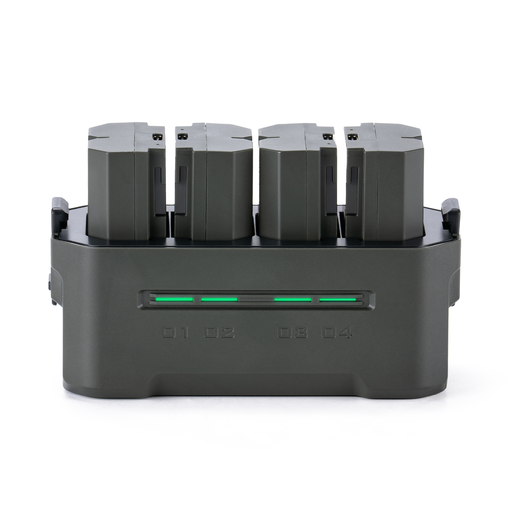
TILTA Portable Charging Station for Sony NP-FZ100 (4 Channel), Green (TBC-FZ100-GN)
The product title specifies Sony NP-FZ100 batteries; check that your battery has exactly this code.
The product description lists four charging channels, a charging status display and a USB-C output. The charging station is described as capable of charging up to four batteries at once.
View at Joybuy
Frequently asked questions
Can any camera with a USB-C port charge its battery?
No. Don’t assume it can just because it has the right port. Check whether your camera body can charge your battery type via USB, and find out which protocol or power output is required. Canon Netherlands specifies that the LP-E6NH can be charged in compatible EOS bodies with USB-PD.
How can I set up a charging spot in my student room?
Don’t use a damaged battery, cable or charger. Place the charger on a hard surface with clear space around it so heat can dissipate. The Netherlands Fire Service advises charging in a room with a working smoke alarm; the Twente Fire Service recommends charging when you’re nearby if possible.
Is a CE mark enough to confirm that a USB camera charger is compatible?
No. The Netherlands Food and Consumer Product Safety Authority advises online shoppers to check things such as the CE mark and seller information, but a mark doesn’t confirm that the charger is compatible with your battery code. Check compatibility separately.
Does the USB-C rule make existing camera batteries compatible with any USB-C charger?
No. The Dutch government described a common USB-C port for new devices from 28 December 2024, but this doesn’t automatically make existing camera batteries or separate chargers compatible with one another. You still need to check the battery code, the manual and the required power supply.


