
Vandaag of morgen in huis

Kwaliteit gegarandeerd

Welkomstaanbiedingen ontgrendelen: GRATIS bezorging | Tot 80% korting | Gratis 30 dagen JoyPlus-proefperiode
Download de app
A USB-C external SSD is handy for backups, photos, videos, games and expanding the storage of a laptop or smartphone. Even so, choosing the right one isn’t as simple as picking a capacity and a headline speed from the product title. The wrong connector, insufficient space or a fragile enclosure can leave you disappointed in real-world use.
In this guide, you’ll learn what to look for in a portable SSD, when a USB-C external hard drive makes more sense, and which models suit different usage scenarios.
A USB-C connector only tells you the shape of the plug. Actual speed depends on the USB version of both the storage and your laptop, phone, tablet or games console.
An SSD with USB 3.2 Gen 2x2 can, according to the product specification, offer read and write speeds of up to around 2,000 MB/s. If your laptop only supports USB 3.2 Gen 2, practical transfer speeds will be lower. Cable quality, file size and heat build-up also play a role.
A 1TB external SSD or 2TB external SSD gives you space, but it doesn’t automatically protect files from loss. If the only copy lives on that drive and it’s lost or damaged, you could lose your data. For important photos, work files and admin, always keep at least one extra backup stored elsewhere or in a cloud service.
An IP rating or drop resistance applies under specific conditions. For the Samsung T7 Shield, IP65 means, according to the product information, protection against dust and temporary exposure to water jets; immersion is not advised. A quoted drop height is also not a guarantee against damage from every impact. A protective case and safely ejecting the drive remain wise.
First check which port your device actually has. In addition to USB-C, look for the stated standard:
Also check whether the box includes a USB-C-to-C cable and, if applicable, a USB-C-to-A cable. That prevents you from having to buy an extra cable or adapter later.
An NVMe SSD uses flash memory and has no moving parts. As a result, a portable SSD is typically light, quiet and ideal for fast transfers. This is practical for home workers, photographers, video makers and gamers who regularly move large files.
A USB-C external hard drive, such as the WD Elements Portable, often offers more capacity at a lower price per terabyte. A 4TB, 5TB or even 6TB external storage model is suitable for archives and periodic backups. However, an HDD is more sensitive to shocks during use and generally slower than an SSD.
Use this guideline as a starting point:
Allow for future growth. A drive that’s just big enough today can quickly feel cramped as you add more videos, RAW photos or games.
The selection below is based on the stated connectors, capacities, speeds and protection features. Manufacturer claims about speed and protection are shown as product specifications from the manufacturer; actual performance can vary by device and usage.
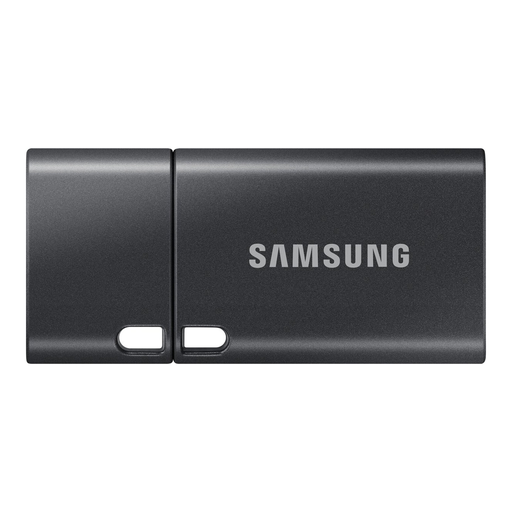
Why this fits the profile: For documents, photos and files on the move, this compact USB-C flash drive offers 512GB of storage without a separate cable.
The stated read speed of up to 400 MB/s is clearer than generic claims of “high speed”. Do check that your device supports USB-C.
512GB capacity, USB 3.2 Gen 1 Type-C and a compact design for laptops, tablets, smartphones and cameras.
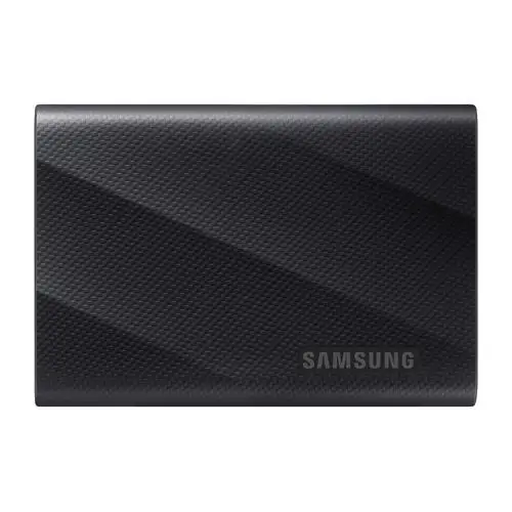
Why this fits the profile: Suitable for professionals and video makers who combine lots of space with fast data transfer.
The product information states 4TB, NVMe, USB 3.2 Gen 2x2 and hardware encryption. Check beforehand whether your computer supports Gen 2x2.
Quoted read and write speeds up to 2,000 MB/s, 4TB capacity, password protection and USB-C-to-C and USB-C-to-A cables.

Why this fits the profile: A practical choice for photographers, home workers and travellers who want to combine speed with extra protection.
The IP65 rating and quoted drop resistance up to 3 metres are more concrete than a generic term like “rugged”. Water resistance does not mean you can submerge the drive.
1TB storage, USB 3.2 Gen 2, NVMe technology, quoted read/write speeds of 1,050/1,000 MB/s and compatibility with PC, Mac, Android and consoles.
We’ve compiled a complete, up-to-date list of products that fully meet these strict selection criteria and current European safety regulations.
Only format the drive when you’re sure the files are stored elsewhere. exFAT is often practical when you want to use files between Windows and macOS, but check the requirements of your camera, smartphone or console.
Always disconnect storage via the safely eject function. If you pull the cable out during a transfer, files can become corrupted. Keep the drive dry, avoid extreme temperatures and make a second backup regularly.
Usually yes for reading and writing files, because an SSD uses flash memory. A HDD can, however, be more attractive if you mainly need many terabytes for archiving and want the lowest purchase price per gigabyte.
Not automatically. The connector can look the same while the USB version differs. So check the support of your device, cable and operating system. With USB 3.2 Gen 2x2, a compatible host port is required to approach the quoted speed.
Lifespan depends on usage, heat, write workload and storage conditions. An SSD isn’t immune to failure or data loss. Don’t use the drive as your only backup and keep important files in at least one additional location.
