Who is this for?

Recordists using different cards

If you use SD and microSD cards in different recording devices, check which slots the reader has first. Sitecom lists the slots on its MD-1011 and MD-1108; Zoom’s card information applies specifically to the H5studio.

Recordists copying files to a phone

If you want to open and copy recordings without a laptop, check the connection, storage format and access through the Files app. Apple explains the requirements for using external storage with an iPhone.

Travellers with limited workspace

The reader’s design can make a difference on a train table: a compact plug-in reader, a model with a short cable or a hub with extra ports each needs a different setup.

What should you look for when buying?

Compact USB-C reader

Choose this if: you switch between SD and microSD cards and want to carry as few separate items as possible.

Bear in mind: a reader that plugs straight into the port can be awkward in a cramped space. Also check the clearance around the port and your phone case.

Reader with a short cable

Choose this if: you want to place the reader next to your device rather than plug it straight into the port.

Bear in mind: you’ll also need to carry a cable and a separate reader. Sitecom lists a 15 cm cable for the MD-1108.

USB-C hub with card reader

Choose this if: you need other ports or pass-through power as well as access to your card.

Bear in mind: a hub takes up more room than a standalone reader. Check that the features you want will work with your device.

Connect the recorder directly via USB

Consider this if: the manual for your specific recorder confirms that you can transfer files via USB to your device.

Bear in mind: you’ll need to connect and carry the recorder itself. The Zoom H5studio manual mentions this option, but that doesn’t mean it’s available on other models.

What to consider What should you check? Who should consider this?
Will the card fit? Compare your recorder’s card format with the SD and microSD slots listed for the reader. A matching slot alone doesn’t prove that every card will work. If I don’t want to have to look for another reader or adapter while travelling, I check that my recording card fits directly first. Around 36% of consumers prioritise card compatibility.
Can the device open the files? Check the USB-C connection, support from the receiving device and the storage format. For external storage on an iPhone, Apple specifies a single data partition and supported formats, including exFAT and FAT32. If I’m copying to a phone or tablet without a laptop, I want to be able to open the card on that device too. Around 29% of consumers prioritise compatibility with the receiving device.
Will the reader fit on your seat? Consider the clearance around the port and the reader’s design. Sitecom lists a 15 cm cable for the MD-1108; a hub adds connections but is larger than a standalone card reader. On a cramped train table, I want to position the reader without carrying connections I don’t need. Around 21% of consumers prioritise their workspace.
Does the stated speed matter? Compare the card interface with the capabilities of the receiving device. Sitecom lists up to 104 MB/s for the MD-1011 and MD-1108; this isn’t a measured speed for your file transfer. If I want to reduce waiting time, I look at the whole combination of card, reader and device rather than relying on a single speed claim. Around 14% of consumers prioritise transfer speed.

Common buying mistakes

  • Focusing only on USB-C

    The connection might fit, but the card itself may not fit in the available slot. For example, the Zoom H5studio uses microSD cards, so check the card format for your own recorder model.

    Read your recorder’s manual and compare it with the reader’s full slot specifications before ordering.

    If the card doesn’t fit directly, you may need a different reader or a separate adapter.

  • Assuming the maximum speed is the copy speed

    Actual transfer speed also depends on the card and receiving device. A product specification isn’t a real-world test with your files.

    Compare the card’s interface with those of the reader and device, and don’t treat a stated maximum as a guarantee for your file transfer.

  • Choosing a hub when you only need to read a card

    A hub can provide extra ports, but it also adds bulk and connections to your travel kit.

    Choose a hub if you genuinely need those extra features. Otherwise, start by looking for a standalone reader that suits your card and device.

    Unused ports can take up unnecessary space in your bag and on the train table.

Brands to consider

Sitecom

Sitecom describes the MD-1011 as a plug-in reader and the MD-1108 as a model with a short cable. Both have SD and microSD slots.

  • The manufacturer lists speeds of up to 104 MB/s for both models and specifies a 15 cm cable for the MD-1108.
  • These are product specifications, not measured copy speeds or confirmation that the readers are compatible with every phone.

UGREEN

The USB-C/USB-A reader 50706 combines SD and microSD slots for use with different receiving devices.

  • UGREEN lists simultaneous use of two cards and support for the specified card types up to 2 TB.
  • Speed and durability claims come from the manufacturer and don’t confirm real-world speeds with your recorder.

Anker

According to Anker’s product support, the USB-C 2-in-1 Card Reader A8370 has one SD slot and one microSD slot.

  • Anker specifies UHS-I slots and describes this model as having a compact connection.
  • Whether it will fit alongside other connections or with a phone case hasn’t been established for your setup. Check the clearance around the port.

Belkin

According to the manufacturer, Belkin’s Connect 7-in-1 hub combines SD and microSD slots with other connections and pass-through power.

  • A hub can combine card access with extra connections when you need them at your workspace.
  • This is a hub, not a standalone card reader of similar compact size. Belkin says it no longer makes standalone memory card readers.

Products on Joybuy

This selection includes USB-C card readers and hubs with SD, microSD or TF card reading. Check which card format your recorder uses and whether the reader works with your receiving device.
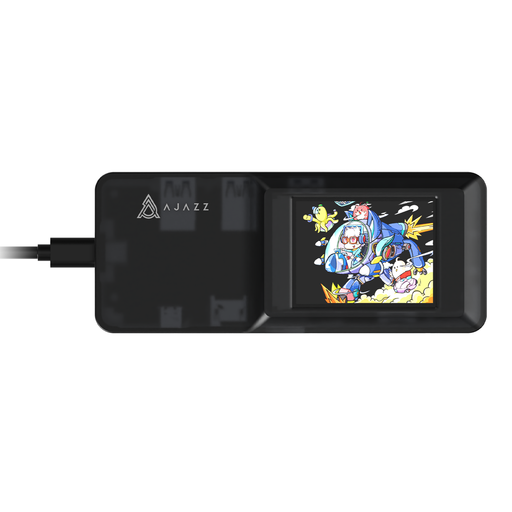
AJAZZ AKP01E 8-in-1 USB-C hub

AJAZZ AKP01E 8-in-1 USB-C hub

An option if you want to combine card reading with extra connections.

The product specifications list SD and TF card slots and a USB-C connection. The SD and TF slots can’t be used at the same time.

Joybuy

Kingston Technology Workflow Dual-Slot SDHC/SDXC UHS-II Card Reader

Kingston Technology Workflow Dual-Slot SDHC/SDXC UHS-II Card Reader

An option if your recorder uses an SD, SDHC or SDXC card and you want to connect via USB-C.

The product information lists USB 3.2 Gen 1, UHS-II and an included USB-C cable. Don’t remove the reader during file transfers.

Joybuy
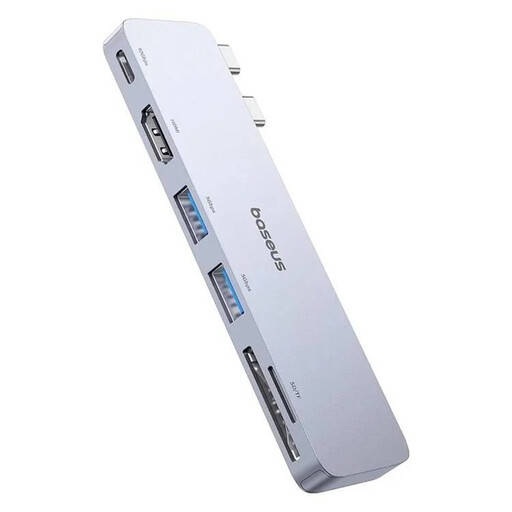
BASEUS Ultra Joy 6-in-1 USB-C hub, 100W

BASEUS Ultra Joy 6-in-1 USB-C hub, 100W

An option if you need other hub connections as well as a card reader.

The product information lists SD and microSD card reading, USB and HDMI ports, and a USB-C connection. Disconnect external devices before unplugging the hub.

Joybuy

Verbatim CMH-13 13-port USB Type-C hub

Verbatim CMH-13 13-port USB Type-C hub

An option if you want to combine SD and microSD card reading with multiple connections.

The product information lists thirteen ports, including SD and microSD slots and USB connections.

Joybuy

Frequently asked questions

Do I need an SD or microSD reader for my field recorder?

It depends on the exact recorder model and the card it uses. Zoom specifies microSDHC and microSDXC cards for the H5studio; this information applies specifically to that model. Then check that the reader has the matching slot.

Why doesn’t my recorder card appear on my iPhone?

First, check that the reader is connected using a suitable connection, then look under ‘Locations’ in Files. For external storage, Apple specifies a single data partition and supported formats, including exFAT and FAT32. Don’t start by formatting a card containing recordings you want to keep; check its existing format first.

How do I disconnect the reader after copying?

First, check that the copy is complete and that the file opens on the destination device. For an iPhone, Apple explains how to remove the connected reader from the charging port. On other devices, follow their instructions for safely removing it.

Who can I contact in the Netherlands if the card reader isn’t working properly?

Contact the seller. According to the Dutch government, the Netherlands has no fixed statutory guarantee period: what you can expect in terms of a product’s lifespan depends on the product and the circumstances. A manufacturer’s warranty is in addition to your statutory rights and doesn’t replace them.

Does a card reader make it legal to copy recorded voices?

No, not by itself. The Dutch Data Protection Authority states that organisations processing personal data need a lawful basis under the GDPR; consent is one possible basis, but not automatically the only one. Whether those rules apply to a particular recording and its use depends on the circumstances, not on the type of card reader.
