
Trail camera user with one card format
Wants to view footage at the camera and is mainly looking for a suitable SD or microSD slot. The card format must match the card in the camera.


Start with a card reader that has a slot to match your trail camera’s SD or microSD card. Then check that your phone, tablet or laptop can read USB storage. If you’re using it away from a mains socket, a USB-powered reader draws power from the connected device, so make sure you have enough battery charge. Extra card formats or USB-A can be useful if you switch between devices, while UHS-II is mainly relevant when both your card and reader support it.
Wants to view footage at the camera and is mainly looking for a suitable SD or microSD slot. The card format must match the card in the camera.
Wants to open or copy footage on a USB-C phone without a computer or mains power. Check both the connection and whether the device can access USB storage.
Switches between SD and microSD cards, or between USB-C and USB-A devices. In that case, a reader with multiple slots or connections may be more practical than one designed for a single card format.
First, check the card format and whether your device can access files. Then consider whether extra connections or support for a higher card speed class would be useful for the way you use it.
| What to consider | What to look for when buying | Who is this important for? |
|---|---|---|
| Suitable card slot | Check whether your camera uses an SD or microSD card and whether the reader supports the correct card standard. | If you want to read footage directly from the camera card, it needs to fit physically in the reader. Around 40% of consumers prioritise the correct card format. |
| Access on your device | Check the USB-C connection and whether your phone, tablet or computer can open connected USB storage. | If you want to open footage on your phone or tablet while you’re out and about, the device needs to recognise the card reader and files. Around 30% of consumers prioritise access on a mobile device. |
| Multiple cards and connections | Check whether the model supports both SD and microSD and has the USB connections you use. | If you switch between cameras or devices, you may prefer to carry one reader that works with those cards and ports. Around 20% of consumers value this flexibility most. |
| Transfer speed | Match the card standard to the reader and connected device. A stated maximum speed does not automatically mean your setup will reach that speed. | If you’re working with large files, you’ll want to know whether both your card and device support the higher standard. Otherwise, a faster reader may not offer a practical benefit. Around 10% of consumers prioritise speed. |
A microSD reader, such as the Kingston MobileLite Duo 3C, does not have a direct slot for a full-size SD card.
Check the card in your trail camera before choosing a reader for a single card format.
If your card doesn’t fit the slot, you may need a different reader or a suitable adapter.
A matching plug doesn’t prove that your phone can access USB storage. Also, without a mains socket, a USB-powered reader draws power from the connected device.
Test your device, reader and camera card together before heading somewhere remote.
A UHS-II reader can work with UHS-I cards, but it won’t make them faster. The manufacturer’s speed claims don’t guarantee the transfer speed you’ll get with your card and device.
Choose a reader to match the standards supported by your card and connected device, rather than relying on the highest figure in the product information.
The SPYPOINT LINK-DARK manual warns that removing a card while the camera is active may result in recordings being lost or damaged. This instruction applies to the models mentioned.
Follow the power-off and card-handling instructions for your own camera, and check that copied files are safe before deleting anything.
Hama describes model 00200131 as a USB-C card reader for SD and microSD.
According to UGREEN, model 50706 combines SD and microSD support with USB-C and USB-A.
The Kingston MobileLite Duo 3C is designed for microSD users who want to be able to use USB-C and USB-A.
Lexar describes the Professional USB-C Dual-Slot Reader as a reader for SD and microSD cards with UHS-II, connected to a USB-C computer.
The Extreme PRO SD UHS-II USB-C Reader/Writer is designed for use with SD cards.
These products combine a USB-C hub or adapter with SD or microSD card capabilities. Before choosing one, check that the exact version is compatible with your trail camera’s card and the device you want to use to view the footage.
 No image available
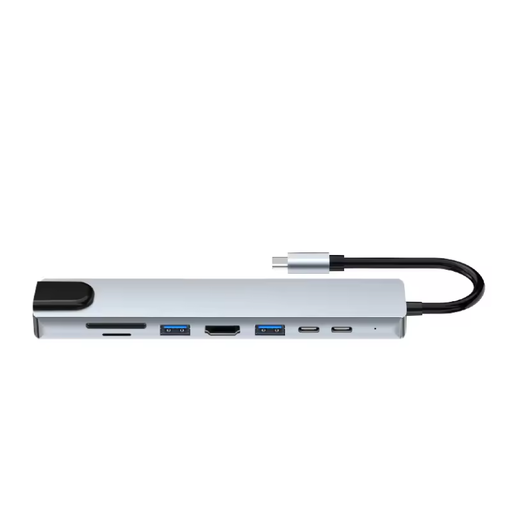
An option to consider if you’re looking for a USB-C hub with an SD and TF card reader. Check that it supports your trail camera’s card format.
The product name also lists HDMI 4K@30Hz, 100W PD charging and 3 USB 3.0 ports with 5Gbps.
 No image available
Worth considering if you want to read both SD and microSD cards. Also check that it works with your phone, tablet or computer.
The product name lists SD and microSD, 3 USB 3.0 ports and a USB-C charging function.
 No image available
This hub is only suitable for reading trail camera footage if the version you choose supports the required card reader function and card format.
The product name lists 10000 Mbit/s and the colour silver. Before use, check that your card and device work with this version.
Yes, if your phone can access connected USB storage and the card reader is compatible. Files by Google explains how to access USB storage on devices running Android 7.0 or later. A reader powered via USB will draw power from your phone, so test the setup beforehand and make sure you have enough battery charge.
Unlock your device before using a storage accessory. If an accessory isn’t recognised, Apple recommends disconnecting it, unlocking your device and reconnecting it. Also check your device’s connection and compatibility.
Follow the instructions for your camera model. The SPYPOINT LINK-DARK manual says to switch off the camera before inserting or removing the memory card to prevent loss or damage. This instruction applies specifically to that model.
For online consumer purchases in the Netherlands, you generally have a statutory 14-day cooling-off period from delivery, subject to legal exceptions. ACM ConsuWijzer also explains that the seller is responsible for the statutory guarantee if, under normal use, the product doesn’t do what you could reasonably expect. These statutory rights are separate from any manufacturer’s guarantee.
Don’t assume you have unrestricted permission to share footage. The Dutch Data Protection Authority distinguishes between cameras used at home solely for household purposes and situations such as filming public areas for security, where the GDPR does apply. For a trail camera in another location, the assessment depends on factors including where it is, why it is being used and what it captures. This guidance does not give general permission to share footage.