Choose a card reader with a slot that fits your recorder’s card and a connection that works with the device you want to use to open your recordings. A compact SD and microSD reader gives you a choice of two card formats. A UHS-II reader is mainly relevant if your card also supports that mode, while a hub is only useful if you need extra ports. Copy the files, check them on the device you’re transferring them to, and follow the instructions for safely disconnecting the reader and removing the recorder card.
Who is this for?
Recordists who switch between SD cards
Check whether your recorder uses SD or microSD, then choose a reader with the right slot. If you use both formats, a dual-slot model may be handy. The Zoom H1essential manual specifies microSDHC and microSDXC cards; this won’t necessarily apply to other recorders. (ZOOM CORPORATION; Baseus Polska; UGREEN NL)
Recordists who copy files to a phone
If you’re not taking a laptop with you, check your phone’s connection and whether it supports external storage. Apple explains how to access connected storage through Files on compatible devices. Also check whether you can open your audio files there. (Apple Support)
Recordists who want to check a copy first
If you want to wait until your files have been transferred before using the memory card again, open the copy on the destination device before disconnecting the card. Follow the instructions for your operating system and recorder. (Microsoft Support; ZOOM CORPORATION)
What to consider when choosing
Start with your recorder’s card format. Then check that your destination device can open the files, and only then choose between a compact reader and a hub.
| What to consider |
What should you check? |
Who is this important for? |
| The right card slot |
Check your recorder’s manual to see whether it uses SD or microSD, then compare this with the slots on the reader. |
If I want to copy files quickly in a café, I don’t want to find out that my card won’t fit the reader. Around 36% of consumers are mainly looking for the right card slot. |
| Opening files on the destination device |
Check the connection, support for external storage and file format; look for audio files in a file app. |
If I’m only taking my phone, I need to be able to find and open the recording on it. Around 29% of consumers prioritise access to files on the destination device. |
| Being able to check a copy |
Copy the files, open them at the destination, then follow the system’s instructions for ejecting the device and your recorder’s instructions. |
If the recording is important, I want to check the copy before using the card again. This is the top priority for around 21% of consumers. |
| Speed, format and extra ports |
Compare the UHS support of both the card and reader, and decide whether you need other ports while copying. |
If I also want to connect other devices, a hub could be useful; if I only need a card reader, the extra bulk may be unnecessary. Around 14% of consumers prioritise speed or extra connections. |
Common buying mistakes
-
Only checking the USB-C connection
A matching plug won’t help if the reader doesn’t have a slot for the card in your recorder. The Zoom H1essential manual specifies microSD; the SanDisk QuickFlow models reviewed are separate SD and microSD readers. (ZOOM CORPORATION; SanDisk)
First check your recorder’s card format, then make sure it matches the slot on the exact reader you’re considering.
-
Assuming the interface speed guarantees copy speed
A stated USB speed isn’t the same as the speed at which your card copies audio files. USB-IF gives 5 Gbps as the signalling rate for USB 3.2 Gen 1; a UHS-II reader also won’t provide UHS-II transfer speeds with a UHS-I card alone. (USB Implementers Forum; SanDisk)
Compare the specifications of the card, reader and connection, and don’t treat maximum speeds as a measured transfer time for your recordings.
-
Confusing a similarly named Baseus version with the USB-C model
The Baseus Lite Series WKQX060113 is described as having USB-A and USB-C. A separate Joybuy listing, WKQX060013, specifies USB-A. (Baseus Polska; Joybuy Netherlands)
Check the full model number and listed connections, not just the series name.
-
Removing the card as soon as the copy seems complete
A transfer-complete notification doesn’t confirm that the files you need are at the destination. Microsoft advises safely ejecting removable storage in Windows before disconnecting it; the Zoom H1essential manual says to switch off the recorder before removing the card. (Microsoft Support; ZOOM CORPORATION)
Check the copied files, then follow the instructions for your system and recorder.
Brands to consider
UGREEN
Compact card readers with SD and microSD slots and USB-C or USB-A connections, depending on the model.
- UGREEN NL lists two slots that can be read simultaneously for model 50706, with speeds of up to 104 MB/s when used with a UHS-I card.
- This is a stated maximum, not a measured copy speed for recorder recordings. Check the specifications for the exact version.
Baseus
Baseus describes the Lite Series WKQX060113 as having USB-A and USB-C, with slots for SD and TF/microSD cards.
- Baseus says the WKQX060113 can read both cards simultaneously.
- Don’t confuse this model with the WKQX060013: the Joybuy listing reviewed for that model specifies USB-A. Check the full model number and connections. (Joybuy Netherlands)
SanDisk
The QuickFlow USB-C range includes separate models for SD and microSD.
- SanDisk lists UHS-I and UHS-II support for the relevant SD and microSD versions.
- Choose the version that matches your recorder’s card format. UHS-II support on the reader doesn’t mean a UHS-I card will run at UHS-II speeds.
Anker
Anker describes the A8370 as a compact USB-C 2-in-1 reader for SD and microSD.
- According to Anker, the model has an SD slot and a microSD slot.
- Check whether your phone or other destination device supports the reader; the stated connection compatibility is a product claim made by Anker.
Belkin
The CONNECT 7-in-1 USB-C Hub AVC009 combines card readers with other connections.
- Belkin Netherlands lists SD, microSD, USB-A, audio, HDMI and passthrough charging up to 100 W.
- The stated USB data speed of 5 Gbps isn’t a measured SD card transfer speed. A hub is most useful if you need the extra connections.
Joybuy products
This selection includes card readers and hubs with card readers for transferring recorder recordings.
 No image available
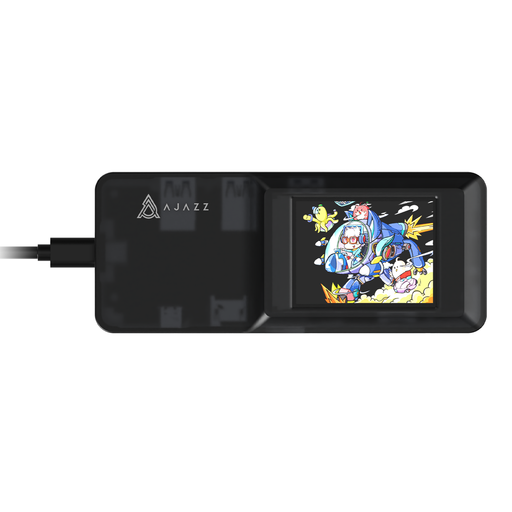
AJAZZ AKP01E Visualization Hub 8-in-1
An option to consider if you’re looking for a hub with extra connections as well as card-reading capability.
The product name specifies USB-C and SD and TF card slots. According to the product description, the two card slots can’t be used simultaneously.
View at Joybuy
 No image available
Kingston Technology USB3.2 Gen1 Workflow Dual-Slot SDHC/SDXC UHS-II Card Reader
A good fit if you’re looking for a dual-slot reader for SDHC or SDXC cards and value UHS-II support.
The product name specifies USB 3.2 Gen 1 and UHS-II. Check that the connection and card mode are compatible with your destination device and memory card.
View at Joybuy
 No image available
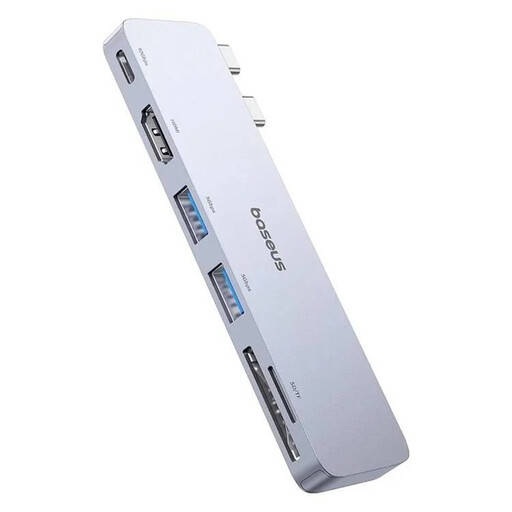
BASEUS Ultra Joy 6-in-1 hub, SD/microSD
A hub to consider if you need other connections while copying files.
The product name specifies an SD/microSD card slot, USB-C, two USB connections and HDMI. Check which connections you want to use at the same time.
View at Joybuy
Frequently asked questions
Can I open recorder recordings as files on an iPhone with USB-C?
You can do this on a compatible iPhone through Files, provided the connection and storage format are supported. Apple also lists a card with a single data partition and a supported format as requirements. Check that your reader and iPhone work together; browsing for audio files is different from importing photos. (Apple Support)
Do I need to format my memory card to copy recordings?
No. Formatting isn’t necessary to copy existing recordings and could delete files. Check your recordings and the copy first. The Zoom H1essential manual covers formatting a card for use in that recorder; this is a separate preparation step. (ZOOM CORPORATION)
How do I disconnect the card reader after copying?
Wait until the transfer is complete and check the files at the destination. Microsoft advises safely ejecting removable storage in Windows before disconnecting it. If you’re using a Zoom H1essential in your card reader workflow, follow the recorder’s manual before removing the microSD card. (Microsoft Support; ZOOM CORPORATION)
What are my rights if a card reader I bought online doesn’t work properly?
According to the Dutch Government, you’re entitled to a product that works properly, and the seller must offer a solution if it doesn’t. For many distance purchases, you have a 14-day cooling-off period, subject to applicable conditions and exceptions. The Netherlands doesn’t have a fixed statutory two-year guarantee for every product. (Dutch Government)


