Start by checking your camera card’s physical size and standard. Then make sure your phone, tablet or laptop can access external storage and open the camera files. A compact reader is designed for accessing cards, while a USB-C and USB-A reader is handy if you switch between devices. Choose a hub if you need other ports too. A faster interface is only useful if the card, reader and receiving device all support it.
Who uses a card reader when travelling?
Viewing footage on a phone while travelling
Wants to view camera footage in a hotel room without a laptop. Check whether your phone recognises external storage and displays the files. Google and Apple explain how to access USB storage or connect a card reader to compatible devices.
Using multiple camera cards
Carries SD and microSD cards or switches between computers. The SD Association describes the different card types, while UGREEN and Sitecom list card readers with USB-C and USB-A connections.
Copying footage while travelling
Wants to copy footage to a personal device and keep the original card until the copy has been checked. Microsoft recommends safely removing storage from Windows before disconnecting it.
What should you look for?
Check in this order: whether the card fits, whether your device can open the files, and whether you really need extra ports or faster transfer speeds as well as card access.
| What to consider |
What should you check? |
Who should pay extra attention? |
| Card size and standard |
Check whether your card is SD or microSD and whether the reader lists the card standard, such as SDHC or SDXC. |
I want to make sure my camera card fits and is recognised. Around 36% of consumers prioritise card compatibility. |
| Access on your device |
Check the connection, access to external storage and whether a test file opens. Google explains how to access USB storage in Files by Google on Android 7.0 and later; test your own phone and camera file too. |
If I’m only taking my phone, I want to be able to access the card and view its images. Around 29% of consumers prioritise access on their own device. |
| A verified copy |
Check the files on the destination device before using the source card again. Microsoft recommends safely removing storage from Windows to reduce the risk of data loss. |
I want to keep my footage without erasing the source card too soon. Around 21% of consumers prioritise having a verified copy. |
| Space, ports and speed |
Choose a compact reader, a cabled model or a hub based on your setup and the ports you need. Compare the card and reader together when considering speed claims. |
If I’m connecting other devices too or copying lots of files, positioning and connections matter. Around 14% of consumers prioritise these practical considerations or transfer speeds. |
Common mistakes
-
Focusing only on USB-C
The connection alone doesn’t tell you whether the reader supports your camera card’s size and standard, or whether your device can open the files.
Check the card itself and compare its size and listed card standard with the reader’s specifications. Test a camera file on the device you’re taking with you.
-
Assuming the stated speed is your guaranteed copy speed
The SD Association describes different card interfaces. A faster interface on the card alone or the reader alone doesn’t guarantee faster transfers from the combination.
Compare the interfaces of both the card and reader, and take the receiving device into account too. Consider speed once you’ve confirmed basic compatibility.
-
Erasing or removing the source card straight away
If the copy turns out to be faulty, you could lose the original files. Microsoft recommends safely removing storage from Windows before disconnecting it.
Open the copied files, keep the source card for now and safely disconnect the reader before using the card again.
Brands to consider
UGREEN
UGREEN describes the 50706 as a card reader with USB-C and USB-A connections and slots for SD and microSD cards, aimed at people who switch between devices or card formats.
- UGREEN says both cards can be read at the same time and that the reader supports UHS-I.
- The stated USB connection speed isn’t a measured transfer speed for a specific camera card.
Anker
Anker describes its USB-C 2-in-1 Card Reader as designed for use with SD and microSD cards via a USB-C connection.
- Anker lists separate SD and microSD slots, both with UHS-I.
- If you need extra ports or explicit UHS-II support, check whether another model is a better match for your equipment.
Sitecom
Sitecom says the MD-1108 combines SD and microSD with USB-C and USB-A via a 15 cm cable. The MD-1011 is a stick-style model for the same card formats.
- The MD-1108’s cable gives you room to place the reader beside your device.
- Sitecom lists a maximum card speed of 104 MB/s for the MD-1108. This is a product specification, not a measured transfer speed for your setup.
Belkin
Belkin describes the AVC009btSGY as a USB-C hub with SD and microSD card reading, for people who need other connections too.
- Belkin lists USB-A and pass-through power, among other features.
- The extra features may be unnecessary if you only want to view camera footage. Check which features your receiving device supports.
Joybuy products
This Joybuy selection includes card readers and USB-C hubs with card reading, for travellers who want to access camera cards and sometimes need other connections too.
 No image available
Verbatim CMH-13 USB Type-C hub, 10,000 Mbit/s, silver
The product information lists SD and microSD card reading and extra connections for this USB-C hub. Check that the card types and ports are compatible with your device. The product title states 10,000 Mbit/s, but this isn’t a measured copy speed for your card combination.
View at Joybuy
 No image available
Acer ODK6V0 7-in-1 USB-C hub
Worth considering if you need other ports as well as card reading. The product title lists HDMI 4K@30Hz, 100W PD, 3x USB 3.0 5Gbps and an SD/TF card reader. Check that these connections and card formats are compatible with your equipment.
View at Joybuy
 No image available
Kingston Technology USB3.2 Gen1 Workflow Dual-Slot SDHC/SDXC UHS-II card reader
This card reader is worth considering if you use SDHC or SDXC cards and want to assess UHS-II support. The product title lists USB3.2 Gen1, Dual-Slot and UHS-II. Check that your card and receiving device support the interface you intend to use.
View at Joybuy
 No image available
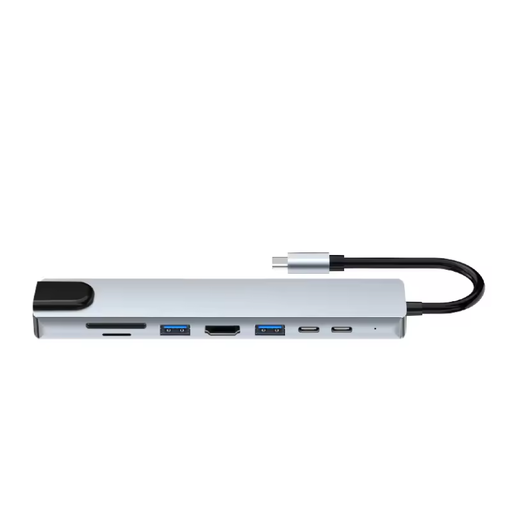
Assortix ProHub 8 USB-C adapter, 8-in-1
This adapter is designed for people who want to combine card reading with extra connections. The product title lists SD and microSD card readers, HDMI, Ethernet, 3x USB 3.0 and a USB-C charging function. Check which ports your device supports.
View at Joybuy
Frequently asked questions
How do I know whether I need an SD or microSD slot?
Check the card that actually comes out of your trail camera and compare its physical size and SDHC or SDXC marking with the reader’s specifications. Don’t rely on the camera description alone.
How do I open the card on my phone?
Connect a compatible card reader and look for the external storage in your file app. Google describes this feature in Files by Google for devices running Android 7.0 or later; Apple explains how to use card readers with the appropriate Lightning or USB-C connection on an iPhone. Check that your camera file opens too.
When can I remove the card after copying?
Only remove the card once copying is complete and you’ve opened the files on the destination device. On Windows, Microsoft recommends safely removing connected storage before disconnecting it.
What are my rights if a card reader bought online turns out to be faulty?
If a card reader is faulty, contact the seller: the Dutch government states that sellers must supply products that are in good working order. For distance purchases, sellers must also tell you about the cancellation period, which is usually 14 days. The specific terms of your purchase still apply.


