Choose a USB-C card reader with a slot that fits your action camera’s card and a connector that works with the device you want to transfer your videos to. A compact microSD reader may be enough if you only use microSD; extra card slots or USB-A are useful if you use other cards or devices too. UHS-II only matters if your card, reader and receiving device all support this interface. Check the copied files before erasing your camera card.
Who is this guide for?
Action camera user with one microSD card
You want to read your action camera’s microSD card on a device with a suitable USB-C port, without needing a standard SD slot. Sandisk describes a USB-C reader for microSD cards, while Apple Support Netherlands explains how to access external storage on an iPhone.
User of multiple cards or devices
You switch between SD and microSD cards, or between devices with USB-C and USB-A. UGREEN and Lexar describe readers that support both card formats; check which connections each model has.
Filmmaker transferring large files
You copy a lot of footage and want to know whether a UHS-II card and reader can use a faster interface together. The SD Association and Lexar explain why the capabilities of the card and system matter.
What should you look for when buying?
Start with your card and the connection on your receiving device. Then check whether extra card slots, ports or UHS-II support would suit the way you use it.
| What to consider |
What should you check? |
Who is this important for? |
| Card and device |
Check the card format, connection, supported card capacity and whether the receiving device can access external storage. |
If I want to read my action camera’s microSD card directly, both the slot and receiving device need to be compatible. Around 36% of consumers prioritise compatibility with their card and device. |
| Lots of video files |
Compare the UHS rating of the card and reader, and also check the capabilities of the USB port and receiving device. |
If I’m copying a lot of footage, I want to know whether my card and the rest of the transfer chain support the interface being used. Around 29% of consumers prioritise large transfers. |
| Multiple cards or connections |
Check that the exact model reads both SD and microSD cards and, if you need them, offers both USB-A and USB-C. |
If I also use standard SD cards or switch between different devices, extra slots or connectors can be useful. Around 21% of consumers prioritise using multiple cards or connections. |
| Phone and file checks |
Check the capabilities of your exact phone and, after copying, open a few files at the destination before erasing the card. |
If I want to copy videos to my phone, I want to be able to open them there before using the source card again. Around 14% of consumers prioritise transferring files to a phone and checking them. |
Buying pitfalls
-
Looking only at the USB-C connector
A connector that fits doesn’t necessarily mean the reader supports your action camera’s card format. You also need to be able to access external storage on a phone.
Check the card, slot, port and receiving device as one complete set-up.
If your card and device aren’t compatible, you may need a different reader or adapter.
-
Assuming the highest quoted speed is your guaranteed copy speed
The SD Association distinguishes between card interface speed and card performance. Lexar notes that maximum read speed depends on the card and system configuration.
Compare the card and reader interfaces, but don’t treat a quoted maximum as a promise of how long it will take to copy your videos.
-
Assuming every version supports large-capacity cards
For model 50706, UGREEN lists a maximum of 512 GB on its Dutch product page and a maximum of 2 TB on its European product page. These figures don’t indicate the same limit.
If you have a card larger than 512 GB, ask for confirmation that the exact version you’re considering supports it.
-
Erasing your camera card as soon as the transfer appears to start
A transfer starting doesn’t prove that the files you need have reached their destination. Apple warns that formatting erases the images on the card.
Wait for the transfer to finish, then check that the videos you need are there and open before erasing or formatting the card.
Brands to consider
SANDISK
Sandisk describes the QuickFlow SDDR-B751-GNANN as a USB-C reader for microSD cards, including those used in action cameras.
- Sandisk lists support for UHS-I and UHS-II microSD cards.
- This model has no listed slot for standard SD cards. Quoted performance isn’t an independent measurement of your copy speed.
UGREEN
UGREEN says model 50706 combines SD and microSD support with USB-C and USB-A; the Revodok Pro 108 is a hub with extra connections.
- The listed connections may suit you if you use different card formats or devices.
- UGREEN lists a maximum of 512 GB for model 50706 on its Dutch page and a maximum of 2 TB on its European page. If you’re using a card larger than 512 GB, confirm support for the exact version.
Lexar
Lexar says the Professional USB-C Dual-Slot Reader is designed for USB-C computers and reads SD and microSD cards.
- Lexar lists UHS-II support, backwards compatibility with UHS-I and a built-in USB-C cable.
- Lexar says the maximum quoted read speed varies according to the card and system configuration. This doesn’t confirm compatibility with a specific phone.
Anker
Anker describes the MagGo A83D1 as a USB-C adapter with SD and microSD slots, designed with iPhone users in mind.
- Anker lists an angled connector and a charging port.
- According to Anker, the charging port is for charging only and not for data devices. Also check that the adapter works with your device.
USB-C hubs and adapters at Joybuy
These product picks focus on USB-C hubs and adapters with microSD card readers; the selection also includes models that list SD support.
 No image available
Acer ODK6V0 7-in-1 USB-C Hub
A good fit if you’re looking for a USB-C hub with a card reader for reading an action camera card.
Listed connections and features: HDMI 4K@30Hz, 100W PD Charging, 3x USB 3.0 5Gbps and SD/TF Card Reader.
View at Joybuy
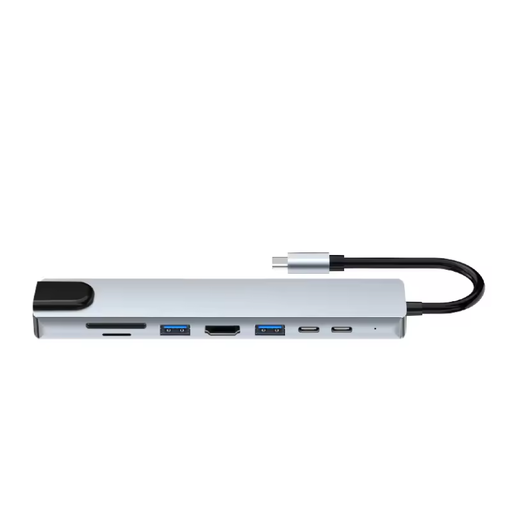 No image available
Assortix ProHub 8 8-in-1 USB-C Adapter
A good fit if you’re looking for a USB-C adapter with microSD and SD card readers.
Listed features: 4K HDMI, Ethernet (RJ45), 3x USB 3.0, SD and MicroSD, and a USB-C Charging Function.
View at Joybuy
 No image available
Verbatim CMH-13 USB Type-C
A good fit if you’re looking for a USB-C hub that supports microSD and SD cards.
Listed specification: 10000 Mbit/s; colour: Silver.
Use certified USB-C cables and adapters, and don’t exceed the stated maximum PD rating of 100 W.
View at Joybuy
Frequently asked questions
Do I need a full-size SD slot for an action camera’s microSD card?
No, not if the reader has a suitable microSD slot. An extra SD slot is useful if you also use standard SD cards; check your camera’s card format.
Can I copy videos straight to my phone?
It depends on your phone, its connection and its support for external storage. Apple Support Netherlands explains how to access connected SD cards through Files on an iPhone; Files by Google explains how to access USB storage on devices running Android 7.0 or later. Also check that the files open in the app you want to use.
When can I erase my camera card?
Wait for the transfer to finish, then check on the receiving device that the video files you need are there and open. Formatting erases the images on the card, so first make sure you have a usable copy.
What if a card reader I bought online isn’t suitable?
Many online purchases in the Netherlands come with a 14-day cooling-off period, according to the Dutch government. You’re also entitled to a product that works properly; if there’s a fault, contact the seller to find a solution. The Dutch government says there is no fixed statutory two-year warranty period for every product in the Netherlands.


