What should you look for?
Start with the card format and how you work on the shared computer. Then check which ports you need, and finally match the card interface to your transfer requirements.
| What to consider |
What should you check? |
Who is this important for? |
| Card format |
Check the card in your recorder or its manual, then compare SD or microSD with the slot on the exact reader model. |
If I want to read cards from different recorders, I first check that each card fits. Around 33% of consumers rank card compatibility as their top priority. |
| Careful copying |
Choose a storage location in advance and check the copy before ejecting the card. |
In a shared workspace, I want to know where recordings are stored and whether others can access them. Around 27% of consumers prioritise careful copying and file handling. |
| Connections |
Check whether your devices need USB-C, USB-A or additional ports. |
If I switch between computers or connect other devices too, I want the right ports close to hand. Around 20% of consumers prioritise connections and switching between devices. |
| Card interface |
Compare the interface used by your card and reader; don’t assume a stated bus speed guarantees a particular file transfer rate. |
If transfer time matters to me, I first check which interface my card uses. Around 20% of consumers prioritise transferring recordings. |
Joybuy card readers and hubs
These Joybuy options are designed for reading cards via USB-C and include hubs and an external DVD drive. Check each version to make sure its card format and connections suit your recorder and the device you’re copying to.
 Image unavailable
Acer ODK6V0 7-in-1 USB-C hub with SD and TF card reader
An option if you want to combine card reading and extra ports in one device.
The product name lists SD and TF card reading, HDMI 4K@30Hz, 100W PD and 3x USB 3.0 5Gbps.
View at Joybuy
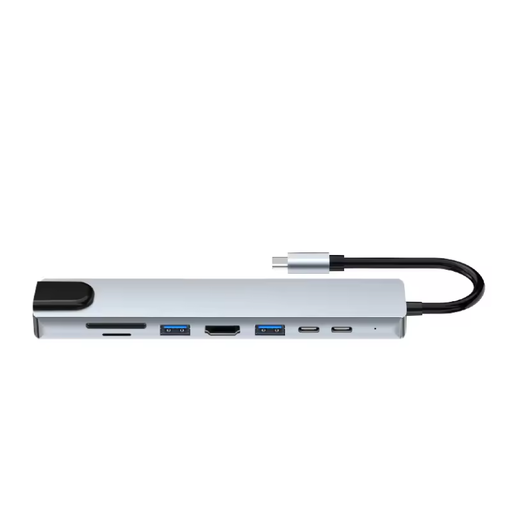 Image unavailable
Assortix ProHub 8 8-in-1 USB-C adapter
This model is worth considering if you’re looking for a USB-C adapter with card reading and additional connections.
The product name lists SD and microSD card reading, HDMI, Ethernet (RJ45), 3x USB 3.0 and a USB-C charging function.
View at Joybuy
 Image unavailable
External DVD drive with SD and TF card reader
This model is worth considering if you’re looking for an external DVD drive as well as a card reader.
The product name lists an SD and TF card reader, along with USB 3.0 and Type-C connections.
View at Joybuy
 Image unavailable
Verbatim CMH-13 USB Type-C hub
This hub is an option if you want to combine card reading with multiple connections.
The product listing specifies SD and microSD card reading and USB Type-C 10000 Mbit/s.
View at Joybuy
Frequently asked questions
Can I read the card from my recorder with any USB-C card reader?
No. First check whether your recorder uses SD or microSD, then choose a reader with the matching slot. Zoom specifies microSD for the F3 and Tascam specifies SD for the DR-07X; those examples don’t automatically apply to other models.
How do I safely remove the card after copying?
First check that the copied files open from your chosen destination, then use your operating system’s eject function. Microsoft recommends safely removing hardware before disconnecting the card or reader.
Does a two-year manufacturer’s warranty cover all my rights?
No. When you buy as a consumer in the Netherlands, your statutory rights apply alongside any manufacturer’s warranty. ACM ConsuWijzer explains that if a product becomes faulty sooner than expected under normal use, the seller must provide an appropriate solution. For online purchases from a business, the Dutch government also states that in many cases you have 14 days to change your mind, although exceptions apply.
Can I leave identifiable conversation recordings on a shared computer?
For organisations that process personal data, the Dutch Data Protection Authority highlights considerations around lawful grounds, security and not keeping data for longer than necessary. Whether a recording contains personal data and what processing is permitted depends on the circumstances; a card reader doesn’t grant permission to do so.


