Choose a reader with a slot for the card in your recorder and a USB-C connection that supports data transfer on your device. A plug-in design keeps cables off your desk, while a short cable can make the card slot easier to reach. Before buying a separate reader, check whether your recorder can transfer files over USB. Zoom confirms that the H1essential can, but this doesn’t automatically apply to other recorders.
Who is this buying guide for?
Recordist looking for card compatibility
You want to know whether the reader works with your recorder’s SD or microSD card, and whether your device can open files over USB-C. Zoom and Tascam provide information about card use for specific recorder models, so check your recorder’s manual.
File copier with limited desk space
You’re choosing between a reader that plugs straight into the USB-C port and one with card slots on a short cable. Which is more convenient depends on the space around the port and where you want to insert the card.
User who transfers files frequently
You want to work out whether a faster option makes sense for your card, reader and computer. The SD Association notes that actual transfer speeds can vary, so a stated maximum doesn’t guarantee a particular copying speed.
What should you look for?
When copying recordings at a small desk, the most important things are the right card slot, a practical position, careful file transfer and a suitable speed. Microsoft recommends safely removing removable storage. For the H1essential, Zoom says to switch off the recorder before removing the microSD card.
| What to consider |
What to look for |
Who is this important for? |
| Card and device compatibility |
Check the card format, the right slot and support for data transfer over USB-C. |
If I want to read the card from my recorder directly on my device, I need to know that the card, slot and connection are compatible. Around 36% of consumers make compatibility their top priority. |
| Positioning on a small desk |
Compare a plug-in design with a short cable, and consider the space around the port and how easy the slots are to reach. |
If the port is hard to reach or close to other plugs, I want to be able to insert the card somewhere more accessible. Around 29% of consumers prioritise positioning. |
| Copying and removing recordings safely |
Check that the files open, safely eject the storage and follow your recorder’s instructions. |
If I want to keep my recordings, I need to check that the copy works before removing the original card. Around 21% of consumers make careful copying their top priority. |
| Transfer speed |
Compare the support offered by the card, reader and computer; don’t treat maximum speeds as guaranteed copying times. |
If I transfer files often, I want to know whether all the components in my setup support the same card interface. Around 14% of consumers put speed at the top of their list. |
Common buying mistakes
-
Focusing only on the USB-C plug
The plug doesn’t tell you whether the reader supports your recorder’s card. Copying files to a mobile device may also depend on support for external storage.
Check the card format, the reader’s slot and your device’s capabilities separately.
-
Mistaking the maximum speed for the copying time
The card and bus connection both affect transfer speeds. So the stated maximum won’t tell you how long your audio files will take to copy.
Compare UHS support across the card, reader and computer. Treat speed ratings as specifications, not as test results for your files.
-
Choosing a hub when you only need to read cards
A hub adds connections you may not need if you’re only copying files from your recorder.
Choose extra ports only if you’ll also use them for other devices or a screen at your workstation.
-
Removing the original card without checking the copy
If the copy is incomplete or unusable, you risk losing your recordings.
Check that the copied files open, safely eject the storage and follow your recorder’s removal instructions before using the original card again.
Brands to compare
Anker
Anker describes the A8370 as a compact USB-C reader with SD and microSD slots, designed for those looking for a plug-in option.
- Anker specifies UHS-I support for both slots.
- Check there’s enough space around the USB-C port and that the card slots remain accessible. This model doesn’t add hub ports.
Sitecom
Sitecom describes the MD-1110 as a reader with SD and microSD slots, a USB-C plug on a 15 cm cable and a USB-A converter.
- The cable gives you more flexibility when positioning the slots on your desk.
- According to Sitecom, overall transfer speed depends on the card and bus; a stated maximum isn’t a real-world test result.
UGREEN
The Dutch manufacturer’s website describes the UGREEN 50706 as having SD and microSD slots, with USB-C and USB-A connections.
- The two plug types can be useful if you use different computers.
- For copying files to a mobile device, UGREEN lists OTG support as a requirement. Check the specifications of the version on offer.
Belkin
Belkin describes the AVC009 as a USB-C hub with SD and microSD slots, for those who need other connections as well as access to their cards.
- The hub combines a card reader with extra ports, including USB-A and HDMI.
- If you only need to copy audio files, a standalone card reader may be a better fit. Check which hub ports your computer supports.
USB-C card readers and hubs at Joybuy
These product picks are USB-C hubs with card readers, for anyone who wants to read recorder cards and may also need other connections. If you only copy audio, the extra hub ports may not be necessary.
 No image available
Acer ODK6V0 7-in-1 USB-C hub
An option if you want to read recorder cards over USB-C and need other connections too. The extra ports may be unnecessary if you only copy audio files.
The product name lists SD and TF card readers, 4K@30Hz HDMI, 100W PD charging and 3x USB 3.0 5Gbps.
View at Joybuy
 No image available
Assortix ProHub 8 8-in-1 USB-C adapter
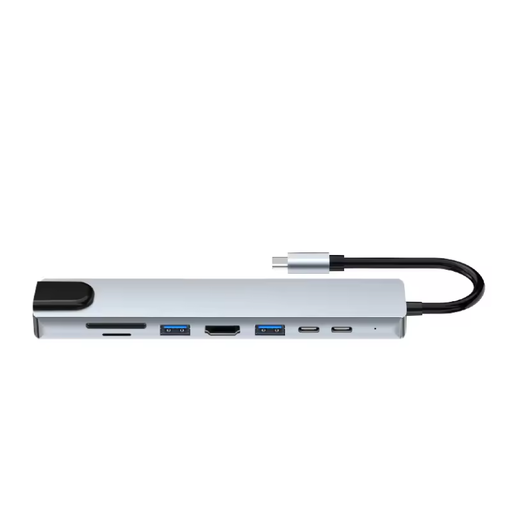
An option if you want to read SD or microSD cards over USB-C and need other ports at the same workstation. The extra connections may be unnecessary if you only copy files from your recorder.
The product name lists 4K HDMI, Ethernet (RJ45), 3x USB 3.0 and SD and MicroSD card readers.
View at Joybuy
 No image available
Verbatim CMH-13 USB Type-C 10000 Mbit/s Silver
This USB-C hub is an option if you want to read recorder cards and may also need other connections. The extra hub ports may be unnecessary if you only copy audio.
The product name lists USB Type-C and 10000 Mbit/s.
View at Joybuy
Frequently asked questions
Do I always need a separate card reader?
No, not if your recorder can transfer files over USB. Zoom confirms that the H1essential can; check your own recorder’s manual, as having a USB-C plug alone doesn’t confirm this.
Can I remove the card straight after copying?
First check that the copied files open, then safely eject the removable storage. Microsoft recommends safe removal to help prevent data loss. Also follow your recorder’s instructions: the Zoom H1essential must be switched off before you remove the microSD card.
Do I need UHS-II for audio recordings?
Not necessarily. The SD Association distinguishes between UHS-I and UHS-II card interfaces, while actual transfer speeds also depend on the card and bus. So check the support offered by the card, reader and computer together before considering a higher stated speed.


