
Photographers with an SD card
You want to import photos from your camera to a laptop and need a suitable SD slot and USB-C connection. ACT and Kingston describe readers with USB-C for SD cards.


Start with a reader that matches your camera’s card format and the port on the device you’re importing to. UHS-II is particularly relevant if you also use UHS-II SD cards. If you need other laptop ports as well, consider a hub and check the card reader’s specifications separately.
You want to import photos from your camera to a laptop and need a suitable SD slot and USB-C connection. ACT and Kingston describe readers with USB-C for SD cards.
You regularly import large batches of photos and want to check whether your card, reader and connection support UHS-II. ACT and Kingston specify UHS-II for certain models; the SD Association describes UHS-II as a bus interface.
You switch between SD and microSD, sometimes import to a phone, or want to use other laptop ports alongside your card reader. Compatibility depends on the specific device and the reader or hub you choose.
First, check the card format and the device you’re importing to. Then compare UHS support and decide whether you need extra ports.
| What to consider | What should you check? | Who is this important for? |
|---|---|---|
| Card format | Compare your camera card’s format with the slots on the exact model. ACT lists SD and microSD for the AC7056; Kingston specifies two SD slots for the Workflow SD Reader. | If I want to connect my camera card without an extra solution, I first check that the reader has the right slot. Around 36% of consumers prioritise compatibility with their card. |
| Connection and importing device | Check the port and importing method on your own device. ACT lists OTG for mobile use of the AC7056; Apple describes importing to an iPhone with a suitable adapter or card reader. | If I want to import photos to my phone or laptop at my desk, I need to know that both the connection and importing method are suitable. Around 29% of consumers prioritise the connection to their importing device. |
| UHS support | Check the UHS mode supported by both your card and your reader. ACT and Kingston list UHS-II for specific models; Anker specifies the A8370’s slots as UHS-I. | If I often transfer large batches of photos, I check the card and reader modes supported without expecting a guaranteed copy time. Around 21% of consumers prioritise transfer time. |
| Extra ports | Decide whether you want to connect other devices at the same time. Belkin lists USB-A, Ethernet and HDMI, among other ports, for the AVC008; check the SD slot’s UHS mode separately. | If I also connect other laptop equipment at my desk, a hub may be more practical than a standalone reader. Around 14% of consumers prioritise extra ports. |
Belkin lists bandwidth for the AVC008, but that specification does not state separately which UHS mode the SD slot supports.
Check the hub’s card specifications separately from its USB connection. Only choose extra ports if you need them.
ACT and Kingston list UHS-II for specific readers, while Anker specifies the A8370’s slots as UHS-I. A UHS-II reader won’t automatically offer an advantage with every card.
Check the UHS mode and format of your own card. Don’t treat a stated interface as a measured copy time for your photos.
A USB-C plug alone doesn’t confirm that your phone is compatible with the importing method you want to use. ACT lists OTG for mobile use of the AC7056; Apple describes importing to an iPhone with a suitable adapter or reader.
Check your device’s specifications, the exact reader model and the app you want to use to import your photos.
ACT lists the AC7054 as discontinued and names the AC7056 as its replacement. Kingston lists the WFS-SD as discontinued; a shop listing alone doesn’t confirm that it’s the same version.
Compare the full model number and version before placing your order.
The AC7056 is a compact USB-C reader for anyone who wants to use both SD and microSD cards.
The Workflow SD Reader is designed for use with two SD cards and a USB-C connection.
The USB-C 2-in-1 Card Reader A8370 combines an SD slot with a microSD slot.
The Connect AVC008 is a multiport adapter for anyone who wants to combine SD imports with other laptop connections.
This selection includes a reader for two SD cards and USB-C hubs or adapters for anyone who wants to combine card imports with other laptop connections. With a hub, check card support and the connection on your own device.
 No image available
A hub to consider if you want to combine card imports with extra connections.
The product name lists SD and TF card readers, HDMI up to 4K at 30 Hz, 100 W PD charging and three 5 Gbps USB 3.0 ports.
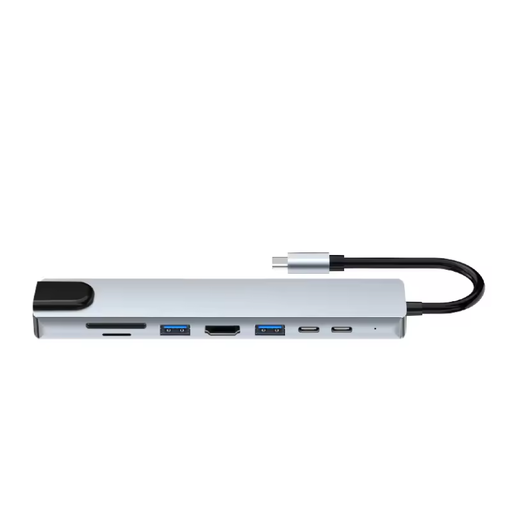 No image available
A hub to consider if you want to use SD or microSD cards and need other laptop connections as well.
The product name lists HDMI, Ethernet, three USB 3.0 ports, SD and microSD, plus a USB-C charging function.
 No image available
A reader to consider if you want to handle two SD cards and need UHS-II support.
The product name lists two SDHC/SDXC slots and UHS-II. Kingston lists part number WFS-SD as discontinued, so check the exact version.
 No image available
An adapter to compare if you want to combine card imports with other laptop connections.
The product name lists a USB Type-C connection. Before buying, check that the card and port support suit your camera and other devices.
No. Check your camera card’s format against the slots on the exact model. ACT lists SD and microSD for the AC7056; Kingston specifies two SD cards for the Workflow SD Reader. Don’t assume this means other card formats are supported.
Apple explains that you can connect a suitable adapter or card reader, insert the SD card and select photos in Photos using ‘Import’. Before you start, check that the connection and reader are suitable for your iPhone; these instructions don’t confirm compatibility with every card reader model.
Wait until copying is complete, then use ‘Safely Remove Hardware’ before disconnecting the reader. Microsoft recommends safely removing removable hardware to prevent data loss.
For a consumer purchase in the Netherlands, the seller is responsible for providing a solution if something goes wrong, according to the Dutch government. For distance sales, you’re also entitled to a 14-day cooling-off period in many cases, although exceptions apply. Check which terms apply to your specific order.
Dispose of discarded electrical equipment separately. According to the Dutch government, when private individuals buy similar equipment, the old-for-new scheme applies; small appliances can also be taken to collection points in certain circumstances without making a new purchase.