
Drone filmer using microSD
You want to copy footage from your drone’s microSD card to a USB-C computer without paying for extra card formats you won’t use. DJI describes a card reader as a way to transfer files from a removable card.


If you’re copying drone footage from a microSD card to a USB-C device, a compact microSD reader may be all you need. Choose a reader with SD and microSD slots, USB-A and USB-C connectors, or extra hub ports only if you’ll use those features; UHS-II matters mainly when both your card and reader support the interface. A card reader doesn’t protect your files: on a shared workstation, decide where the footage will be saved, who can access it and whether the copy is complete before you erase the card.
You want to copy footage from your drone’s microSD card to a USB-C computer without paying for extra card formats you won’t use. DJI describes a card reader as a way to transfer files from a removable card.
You also use full-size SD cards or switch between devices with USB-A and USB-C. The card slots and connectors determine which reader will work with your devices.
You want to know where the footage will be saved and who can open it. A card reader doesn’t manage access security; if people are recognisable in your drone footage, the Dutch Data Protection Authority says GDPR rules are relevant.
Start with the card format and the connection on the device you’ll copy to. Choose extra ports or UHS-II only if they suit your cards and how you’ll use them.
DJI describes a card reader as a way to export files from removable microSD cards, while the SD Association explains UHS bus interfaces. If people are recognisable in your drone footage, GDPR rules are also relevant, according to the Dutch Data Protection Authority.
The percentages below relate to consumers considering a card reader for drone footage on a shared workstation; each row describes a different main priority.
| Consideration | What to check | Who is this most relevant to? |
|---|---|---|
| Card and port compatibility | Check the card format and the USB connection on the device you’re copying to. | I want to know first whether my drone card will fit the device I use. For around 36% of consumers in this situation, card and port compatibility is the main consideration. |
| Access to the footage | Decide in advance where the files will be saved and who can access them. | On a shared workstation, I want to know in advance where my footage will be saved and who can open it. For around 29% of consumers, managing access to the footage comes first. |
| Copying speed | Compare the UHS rating of the card with that of the reader. | If I’m transferring a lot of footage, I want to know whether my card and reader support the same interface. Around 21% of consumers in this situation prioritise compatibility with the card interface. |
| Extra slots and ports | Think about which other card formats or USB devices you actually use. | Alongside drone footage, I use other cards or peripherals and want to connect them at the same workstation. For around 14% of consumers, extra card slots or ports are the main consideration. |
An interface rating alone won’t tell you how long it will take to transfer your drone footage. The SD Association describes different bus interfaces; Lexar says results with its UHS-II reader depend on the card and system.
Check the interface on your own card, and treat stated maximum speeds as specifications measured under certain conditions, not as a prediction for your transfer.
The reader gives you access to the card, but it doesn’t control who can open the copied files. If people are recognisable or identifiable in your drone footage, the Dutch Data Protection Authority says GDPR rules apply.
Choose a suitable storage destination with access permissions, check the copy and delete the original files only once you’ve confirmed the transfer is complete.
Extra USB connections are useful only if you also connect other devices at that workstation. A stated USB speed for the hub doesn’t tell you how quickly it will read a memory card.
Choose your reader based first on the card slot and connector. Add extra ports only if you’ll actually use them.
The QuickFlow SDDR-B751-GNANN is a USB-C card reader for microSD cards.
The USB-C and USB-A model reviewed combines SD and microSD slots.
The Professional USB-C Dual-Slot Reader is designed for SD and microSD cards.
The Halyx 24191 combines a USB-C hub with an SD and microSD card reader.
The Lite Series WKQX060113 combines USB-A and USB-C with SD and microSD slots.
These Joybuy picks are USB-C hubs with card readers for SD, microSD or TF cards, plus extra connections for peripherals.
 No image available
A good fit if you want to read SD or TF cards and need extra connections at your workstation too.
The product name lists an SD/TF card reader, three USB 3.0 ports, HDMI up to 4K at 30 Hz and 100 W PD charging.
The card reader doesn’t manage access permissions, so choose your storage destination separately.
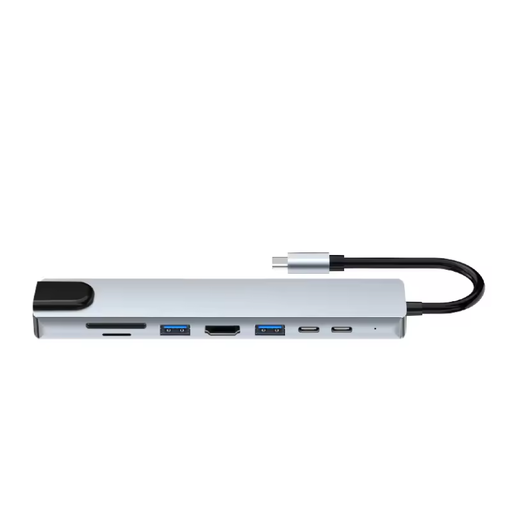 No image available
A good fit if you want to read SD and microSD cards and need more connections alongside the card reader.
The product information lists SD and microSD card readers, three USB 3.0 ports, HDMI up to 4K, Ethernet (RJ45) and a USB-C charging function.
The card reader doesn’t manage access permissions, so choose your storage destination separately.
 No image available
A good fit if you want to read SD or microSD cards via USB-C and need several USB connections at the same workstation.
The product specifications list SD and microSD card readers and several USB connections.
The card reader doesn’t manage access permissions, so choose your storage destination separately.
If the footage is stored on a removable microSD card, DJI describes removing the card and reading it with a card reader as one way to export files. DJI also mentions other methods, so check where your drone stores the original files.
No. The SD Association describes speed classes as ratings for minimum write performance under the relevant standard. When copying files, also consider the card interface, the reader and the connection.
Check that the expected files are in the chosen location and that the transfer is complete. On Windows, use the safely remove feature before disconnecting removable storage; Microsoft recommends this to help prevent data loss.
For a consumer purchase, the Dutch government says you’re entitled to a product that works as it should, and you can contact the seller if it’s faulty. The Netherlands has no fixed statutory warranty period; a manufacturer’s warranty is in addition to your statutory rights.
The Dutch Data Protection Authority says GDPR rules apply if a drone captures people in a recognisable or identifiable way, even if that wasn’t intentional. Organisations processing this kind of personal data must ensure security measures are appropriate to the risks. Consider the footage, access permissions and storage destination in your situation.