Choose a card reader with a microSD slot if your dashcam uses a microSD card, and check that your phone or laptop can access external storage through the connection you’ve chosen. A compact reader keeps your kit simple; a hub is worth considering if you also need extra ports or charging while copying. Copy any important footage and check that it opens before using the card again.
Who might find a USB-C card reader useful?
Traveller copying to a phone
Wants to open and copy dashcam footage on a USB-C phone without using a laptop. Check whether the device can read external storage and has enough free space. Google explains how to manage files on USB storage using Files by Google.
Traveller using different computers
Wants to read the same card on both USB-C and USB-A devices. According to UGREEN, the 50706 combines both connector types with SD and microSD slots.
Laptop traveller who needs multiple connections
Wants to connect other devices or charge their laptop while copying. The Belkin AVC009btSGY is a USB-C hub with microSD and passthrough charging; check that its connections suit your device.
What should you look for?
Compact USB-C card reader
Choose this option: if you mainly copy via USB-C and want a standalone reader with card slots. Anker lists SD and microSD slots for the A8370.
Bear in mind: a compact card reader doesn’t automatically double as a hub with extra ports or a charging function.
Reader with USB-C and USB-A
Choose this option: if you want to use the same card with USB-C and USB-A devices. UGREEN lists both connector types, along with SD and microSD slots, for the 50706.
Bear in mind: UGREEN lists support for UHS-I cards; check that this suits your card and how you plan to use it.
USB-C hub with microSD
Choose this option: if you need extra ports or charging while you use the card reader. Belkin lists microSD and passthrough charging for the AVC009btSGY.
Bear in mind: if you only need to copy a card, you may be carrying features you won’t use. Check that the connection and charging setup suit your device.
First, check that the card, reader and receiving device work together. Then decide whether you mainly need a verified copy, a quick transfer or extra connections.
| What to consider |
What should you check? |
Who is this most important for? |
| Card and device |
Check the card type and slot, the connection, and whether your phone or laptop can access external storage. |
If I want to copy straight to my phone while travelling, the whole setup needs to work. Around 36% of consumers prioritise this compatibility. |
| Keeping recordings |
Copy the footage, open the copy and keep the original until you’ve checked the transfer. |
If I want to keep important footage safe, I need to check the copy before reusing the card. Around 29% of consumers prioritise keeping their recordings. |
| Transfer within your travel time |
Compare the card and reader specifications, and test with a representative clip beforehand. |
If I want to copy footage during a train journey, I need to know whether my chosen method will fit the time available. Around 21% of consumers prioritise a quick transfer. |
| Extra ports or charging |
Decide whether you really need extra connections or passthrough charging as well as a card reader, and check compatibility. |
If I also want to connect or charge other devices while copying, a hub might suit my setup. Around 14% of consumers make extra ports or charging their main priority. |
Common mistakes when buying and copying
-
Checking only the USB-C plug
A plug that fits doesn’t necessarily mean the reader accepts your dashcam’s card or that your device can access its storage.
Check the card type and slot beforehand, and find out whether your phone or laptop can read files from external storage.
-
Assuming USB speed guarantees a particular backup time
The SD Association distinguishes between interface speed and card performance. The receiving device also makes a difference.
Compare the card and reader specifications, and try copying a representative clip at home.
-
Deleting the original as soon as copying starts
On the Garmin Dash Cam Live, older unsaved recordings may be deleted when the card fills up. Check how your own dashcam handles this.
Open the copied files before deleting the original or reusing the card.
-
Taking a hub for a single card copy
Extra connections may be unnecessary if you only want to read a card. A hub is also one more device to carry.
Choose a hub only if its extra connections or charging features suit your travel setup.
Brands to compare
Anker
Anker describes the USB-C 2-in-1 Card Reader A8370 as a compact reader with SD and microSD slots for compatible USB-C devices.
- The two listed card slots may be useful if you want to read both SD and microSD cards.
- A quoted transfer speed isn’t a real-world test of the whole copying setup. Check separately whether you need extra ports or charging.
UGREEN
UGREEN lists USB-C and USB-A, along with SD and microSD slots, for the 50706.
- UGREEN lists support for UHS-I cards and simultaneous use of both card slots.
- The quoted connection speed doesn’t guarantee how quickly your card, reader and device will copy files together. The SD Association points out that card performance also matters.
Belkin
According to Belkin, the Belkin CONNECT™ Multiport 7-in-1 USB-C Hub Adapter AVC009btSGY combines multiple connections with a microSD card reader.
- Belkin lists passthrough charging of up to 100 W for this model.
- Extra hub features may be unnecessary if you only need to copy one card. Check that charging and connected devices suit your setup.
Joybuy products for copying cards on the go
This selection includes a standalone card reader with two slots and a USB-C docking station with SD and microSD slots. Choose based on your card, device and need for extra connections.
 Image unavailable
Kingston Technology Workflow Dual-Slot SDHC/SDXC UHS-II USB 3.2 Gen 1 Card Reader
An option to compare if you want to copy card footage to a laptop. Check beforehand that the card and connection suit your setup.
- Dual-Slot
- SDHC/SDXC
- UHS-II
- USB 3.2 Gen 1
Don’t remove the reader while files are being transferred.
Joybuy
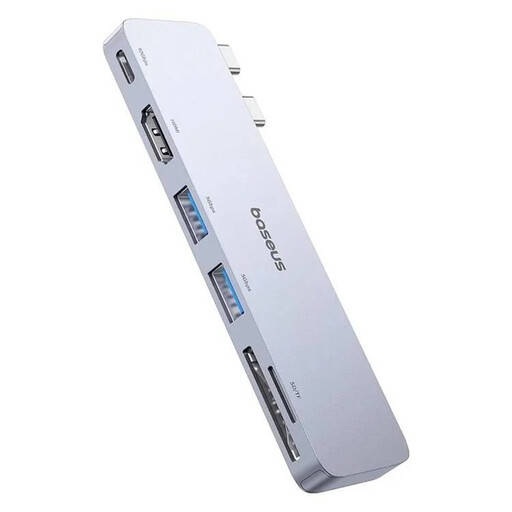 Image unavailable
BASEUS Ultra Joy 6-in-1 100W USB-C docking station with SD/microSD
A docking station to consider if you want to use the listed extra connections as well as access your card. Check that they suit your device and travel setup.
- SD and microSD slots
- 1× USB-C, 2× USB and 1× HDMI
- 100 W
- Colour: grey
Disconnect external devices before unplugging the docking station.
Joybuy
Frequently asked questions
Can I copy footage from a dashcam card to an Android phone without a laptop?
Yes, if your Android device can access the connected USB storage and has enough space. Google explains how to access USB storage using Files by Google on devices running Android 7.0 or later. Also check the connection and card reader.
Will a microSD card reader work with an iPhone that has USB-C?
It can, if the iPhone supports the connected reader and storage. Apple says external storage must have a single data partition and a supported file format. Check this for your phone and card before relying on the copy while travelling.
Do I need to format my dashcam card to transfer footage?
No, you don’t need to format it to copy files. Choose the copy option and check the result. Apple warns that using the ‘Erase’ function deletes the storage contents.
What are my rights if a card reader I bought online doesn’t work properly?
When you buy from a business in the Netherlands, you’re entitled to a product that works as it should. Contact the seller if there’s a fault. Many online purchases from a business also come with a 14-day cooling-off period, subject to legal exceptions. The Dutch Government describes these as statutory consumer rights, not an extra manufacturer’s warranty.
Can I share dashcam footage showing identifiable people online without restriction?
Not without restriction. The Dutch Data Protection Authority explains that identifiable people in footage count as personal data. The exception for personal or household use assumes that you keep the footage private or share it with only a very limited group; the exception doesn’t apply if you share it more widely.


