Who is this buying guide for?

Traveller with a USB-C phone

Wants to copy dashcam clips to their phone without using a laptop. Files by Google explains how to access USB storage on Android 7.0 or later; Apple Support outlines the requirements for external storage on an iPhone. Also check that your phone has enough free space.

Driver who wants to keep footage of an incident

Wants to save important clips and check the copy before potentially deleting the original. Keep the card until you’ve confirmed that the copied files open.

Traveller with a phone and a laptop

Wants to read the same card on different devices or copy clips from a laptop to a second storage device. A reader with the right connectors may be more practical; check the ports and storage options on your own devices.

What should you look for when buying?

Compact USB-C reader

Best for: reading a single microSD card with a compatible USB-C phone or laptop.

Keep in mind: it may not have a USB-A connection or an extra port for a second storage device.

Reader with USB-C and USB-A

Best for: switching between a USB-C phone and a laptop with USB-A, or reading standard SD cards too.

Keep in mind: extra connections aren’t necessary if you only use one device and one card; check the full model number.

USB-C hub with a card slot

Best for: a laptop workflow where you want to connect a card and a second storage device at the same time.

Keep in mind: a hub takes up more space; check that it has the right ports and, if needed, a power supply.

USB-C reader with UHS-II

Best for: anyone using a UHS-II microSD card and copying large numbers of clips to a compatible destination.

Keep in mind: support alone doesn’t guarantee a faster complete backup; the card, device and destination also play a part.

What to consider What should you check? Who is this important for?
Card and device compatibility Check support for microSDHC or microSDXC, the USB-C data connection, and whether your phone or laptop can open the card in a file management app. Apple lists exFAT and FAT32 among the storage formats supported by iPhone. I want to read my dashcam card directly on my own USB-C device; compatibility is the top priority for around 36% of consumers.
Keeping clips and checking the copy Choose a destination with enough free space, and open a few copied files before deleting anything from the card. Follow your dashcam’s instructions for switching it off and removing the card. I want to avoid losing important footage through deletion, formatting or overwriting; around 29% of consumers give keeping clips their highest priority.
Using multiple devices Compare the ports on your phone and laptop with the exact reader model. If you’re using a second storage device, check whether you can connect both at the same time and whether power is required. I want to switch between my phone and laptop while travelling, or connect a second destination; using multiple devices is the main consideration for around 21% of consumers.
Transfer speed Check the speed standard of your microSD card and compare it with the specifications of the exact reader model. A stated maximum doesn’t guarantee a particular copying time. I regularly copy lots of clips and want to know whether a faster interface will make a difference in my setup; around 14% of consumers put speed first.

Common pitfalls

  • Assuming a card reader is backup storage

    The reader lets you access the card, but doesn’t store the copy itself. You’ll need a destination, such as enough free space on your phone or laptop.

    Before you set off, decide where you’ll copy the clips to, and open the files at that destination.

    You may need extra storage space or an external drive for a separate destination.

  • Confusing a USB-A-only version with a USB-A/USB-C model

    A similar product name doesn’t guarantee that the connectors are the same. Baseus lists model WKQX060113 as the version with both USB-A and USB-C; check the full model number and the listed connections.

    Before buying, check that the version you’ve chosen has the USB-C connection you need.

  • Taking an interface speed to mean a guaranteed copying time

    Actual transfer speeds also depend on the card, connected device and destination. A maximum in a specification doesn’t automatically tell you how quickly your dashcam clips will copy.

    Compare the standards supported by your own card and reader. Don’t choose UHS-II solely on the basis of a speed claim if your card doesn’t use that standard.

  • Wiping your dashcam card as soon as copying starts

    Starting a copy doesn’t confirm that the files are at the destination or that they open. The manual for the Nextbase model consulted warns that formatting erases files.

    Check the copied clips before deleting anything from the original card or formatting it.

    Unverified footage could be lost if the card is erased before you’ve checked the copy.

Brands to consider

Baseus

According to Baseus product specifications, the Lite Series WKQX060113 is a card reader with USB-A, USB-C, SD and TF connections for use with different devices.

  • Baseus specifies both connections and simultaneous access to SD and TF cards for the WKQX060113.
  • These features don’t automatically apply to a Lite version with a similar name; check the full model number.

UGREEN

The EU product information for model 50706 describes a card reader with USB-C, USB-A, SD and microSD.

  • UGREEN specifies support for up to UHS-I and simultaneous access to two cards.
  • The stated 5 Gbps is a USB interface claim, not a guaranteed speed for copying dashcam clips.

StarTech.com

According to StarTech.com, model SDMSDRWU3AC is designed for use via USB-A or USB-C with SD and microSD cards.

  • The manufacturer specifies UHS-I and simultaneous access to both card slots.
  • The stated support doesn’t make this a substantiated choice for anyone who specifically needs UHS-II.

SanDisk

The QuickFlow SDDR-B751-GNANN is a USB-C microSD reader for which SanDisk specifies UHS-I and UHS-II support.

  • SanDisk lists a maximum sequential read speed of 250 MB/s.
  • This is a maximum from the specifications, not an independent test using a dashcam card. According to the product specifications, this model doesn’t have a standard SD slot.

Anker

According to Anker, the USB-C 2-in-1 Card Reader A8370 has an SD and a microSD slot.

  • Anker describes simultaneous use of both card formats and a connector designed to fit alongside a phone case.
  • That fit hasn’t been confirmed for every phone and case combination; the product page consulted is aimed at Canada and doesn’t provide information about availability in the Netherlands.

Card readers and hubs at Joybuy

This Joybuy selection includes USB-C card readers and hubs with SD, microSD or TF slots. Check that the slot matches your dashcam’s card; according to the product description, the SD and TF slots on the AJAZZ hub can’t be used at the same time.
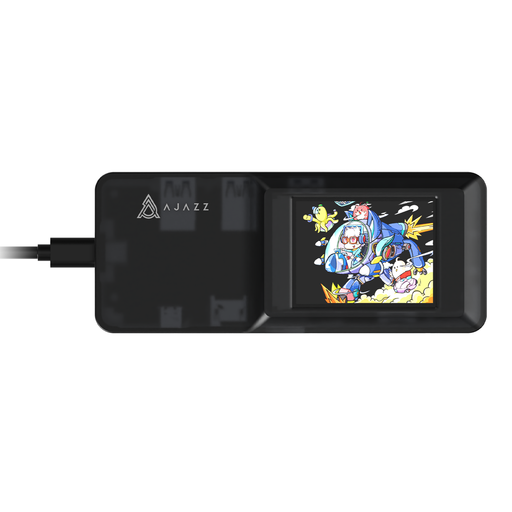
AJAZZ AKP01E 8-in-1 USB-C expansion hub

AJAZZ AKP01E 8-in-1 USB-C expansion hub

Could suit you if you’re looking for a USB-C hub with card reader slots and extra connections.

The product description lists three USB 3.0 ports and SD and TF slots. The SD and TF slots can’t be used at the same time.

View at Joybuy

Kingston Technology USB3.2 Gen1 Workflow Dual-Slot SDHC/SDXC UHS-II Card Reader

Kingston Technology USB3.2 Gen1 Workflow Dual-Slot SDHC/SDXC UHS-II Card Reader

Could suit you if you’re looking for a portable card reader to use with USB-C and SD or microSD cards.

The product name specifies UHS-II. The instructions warn against disconnecting the reader during file transfers to prevent data loss or damage.

View at Joybuy
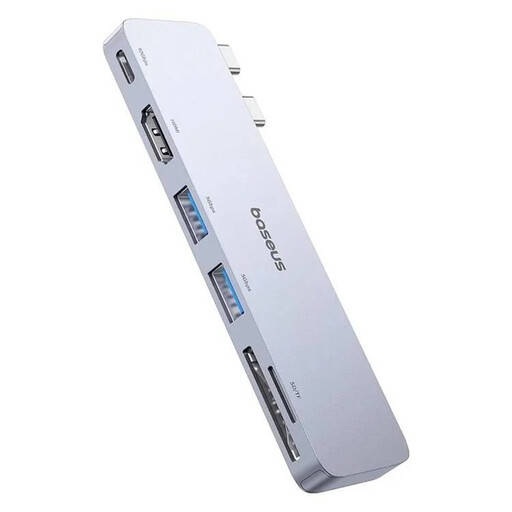
6-in-1 BASEUS Ultra Joy USB-C hub with SD and microSD slots

6-in-1 BASEUS Ultra Joy USB-C hub, 100W

Could suit you if you need extra ports as well as an SD or microSD card reader.

The product name lists USB-C, two USB ports, HDMI and an SD/microSD slot. The product description lists two USB 3.0 data ports.

View at Joybuy

Verbatim CMH-13 USB Type-C hub

Verbatim CMH-13 USB Type-C hub

Could suit you if you’re looking for a USB-C hub with card reader slots and extra USB-A connections.

The specifications list SD and microSD cards and several USB-A ports. The product description lists Windows, Linux and Mac as supported systems.

View at Joybuy

Frequently asked questions

Can I copy dashcam clips to my USB-C phone without a laptop?

Yes, if your phone recognises the card as external storage through the reader and has enough free space. Files by Google explains how to access USB storage on Android 7.0 or later; Apple Support explains how to access supported external storage through Files on an iPhone. Test your own phone and card first.

How can I avoid losing clips while copying them?

Follow your dashcam’s manual for switching it off and removing the card. For the model consulted, Nextbase recommends switching off the camera first and warns that formatting erases files. Open the copied clips and keep the original until you’ve checked the copy.

What should I do if my iPhone doesn’t show the card or external drive?

Check that your iPhone is unlocked, that the storage appears under ‘Locations’ in Files, and that the storage format is supported. Apple lists a single data partition and formats including exFAT and FAT32; some external hard drives may need additional power. Don’t make formatting a card with footage that hasn’t been backed up your first step.

Who should I contact in the Netherlands about a faulty card reader?

Contact the retailer. According to the Dutch government, the retailer must provide a solution if a product is faulty; a manufacturer’s guarantee doesn’t replace your statutory rights.

Can I safely share dashcam footage publicly?

Not necessarily. The Dutch Data Protection Authority says that identifiable people count as personal data, and that the exemption for private or domestic use doesn’t apply when footage is shared more widely. Keep a private copy and consider separately whether public sharing is permitted.
