
Dashcam user with a microSD card
You want to save clips to a USB-C device and need a reader that supports your card. Sitecom and UGREEN product specifications describe card readers with microSD and SD slots.


Start with the microSD card in your dashcam and the device you want to save the clips to. Having the right card slot and access to external storage matters more than a headline speed claim. A compact plug-in reader keeps loose items off your desk, while a short cable lets you position the reader next to your laptop. Choose a hub if you’ll also use the extra ports. A UHS-II reader won’t automatically make copying faster if your card or connection is the bottleneck.
You want to save clips to a USB-C device and need a reader that supports your card. Sitecom and UGREEN product specifications describe card readers with microSD and SD slots.
You’re weighing up whether a reader that plugs straight into the port will suit you, or whether a short cable would make it easier to place the card next to your laptop. Sitecom lists a 15 cm cable for the MD-1108 and MD-1110; UGREEN describes the 50706 as a cable-free design.
As well as card access, you may need ports for other devices. A standalone card reader and a USB-C hub offer different options, so check which ports the exact model has.
Choose this option: if you mainly read one dashcam card and want to keep loose items on your desk to a minimum.
The trade-off: the reader sticks straight out of the USB-C port, so check that the port will still be easy to access.
Choose this option: if you want to place the card next to your laptop or regularly switch between microSD and SD cards.
The trade-off: Sitecom lists a 15 cm cable for the MD-1108 and MD-1110, which takes up a little extra space.
Choose this option: if you also want to connect other peripherals at the same workstation.
The trade-off: a hub adds ports you won’t need just to back up dashcam footage, so check that the model has a microSD slot.
| What to consider | What to check before buying | Who is it most important for? |
|---|---|---|
| Card and device compatibility | Check that the reader supports microSD, that your card capacity is within the stated limit and that the device you’re saving to can access the storage. | I want to read my dashcam card directly on the device I use to save my clips. Around 36% of consumers prioritise card and device compatibility. |
| Access on a small desk | Check the space around the USB-C port and whether a cable would make it easier to place the card reader alongside your device. | If the USB-C port is hard to reach, I want to be able to place the card reader nearby without cluttering my desk. Around 29% of consumers put ease of placement first. |
| Video clip transfer time | Check the card interface and compare it with the reader and connection. Don’t treat a stated maximum as a measured copy speed. | If I regularly back up a lot of footage, I want to know whether my card and reader can deliver the transfer speed I need. Around 21% of consumers prioritise transfer time. |
| Extra card slots and ports | Check whether the model lists microSD, SD or both, and which additional ports the hub has. | If I connect other devices at the same desk, a hub or an extra card slot could save me from needing separate adapters. Around 14% of consumers give versatility top priority. |
A card reader’s stated speed isn’t necessarily the speed at which your clips will copy. Sitecom notes that the overall transfer rate also depends on the card and the connection.
Check the card and reader together, and treat maximum speeds as product specifications rather than measured copy times. The SD Association describes UHS-I and UHS-II as different card interfaces.
A higher speed rating may go unused if your card or connection doesn’t support it.
A hub with an SD slot won’t necessarily give you microSD access too. For example, Belkin lists SD and microSD for the AVC009btSGY, while the port list for the AVC008btSGY mentions SD only.
Check the slots against the full model number before choosing a hub for a dashcam card.
If the slot isn’t suitable, you may need a separate adapter or card reader.
A card reader won’t check for you whether the files have arrived safely at their destination. Microsoft warns that disconnecting a device unsafely can lead to data loss.
Check that the copied clips are there and can be opened. Then safely eject the card or reader before using the card again.
Sitecom describes the MD-1108 and MD-1110 as USB-C card readers with a 15 cm cable, SD and microSD slots, and a USB-A adapter.
According to UGREEN Netherlands, the UGREEN 50706 is a cable-free card reader with USB-C, USB-A, SD and microSD.
The Anker USB-C 2-in-1 Card Reader is a compact option if SD and microSD are the card formats you need.
The Belkin AVC009btSGY is a USB-C hub for anyone looking to combine card access with other connections.
The Joybuy products below are USB-C hubs whose product information mentions card reading. They’re suited to anyone looking to combine card access with extra connections at one workstation.
 No image available
Suited to anyone looking to combine card access and extra connections in a single USB-C hub.
The product details list microSD and SD card types, as well as 13 ports.
 No image available
Suited to anyone looking to combine card access and extra ports in a single USB-C adapter.
The product information lists an SD/TF card reader, HDMI and three USB 3.0 ports.
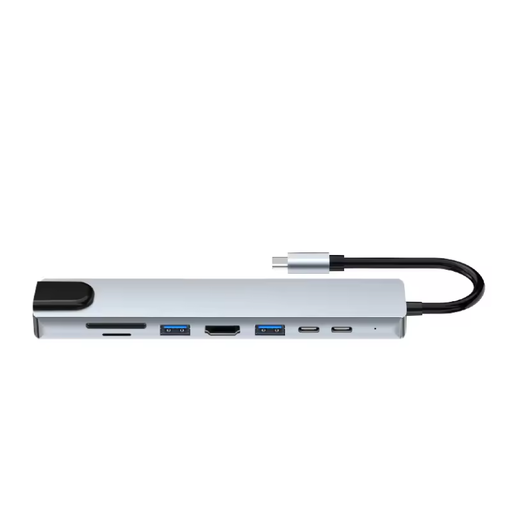 No image available
Suited to anyone looking to combine SD and microSD card reading with other laptop connections.
The product information lists HDMI, Ethernet, USB 3.0 ports and a USB-C charging port.
No. First check which card interface your dashcam card uses. The SD Association describes UHS-II as a different, faster bus than UHS-I. A higher speed claim for the reader doesn’t guarantee a faster back-up with your card and device.
Yes, if you can connect the reader and the storage meets the iPhone’s requirements for external storage. Apple Support Netherlands lists requirements including partitioning and formatting; also check that there’s enough space to save the clips you need.
First check that the copied files are at their destination and can be opened. Then eject the card or reader before disconnecting it. Microsoft recommends safely removing devices to help prevent data loss.
No. According to the Dutch government, the Netherlands has no fixed statutory guarantee period; a product must do what you can reasonably expect it to do. If a product is faulty, contact the seller.
Not necessarily. The Dutch Data Protection Authority distinguishes between private use and sharing more widely; if people are identifiable, the GDPR may apply. The exception for personal or household use doesn’t cover wider publication.