
Dash cam user with a USB-C phone
Wants to open a card on their phone and copy clips while on the go. Check that the phone recognises the storage and has enough free space; Apple Support explains how to use external storage on USB-C iPhones.


Choose a card reader that supports both the format of your dash cam card and the connection on the device where you want to save your footage. A basic reader may be all you need for one card and one device; extra card slots or USB-A are useful if you use different cards or devices. UHS-II only matters if your card and the rest of your copying set-up support the standard too.
Wants to open a card on their phone and copy clips while on the go. Check that the phone recognises the storage and has enough free space; Apple Support explains how to use external storage on USB-C iPhones.
Switches between SD and microSD cards, or between a phone and a laptop. In that case, the right card slots and connectors matter more than a standalone speed claim. StarTech.com and UGREEN describe models with both card formats and USB-A and USB-C connections.
Wants to handle large copying jobs quickly and should compare the support offered by the card, reader and receiving device. The SD Association explains the differences between UHS bus modes.
Start with the card format and the connection on the device you want to copy to. Then check that the destination has enough space and whether extra speed is relevant to your card and how you use it.
| Priority | What to look for | Who is this important for? |
|---|---|---|
| Card and port compatibility | Check that the reader accepts your SD or microSD card and connects via USB-C. | If I want to copy footage from my own dash cam card while on the go, both the card slot and connector need to fit; around 36% of consumers put compatibility first. |
| The destination | Check that your phone, tablet or laptop can access external storage and has enough free space. | I want to save clips straight to my phone, tablet or laptop and be able to open them there; around 29% of consumers prioritise copying to a mobile device. |
| Verifiable backup | Open the copied files on the destination before deleting the originals. | When I want to keep important footage, I want to check that the copies work first; around 21% of consumers make this their top priority. |
| Transfer speed | Compare the UHS support of the card and reader; don't treat an interface specification as a guaranteed copying speed. | When I have lots of clips and little time, I want to speed up transfers; around 14% of consumers prioritise copying time. |
The connection on your device and the card slot on the reader are separate features. The right connector won't help if the card doesn't fit the reader.
Before buying, compare your card format with the slots listed and check how the reader connects to the device you want to copy to.
An interface specification alone doesn't tell you how quickly your files will be copied. The card, reader and receiving device all need to support the transfer you want.
Check the markings on the card and reader, and don't compare bus or interface speeds directly with a promised copying time.
Starting a copy doesn't mean all the files you want are on the destination. If you delete the source before checking the copies, you could lose footage.
Open the copied files on the destination and keep the originals until you have checked that the clips you need are there and can be opened.
The SDMSDRWU3AC is designed for anyone who wants to use SD and microSD cards with USB-C and USB-A devices.
The 50706 is designed for switching between SD and microSD, and between USB-C and USB-A devices.
The AVC009 is a USB-C hub for anyone who wants extra laptop connections and pass-through charging as well as card access.
The USB-C 2-in-1 Card Reader is an option for using SD and microSD cards with a USB-C device.
The Joybuy products below are USB-C hubs with card readers for anyone who needs extra connections as well as access to a dash cam card.
 No image available
A hub for anyone who needs other connections as well as card access.
The product name lists HDMI with 4K@30Hz, 100W PD charging, 3 5Gbps USB 3.0 ports and an SD/TF card reader.
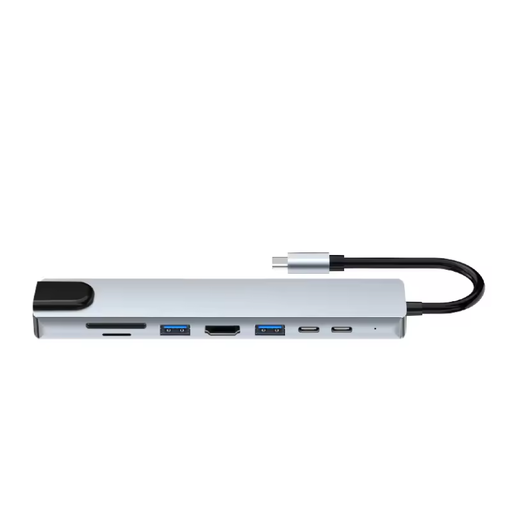 No image available
An option if you want to use several connections as well as the card reader.
The product name lists HDMI, Ethernet (RJ45), 3 USB 3.0 ports, SD and microSD slots, and USB-C charging.
 No image available
A hub to consider if you need several connections as well as card access.
The product information lists 13 ports, including HDMI, USB and Ethernet, plus SD and microSD card readers.
Yes, if your phone recognises the connected storage and you have a suitable destination. Files by Google explains how to open and copy files from USB storage on supported Android devices; Apple explains how to use external storage on USB-C iPhones. Unlock an iPhone or iPad before using a storage accessory, and test your own set-up in advance.
Check that your phone is unlocked, the reader is connected properly and the storage appears in your file app. Google explains how to access connected USB storage; Apple recommends disconnecting an unrecognised accessory, unlocking your device and reconnecting it.
Formatting isn't part of the copying process. Check the copies first and keep the source files for as long as you need them. Apple warns that formatting an SD card erases all the images on it; if you decide to format it later, follow your dash cam's instructions.
Don't assume so. The Dutch Data Protection Authority says that permission is generally required to publish information about other people online. Its guidance on domestic cameras also distinguishes between household use and footage made available to an unrestricted audience. This guidance is neither general permission nor a blanket ban for every dash cam situation.