
Photographer with one SD card
You want to import camera photos via USB-C with as little equipment as possible on your small desk. First, check whether your card uses UHS-I or UHS-II.


Choose a reader that matches your camera’s exact card format and your computer’s USB-C connection. A compact reader with a built-in plug keeps your setup simple, while a cabled reader can sit elsewhere on your desk. UHS-II is relevant only if both your card and reader support the interface. If you use CFexpress, check whether the reader supports Type A or Type B.
You want to import camera photos via USB-C with as little equipment as possible on your small desk. First, check whether your card uses UHS-I or UHS-II.
You switch between SD and microSD, or also use CFexpress. Choose only the slots that match your camera’s cards.
You regularly copy lots of photos and want to know whether your card, reader and computer can make use of a faster interface together.
Choose this if: you use SD or microSD cards and want a short, direct connection.
Trade-off: the casing may take up space next to your computer’s port; the UHS-I versions listed do not make use of a UHS-II interface.
Choose this if: you use a compatible UHS-II card and regularly import larger batches of photos.
Trade-off: the interface does not guarantee a particular import speed; your card, port and computer all play a part too.
Choose this if: you want to position the reader somewhere other than right next to the USB-C port.
Trade-off: the reader and cable take up space together; check which cable comes with the version you choose.
Choose this if: you use CFexpress as well as SD.
Trade-off: CFexpress Type A and Type B require the corresponding version; the two types are not interchangeable.
| What to consider | What to look for when buying | Who should consider this? |
|---|---|---|
| Compatible card format | Compare the format shown on your card or in your camera’s documentation with the slots on the exact model. Distinguish between CFexpress Type A and Type B. | If I want to read my camera card, I first check that the reader supports that exact format. Around 36% of consumers prioritise card compatibility. |
| Connection and desk space | Check the port location, the space next to other connections and whether a suitable cable comes with the version you choose. | If my computer’s port is awkwardly positioned, finding a suitable place for the reader on my small desk is important. Around 29% of consumers choose primarily based on the connection and positioning. |
| Import time | Compare the UHS interface of the card and reader, and the data connection provided by your computer, port and any cable. MB/s and Gbps are different units. | For large or regular imports, I want to know which interfaces my entire setup can make use of. Around 21% of consumers prioritise practical transfer speeds. |
| Safe copying and removal | After importing, check that the photos you want have transferred, then safely eject the card or reader according to your operating system. | If I want to import and disconnect my card safely, I take those steps into account when choosing. Around 14% of consumers prioritise this careful approach. |
An SD/microSD reader is not automatically compatible with CFexpress. Lexar describes separate combination readers for CFexpress Type A and Type B.
Before buying, compare the format shown on your card or in your camera’s documentation with the slots on the exact reader model.
The card interface and USB connection each have their own limits. A quoted maximum is not a measurement of the complete card, reader and computer setup.
Check the interfaces of your card, reader, computer port and any cable together. Choose UHS-II only if you can make use of that interface.
A built-in plug may block neighbouring ports, while a cabled reader takes up more space but can be positioned elsewhere.
Check the port layout on your computer and confirm which cable comes with the exact version.
The USB-C 2-in-1 Card Reader is a compact option for SD and microSD if UHS-I is sufficient.
According to UGREEN, Model 50706 combines USB-C and USB-A with SD and microSD slots.
The Professional USB-C Dual-Slot Reader is designed for SD and microSD with UHS-II; Lexar also offers separate combinations for CFexpress Type A and Type B.
According to SanDisk, the PRO-READER SD and microSD has a USB-C port and is an option if you can position the reader away from your computer.
According to Angelbird, the Card Reader PKT SD is a pocket-sized SD reader for UHS-I and UHS-II.
This selection includes USB-C hubs, docking stations and an external DVD drive. For each model, check that the card reader and slot are compatible with your camera’s card and suit the space available on your desk.
 No image available
An option if you’re looking for extra connections as well as a card reader; check that the listed card slots are compatible with your camera card.
The product name lists SD and TF card slots, three 5 Gbps USB 3.0 ports, HDMI up to 4K@30Hz and 100W PD charging.
 No image available
This version combines a card reader with an external DVD drive; check that both functions suit your desk setup.
The product name lists USB 3.0 and Type-C, an SD/TF card reader, and CD and DVD support.
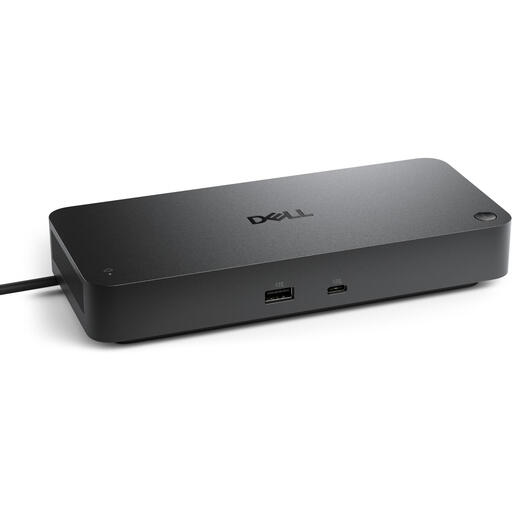 No image available
The wired USB Type-C connection may suit a computer setup that needs extra ports. Check that the exact version has the card reader and card format you need.
The product name lists USB 3.2 Gen 2 (3.1 Gen 2) Type-C and a black finish.
 No image available
A hub with a card reader may suit a desk setup with several devices; check that the card slots are compatible with your camera card.
The specifications list SD and microSD card types and a 10,000 Mbit/s USB 3.2 Gen 2 host interface.
No. You can also use a UHS-II card with a compatible reader that has an older interface. According to the SD Association, making use of the faster interface depends on both the card and reader supporting it; the rest of the connection also matters.
On a Mac, connect the card reader, insert the card and select the photos you want in Photos using ‘File’ and ‘Import’, as Apple explains. Then safely eject removable storage according to your system; Microsoft recommends doing this in Windows to prevent data loss.
If a product is faulty, the seller must provide a solution under the statutory guarantee. For distance purchases from a business, the Dutch government says you usually have 14 days to change your mind; check the terms that apply to your purchase.