
Vandaag of morgen in huis

Kwaliteit gegarandeerd

Welkomstaanbiedingen ontgrendelen: GRATIS bezorging | Tot 80% korting | Gratis 30 dagen JoyPlus-proefperiode
Download de app
You're on your way to an important meeting when suddenly, a notification pops up: 'Battery low'. A dead laptop is more than just an inconvenience; it can derail a productive day. A good usb c car charger for laptop seems like a simple solution, but the market is flooded with models that overpromise and underdeliver. As a Joybuy Product Recommendation Officer, I often see where things go wrong. Before you spend your money, it's wise to know how to avoid the common pitfalls.
Many chargers look good on paper but fail in practice. Watch out for these common marketing traps to avoid buying a charger that could damage your devices or simply not work.
100w car charger that will quickly charge your laptop, the USB-C port might only deliver 30W. That's not enough to efficiently charge a laptop while it's in use.12v laptop charger that doesn't fit securely in the cigarette lighter socket. At the slightest movement, the charger loses contact, constantly interrupting the charging process.To ensure you make a smart purchase, check these three points. They make the difference between a frustrating experience and a reliable power supply on the go.
Don't just look at the total power, but at the maximum power a single USB-C port can deliver. To effectively charge laptop in car, you need a port that provides at least 45W to 65W. For more powerful models, like a car charger for macbook Pro, 90W or more is recommended. This information is usually found in the product specifications.
A power delivery car charger is essential. This is a smart charging technology that ensures your device gets exactly the power it needs at the highest possible safe speed. Without PD, a fast car charger usb c will treat your laptop like a smartphone and charge it with far too little power.
Consider how many devices you want to charge simultaneously. A multi-port car charger with a combination of USB-C and USB-A ports is practical for the whole family or the professional with a laptop, tablet, and phone. Some models even have retractable cables, which helps keep the car tidy.
Not everyone needs the same charger. Here are some recommendations, tailored to specific user profiles.
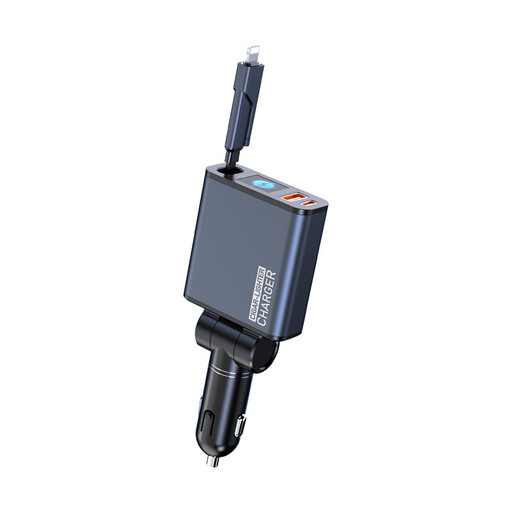
Why it's a match: Ideal for consultants, sales reps, and tech enthusiasts who need maximum power and convenience. This charger can power a high-performance laptop and other devices simultaneously at full speed, without a tangle of cables.
Delivers high power per port, not just a high total output. The built-in retractable cables solve the problem of loose, messy cords.
160W total power with QC5 and PD3.0 support. The two built-in retractable cables (90 cm) keep your car clutter-free.
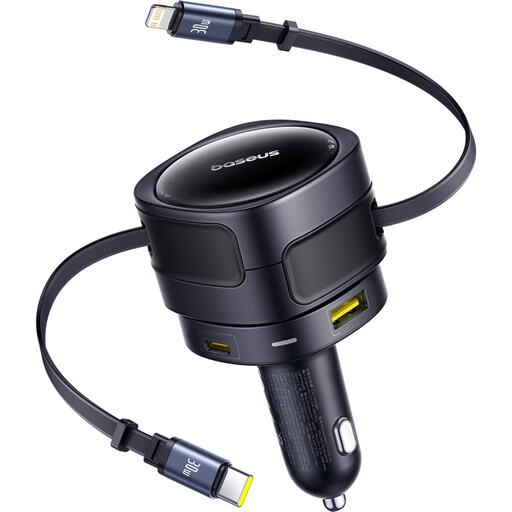
Why it's a match: Perfect for long family road trips. This charger can power multiple devices at once, such as tablets for the kids, phones, and a laptop, without any arguments over who gets to charge next.
This charger is designed to intelligently distribute power. Even with three devices connected, each port still delivers a respectable 30W, enough for most tablets and phones.
Four charging points in one: two fixed cables (USB-C and Lightning) and two additional ports (USB-C and USB-A). Total power of 90W.
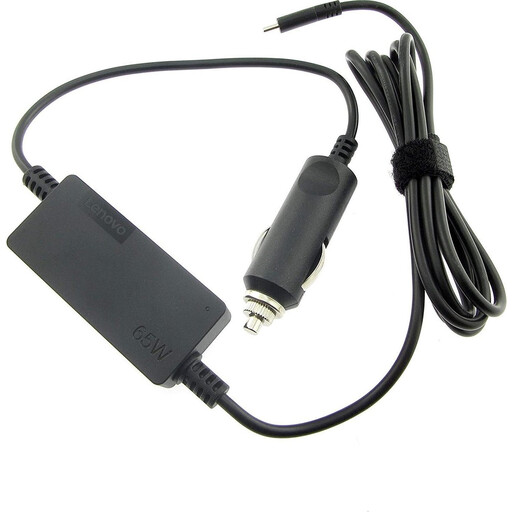
Why it's a match: For the user who needs a reliable, no-nonsense solution for a specific work laptop, like a Lenovo ThinkPad. No unnecessary features, just a charger that gets the job done.
This charger is specifically designed for laptops and delivers a stable and guaranteed 65W output via the USB-C port. No confusion about shared power.
An official charger from a reputable brand, optimized for compatibility with their own devices. Delivers a constant power output of 65W, ideal for most business laptops.
We have compiled a complete, up-to-date list of products that fully meet these strict selection criteria and safety standards.
No. A charger must have two key features: sufficient power (wattage) on a single port (at least 45W) and support for the Power Delivery (PD) protocol. A standard USB-C phone charger will not charge your laptop, or will do so very slowly.
Yes, generally. Modern cars and high-quality chargers are designed for this. A good charger has built-in protection against overheating, overvoltage, and short-circuiting. The charger will never draw more power than the car can supply. When in doubt, consult your car's manual regarding the capacity of the 12V socket.
The easiest way is to check the original charger that came with your laptop. The power output in watts (W) is printed on the adapter. For the best performance, choose a car charger that can deliver a similar or higher wattage through a single USB-C port.
