
Vandaag of morgen in huis

Kwaliteit gegarandeerd

Welkomstaanbiedingen ontgrendelen: GRATIS bezorging | Tot 80% korting | Gratis 30 dagen JoyPlus-proefperiode
Download de app
A broken or slow charging cable is a common problem. Your new smartphone or laptop won't charge, or it takes hours. The market for USB-C cables is vast, but it's filled with marketing claims that don't always deliver. Making the wrong choice not only leads to frustration but can also damage your devices.
Before you buy a new USB-C cable, it's important to recognize the most common pitfalls:
By paying attention to a few key specifications, you can avoid a bad purchase and find a cable that perfectly suits your needs.
You don't need to read a technical manual to make the right choice. Focus on these three practical features that distinguish a good cable from a bad one.
The charging power, measured in Watts (W), determines how quickly a cable can charge your device. A smartphone, often needing a Samsung charging cable, is typically fine with 25W, while a laptop can require anywhere from 60W to 100W.
The key here is Power Delivery (PD). This is a charging protocol that allows your device, charger, and cable to communicate to safely deliver the highest possible charging speed. A fast charger cable must explicitly mention Power Delivery and its maximum wattage. Always check that your adapter and your device (for example, for an iPhone 15 charging cable) support the same standard.
Do you only use the cable for charging? Then a standard USB 2.0 cable (480 Mbps) is perfectly fine. But if you regularly transfer large files like videos or photo collections, a cable with USB 3.1 (5 Gbps) or higher is a wise investment. This can be the difference between waiting minutes or seconds. This information is usually found in the product details.
A cable's lifespan depends on its materials. Standard cables are often made of TPE or PVC, which is flexible but also prone to breaking. For heavy use, a braided nylon cable is a better option. This material is stronger, less likely to tangle, and more resistant to wear and tear. Also, look for reinforced connectors; a longer, sturdier piece of plastic at the transition from cable to plug prevents the most common type of cable failure.
Not everyone needs the same cable. Here are some popular choices tailored to specific user profiles.
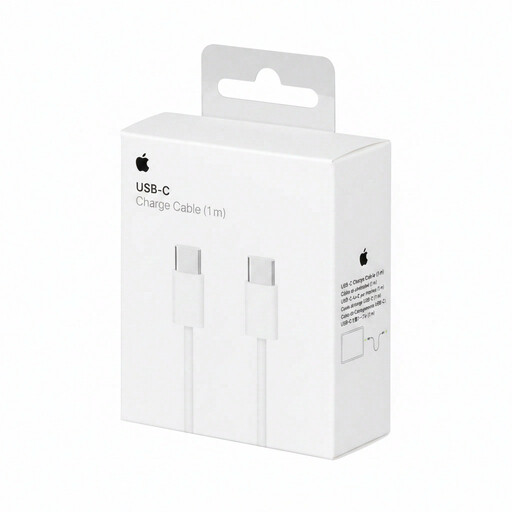
Why This Fits Their Persona: Ideal for those seeking a reliable, no-nonsense cable for charging a smartphone (like the iPhone 15), tablet, or other standard USB-C devices. A trusted choice for the Apple USB-C ecosystem.
This cable from a well-known brand delivers on its promises. It avoids the pitfall of vague 'fast-charging' claims by providing clear specifications that work with compatible adapters.
Supports charging and data transfer for USB-C devices. The 1m USB C cable is a practical length for daily use at home or in the office.
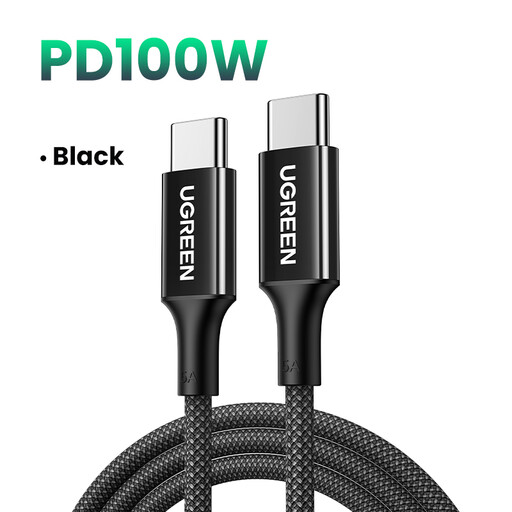
Why This Fits Their Persona: Perfect for those who want to charge their laptop, tablet, and smartphone with a single, powerful cable. This UGREEN cable is built for heavy use and high performance.
The braided exterior prevents cable fraying, a common problem with heavy use. The clear 100W Power Delivery specification avoids the pitfall of a 'fast-charge' cable that can't handle your laptop.
Supports up to 100W for charging most USB-C laptops at full speed. The braided nylon construction ensures a longer lifespan.
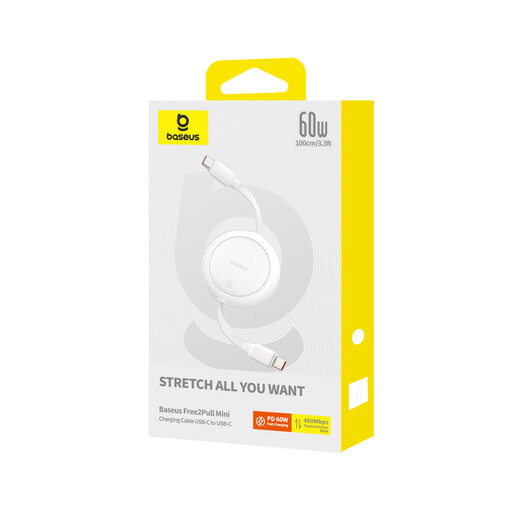
Why This Fits Their Persona: For those who value a tidy bag and workspace. This cable is the solution to the eternal tangle of wires, without compromising on charging power.
The retractable design prevents the tangles and wear that standard cables suffer in a bag. This mechanism protects the cable and significantly extends its lifespan.
Fully retractable and very compact, ideal for on the go. Supports up to 60W charging, powerful enough for most tablets and even some laptops.
We have compiled a complete, up-to-date list of products that fully meet these strict selection criteria and safety standards.
No, not every cable is suitable for this. Laptops require high charging power, typically between 60W and 100W. Check if the cable supports Power Delivery (PD) and if the maximum wattage matches what your laptop and charger require. A standard USB-C charging cable for a phone is often not powerful enough.
The price difference is usually in the build quality, certification, and specifications. More expensive cables often use more durable materials like braided nylon, have reinforced connectors, and include an E-Marker chip, which is necessary for safe charging above 60W. Additionally, they often offer higher data transfer speeds (USB 3.x) than cheaper alternatives.
Look for terms like Power Delivery or PD in the product description. The specifications should also list the maximum charging power in Watts (W), for example, "60W" or "100W". Without this information, the cable likely only supports standard charging speeds.
