
Vandaag of morgen in huis

Kwaliteit gegarandeerd

Welkomstaanbiedingen ontgrendelen: GRATIS bezorging | Tot 80% korting | Gratis 30 dagen JoyPlus-proefperiode
Download de app
Buying a new USB-C cable seems simple. You grab the first one you see, plug it in, and you're done. But in reality, this often leads to frustration: a phone charger that's painfully slow, a cable that frays after just three months, or a laptop charging cable that doesn't charge your expensive device at all.
Before you spend money on a cable that won't live up to its promises, it's wise to pay attention to a few key details. Many cables are sold with vague claims that mean very little in practice. We've outlined the most common pitfalls.
Many packages advertise "fast charging," but this doesn't automatically mean your device will actually charge quickly. Fast charging depends on a protocol, usually Power Delivery (PD). If your charger, your device (like a Samsung phone or MacBook), and your fast charger cable don't all support the same protocol and wattage, you'll never reach maximum speed. A cable that can only handle 15W will render your 65W laptop charger useless.
The weakest point of a charging cable is almost always where the cable meets the connector. Manufacturers of cheap cables often cut corners here, resulting in a cable that frays or breaks after just a few bends. A braided cable made of nylon can be more durable, but the quality of the connector and the strain relief is just as important.
Some dirt-cheap USB-C cables are designed purely for charging. The internal wiring for data transfer is simply missing. Want to transfer photos from your phone to your laptop? That cable will be useless. A good data cable is essential for more than just charging.
To avoid the pitfalls above, check the following three specifications before you buy. You can usually find these on the product page or packaging.
The power, expressed in Watts (W), determines how fast a cable can charge your device. This must match what your charger can deliver and what your device can handle.
Samsung charging cable for Super Fast Charging).A USB C to USB C cable with a specification of 60W PD or higher is a versatile choice that will suffice for most devices.
If you also plan to use the cable for transferring files, speed is important.
You can recognise a durable cable by a few key features. A braided nylon exterior provides protection against kinks and abrasion. Just as important is a reinforced connector housing, which prevents the cable from breaking at its most vulnerable point. Brands that specify the durability of their cables, for example, by the number of bends a cable can withstand, often offer a more reliable product.
Based on these objective criteria, we have selected a number of cables that suit different user profiles.
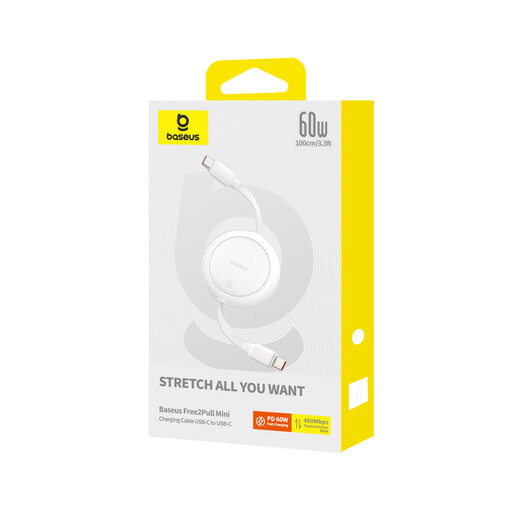
Why This Fits Their Persona: Ideal for those who are always on the go. The retractable design prevents a tangled mess of cables in your bag. With a length of up to 1 meter and a weight of just 36 grams, it's extremely compact.
This cable supports 60W Power Delivery, which is true fast charging for most phones and tablets. This helps you avoid the pitfall of a cable that's only "fast" on the packaging.
The retractable mechanism is unique and practical. The cable supports data transfer via USB 2.0 (480 Mbps), which is sufficient for daily syncing.
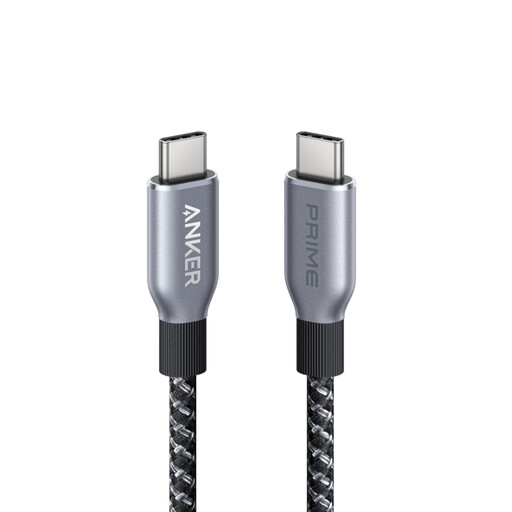
Why This Fits Their Persona: For those who want to get the most out of their gear. This cable is suitable for the most demanding tasks, from charging a high-end laptop to high-speed data transfer, and is built to last.
The braided exterior and Anker's claimed lifespan of over 300,000 bends directly address the problem of fragile cables. It's an investment in durability.
It supports up to 240W Power Delivery, making it future-proof for the next generation of fast charging. The 1.8-meter length offers extra flexibility.
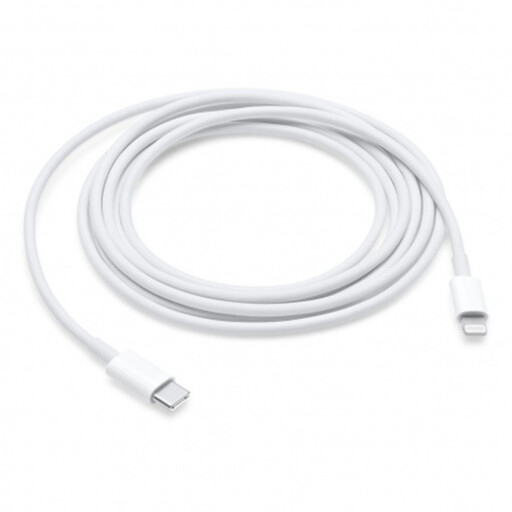
Why This Fits Their Persona: For owners of an iPhone, iPad, or iPod with a Lightning port who want to charge via a modern USB-C charger or MacBook. This is the official solution for a seamless experience.
As an official Apple product, compatibility is guaranteed. It supports the fast-charging feature on compatible iPhone and iPad models, something uncertified cables often fail to do reliably.
The 2-meter Apple Lightning cable offers plenty of reach. It's designed for both charging and data syncing with Mac computers.
We have compiled a complete, up-to-date list of products that fully meet these strict selection criteria and safety regulations.
Check the specifications of both your device and your charger. The cable must be able to handle at least the wattage of the charger. For a laptop charging cable, 60W or more is often required. For a phone charger, 20-45W is usually sufficient. When in doubt, a cable with a higher wattage rating (e.g., 100W) is a safe bet, as it will also work with lower-power chargers.
Not necessarily, but it often is. A braided cable is more resistant to abrasion and kinking. However, the overall build quality is more important. Pay close attention to the reinforcement at the connectors (strain relief). A well-made standard cable can outlast a poorly finished braided one.
Yes, you can, provided the cable supports enough power. A standard Samsung charging cable (e.g., 25W) will charge a MacBook very slowly, if at all. Check the cable's specifications. A USB C to USB C cable with a power rating of 60W or higher is a versatile choice suitable for both phones and most laptops.
