Who is this buying guide for?

Cyclists with a small USB light

If you want to stop your light cutting out before it’s fully charged, check the connection and, if necessary, look for a mode designed for low-power devices. The Anker A1388 manual describes such a mode, but doesn’t confirm compatibility with every bike light.

Cyclists with several USB devices

If you want to charge another device as well as your light, compare the available ports and the stated capacity. The Consumers’ Association lists capacity, speed, ease of use and portability as features to compare when choosing a power bank.

Home chargers with limited worktop space

If you charge your light on the worktop, you’ll need a suitable cable and a clear, dry spot for your equipment. The Fire Service advises keeping equipment clear while it charges so heat can escape.

What should you look for when buying?

What to consider What should you check? Who should take note?
Will the light keep charging? Check whether the power bank continues to supply power when the device draws very little; if necessary, look in the manual for a low-power mode. If my small light stops charging before it’s full when connected to a standard power bank, I want to know whether a suitable charging mode could help. Around 36% of consumers prioritise a steady charge for their light.
Compatible plugs and cable Compare the light’s charging port with the power bank’s output, and check both ends of the cable. I want to connect my light using the cable I already have, and I don’t want to assume that every USB plug will fit. Around 29% of consumers prioritise the connection and cable.
Capacity and number of ports Compare the stated capacity and number of outputs with your charging needs. The mAh figure alone doesn’t tell you how many times your light will charge. If I want to charge other devices too, or recharge less often, I’ll consider whether extra capacity would be useful for me. Around 21% of consumers prioritise having enough capacity for several charges or devices.
Charging spot on the worktop Choose a dry spot where equipment can sit clear and heat can escape; don’t use damaged cables. The Fire Service advises charging in a room with a working smoke alarm. I want to charge my light neatly at home, without a taut cable or equipment close to moisture. Around 14% of consumers prioritise a safe, practical place to charge.

Common buying mistakes

  • Looking only at the maximum wattage

    A power bank’s maximum output doesn’t automatically tell you how quickly or how well it will work with your bike light.

    Check your light’s charging requirements and which output it needs. If it stops charging before it’s full, also check whether the manual describes a low-power mode.

  • Assuming every USB cable will fit

    The plug on the cable supplied with a power bank may not match the port on your light.

    Before you order, compare both ends of the cable with your light’s charging port and the power bank’s output.

    If the plugs don’t match, you may need a different cable.

  • Assuming a higher capacity guarantees a set number of charges

    Each light uses a different amount of energy. The stated capacity alone won’t give you a reliable number of charges for your model.

    Use capacity to compare models, but check your own light’s specifications before counting on a particular number of charges.

  • Judging a product listing by its model name alone

    A Joybuy listing for Trust gives the model number as 25028 in the title and 24678 in the specifications, and says the product is no longer available.

    Before buying, check the full model number and compare it with the manufacturer’s information.

Brands to consider

Anker

The A1388 is worth considering if you’re looking for a power bank whose manual describes a mode for low-power devices.

  • The A1388 manual describes a low-power mode and lists USB-A and USB-C outputs.
  • The manual doesn’t confirm that this mode works with every bike light. Check that you have the right cable too.

Belkin

The BoostCharge BPB011btBK may suit you if you want to connect different cables or several devices.

  • Belkin lists two USB-A outputs, one USB-C output and a USB-A/USB-C cable included with the 10,000 mAh version.
  • The product specifications don’t confirm a low-power mode. Check that the supplied cable fits your light.

Xtorm

The Fuel Series 5 FS5100 combines USB-A and USB-C connections.

  • Xtorm lists a capacity of 10,000 mAh, two USB-C ports and one USB-A port, with up to 20 W via USB-C PD.
  • The stated maximum doesn’t prove that a bike light will charge faster. Check which output and cable your light needs.

Trust

The Primo 24678 is worth a look if you use USB-A cables.

  • Trust describes two USB-A ports and one USB-C port. According to Trust, the power bank itself can be charged via micro-USB or USB-C.
  • Check the full model number when comparing offers and product specifications.

Fresh 'n Rebel

The 12,000 mAh power bank reviewed combines USB-C with a USB port and a battery indicator.

  • Fresh 'n Rebel lists 20 W Power Delivery and safety features for this model.
  • A stated fast-charging feature doesn’t prove that a bike light will charge faster. Check your light’s connection and charging requirements.

Power banks at Joybuy

These Joybuy product picks are power banks for USB devices. If you’re using one with a bike light, always check that the connection and charging function are suitable for your light model.
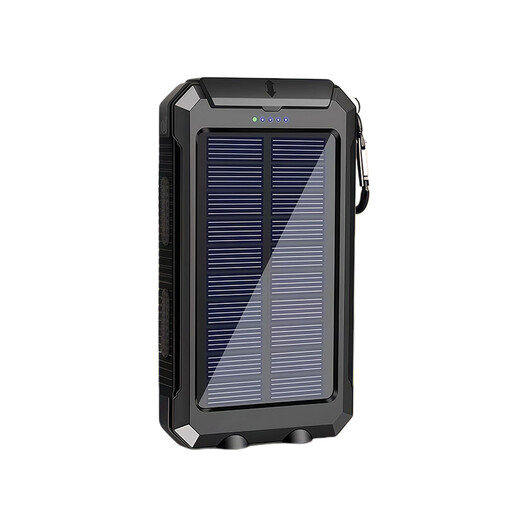
XBJ T8 USB Power Bank 10000 mAh with solar function

XBJ T8 USB Power Bank 10000 mAh with solar function

The product title describes this model as a USB power bank. Check that its connection and charging function suit your bike light.

The title lists a capacity of 10,000 mAh and a solar function.

View at Joybuy
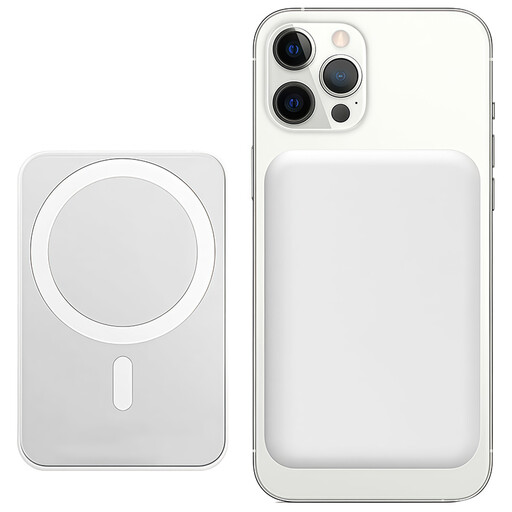
Power bank 10,000 mAh, 15 W, magnetic wireless charging

Power bank 10,000 mAh, 15 W, magnetic wireless charging

The product title mentions wireless charging, but that won’t necessarily replace a cable connection to a USB bike light. Before buying, check that it has a suitable wired output.

The title lists 10,000 mAh, 15 W and magnetic wireless charging.

The product description advises keeping the device away from liquids.

View at Joybuy

Samsung Power Bank 20,000 mAh, 45 W, 3 USB-C ports, beige

Samsung Power Bank 20,000 mAh, 45 W, 3 USB-C ports, beige

The three USB-C ports may be useful if your bike light uses a compatible USB-C cable. Check your light’s connection and charging requirements.

The product title lists 20,000 mAh, 45 W and three USB-C ports. The product description says it can charge up to three devices at once.

View at Joybuy
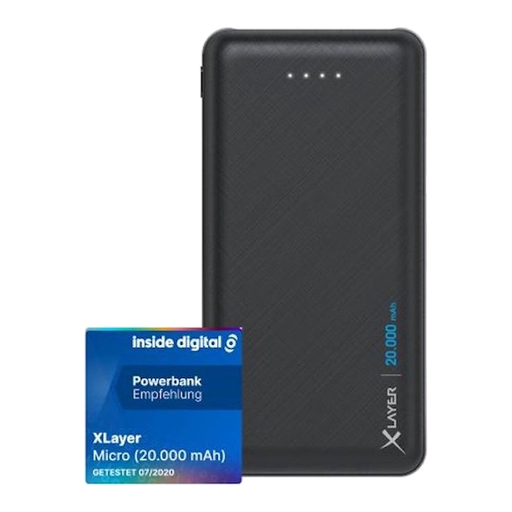
Xlayer Power Bank Micro Black Edition 20,000 mAh

Xlayer Power Bank Micro Black Edition 20,000 mAh

The listed USB-A outputs may work if your bike light connects via a USB-A cable. Check your light’s charging port.

The product title lists 20,000 mAh. The product description mentions two USB-A outputs and one USB-C input.

The product description advises avoiding contact with water, rain and high humidity.

View at Joybuy

Frequently asked questions

Does my bike light need a special power bank?

Not necessarily. First check your light’s charging port and cable. If charging stops before it’s full because the light draws very little power, a model-specific low-power mode may help. The Anker A1388 manual describes such a mode, but doesn’t confirm compatibility with every bike light.

How can I charge a bike light safely on the kitchen worktop?

Keep charging equipment clear so heat can escape, place it somewhere dry and don’t use damaged cables. The Fire Service advises charging battery-powered equipment in a room with a working smoke alarm.

Does a higher wattage mean my bike light will charge faster?

Not necessarily. The maximum output describes the power bank; it doesn’t prove that your light will charge faster. Check which output and charging function your light supports.

What should I do if my power bank doesn’t work properly after I buy it?

Report the fault to the seller and explain what isn’t working. According to the Dutch government, you’re entitled to a product that does what you can reasonably expect it to do; a manufacturer’s warranty doesn’t replace this right. In the Netherlands, there’s no fixed statutory warranty period that applies to all products.

What should I look for in a CE mark on a power bank?

The Netherlands Food and Consumer Product Safety Authority advises consumers to check for the CE mark and the seller’s identity when buying electronic products. This doesn’t automatically mean that the Low Voltage Directive applies to every USB power bank: the Authority sets out voltage limits for this directive and also points to other applicable product safety rules.
