First, check your bike light’s instructions and cable. A USB power supply you already own may be suitable if the connection and permitted charging method are right. Buy a mains charger if you don’t have the right output or want to charge several devices at once; a higher power rating doesn’t prove that your bike light will charge faster. Charge it in a dry, clear space, and don’t use a damaged cable.
Who is this guide for?
Cyclist with one USB light
Wants to charge one bike light at home and check whether their existing power supply and cable are suitable. Spanninga recommends a micro-USB cable and a computer or suitable adapter for its own USB lights. For other brands, follow the instructions for the specific light model.
Cyclist with two rechargeable lights
Wants to charge front and rear lights from one socket, so compares the number of outputs and the connection on each cable. Belkin and Hama document models with multiple USB outputs.
Shared kitchen charger
Wants to connect another USB device as well as a bike light. Check that the ports match your cables and charge in a dry, clear space.
What should you look for when buying?
First check the light’s instructions and cable. Then decide how many devices you need to charge at once, and choose a power supply with the necessary connections.
| What to consider |
What should you check? |
Who is this important for? |
| Connection and compatibility |
Check the light’s instructions and both ends of the cable. Follow the power supply instructions permitted for that exact model. |
If I want to charge one light at home, I want to know whether my existing power supply and cable are suitable. Around 36% of consumers say compatibility is their top priority. |
| Safe charging on the kitchen worktop |
Check the condition of the charger and cable, as well as the required product markings. Use a dry, clear space where heat can dissipate. |
If I’m charging on the kitchen worktop, I want to avoid moisture and damaged equipment, and make sure the charger is unobstructed. Around 29% of consumers put safe charging in this location first. |
| Number and type of ports |
Count the devices you need to charge at once and check whether each cable needs USB-A or USB-C. |
If I want to charge the front and rear lights at the same time, there must be a suitable output for both cables. Around 21% of consumers say charging multiple devices at once is their main consideration. |
| Avoiding an unnecessary purchase |
First check which cable came with the light and whether the instructions allow you to use a power supply you already own. |
If my current power supply and cable are suitable, I don’t want to buy a new charger without good reason. Around 14% of consumers are mainly concerned with avoiding an unnecessary purchase. |
For electrical products that must carry the CE marking, the Netherlands Food and Consumer Product Safety Authority describes it as the manufacturer’s declaration that the product meets the applicable EU requirements. A CE marking doesn’t mean that every individual item has been independently tested.
Common buying pitfalls
-
Assuming more watts means faster charging
A charger’s stated power rating isn’t the same as your bike light’s charging time. The light’s instructions determine which power supply is suitable.
Start with the instructions, and only choose extra power if you also need it for another compatible device.
-
Choosing a charger without checking the cable
USB-A and USB-C are different connections. A suitable port on the charger won’t solve the problem if you don’t have the right cable, or the cable isn’t suitable.
Check which end of the cable connects to the power supply and what type of connection the light uses.
-
Charging near water or with a damaged cable
Moisture, damaged equipment and a place where heat can’t dissipate are all important considerations when charging on a kitchen worktop.
Use a dry, clear space, and don’t continue charging with a damaged cable or device. The Fire Service advises placing chargers in an unobstructed spot so they can dissipate heat.
Brands to consider
Belkin
Belkin’s Dutch product documentation describes mains chargers with one USB-A port, two USB-A ports, and a combination of USB-A and USB-C.
- For the models mentioned, the port layout and stated maximum power are specified.
- Claims that other devices charge faster don’t prove that a bike light will charge faster. Also check that the model variant and mains plug are suitable.
Hama
Hama documents, among other products, USB-A charging stations for several devices and separate USB cables.
- Model 00223201 is described as a charging station with six USB-A connections and a mains cable.
- Six ports may provide more capacity and take up more space than you need for one bike light. You’ll need to check separately whether it’s suitable for a specific light.
UGREEN
The EU product page for the Nexode 100W describes a multi-port charger with USB-C and USB-A outputs.
- The product specifications list several voltage options for the USB-A output.
- The total output of 100 W isn’t a proven advantage for charging one bike light. Check the exact model variant, mains plug and light instructions.
Joybuy products
These are multi-port USB mains chargers to consider if your light’s instructions and cable are compatible with an available output. Extra ports may also come in handy for other devices.
 No image available
OnePlus 80W Dual Ports SUPERVOOC Adapter
Worth considering if the power supply end of your compatible cable connects to one of the listed port types. Follow your bike light’s instructions.
The product name specifies 80 W, two ports (Type A and Type C) and the colour white.
View at Joybuy
 No image available
65W wall charger, 2 USB-C ports and USB-A
Worth considering if one of the outputs matches your light’s cable and you also want to use the other ports. Check the light’s instructions.
The product name specifies 65 W, two USB-C ports and one USB-A port.
View at Joybuy
 No image available
30W wall charger, USB-C and USB-A
Worth considering if you need a compatible USB-A or USB-C connection. Check which type of connector your cable has at the power supply end.
The product name specifies 30 W and two ports: USB-C and USB-A.
View at Joybuy
 No image available
Fairphone Dual USB-C + USB Fast Charger 65W Black
Worth considering if one of the outputs matches your light’s cable. The product information specifies a Europlug Type C. Also check your light’s instructions.
The product information specifies up to 65 W and USB-A and USB-C outputs. Cables aren’t included.
View at Joybuy
 No image available
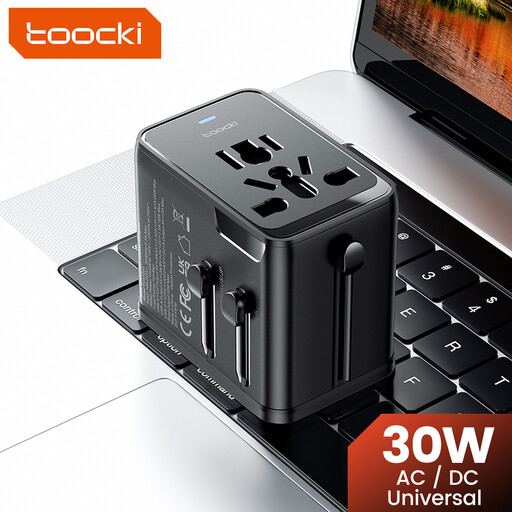
toocki Universal Travel Adapter 30W PD
Worth considering if you’re also looking for a travel adapter. Check that the output and cable are suitable for your bike light, and follow the light’s instructions.
The product name specifies 30 W, one USB-A port, two USB-C ports and support for EU, UK, US and Australian plug types.
View at Joybuy
Frequently asked questions
Can I charge my USB bike light with a charger I already own?
That depends on the exact light model. Check the instructions and cable. For its USB lights, Spanninga recommends a computer or adapter and specifies a CE-marked power adapter with a maximum of 5 V. Don’t assume this instruction applies to lights from other brands.
Where can I safely charge the light on the kitchen worktop?
Choose a dry, clear space where heat can dissipate, and don’t use a damaged cable. The Fire Service advises placing chargers in an unobstructed spot. Also follow your light’s instructions.
Does a USB mains charger need a CE marking in the Netherlands?
For electrical products that must carry the marking, the CE marking is the manufacturer’s declaration that the product meets the applicable EU requirements. The Netherlands Food and Consumer Product Safety Authority clarifies that this doesn’t mean every item has been independently tested.
What cooling-off period applies if I buy a charger online from a business?
According to the Dutch government, a 14-day cooling-off period applies in many cases to distance purchases. Check the terms and any applicable exceptions. Buying from a private individual isn’t the same as buying from a business at a distance.


