Who is this charging solution for?

Cyclists with an unfamiliar charging connector

You want to charge your existing light without choosing an unsuitable port or cable. Bike lights may use a built-in USB-A plug, USB-C or Micro-USB, for example; ANWB Webwinkel, Lezyne Customer Service and Warranty Support, and Knog US describe these different connections.

Cyclists sharing a charger between several devices

You want to connect your bike light alongside a second light or work device. Check the number of ports and how power is distributed when charging several devices at once; UGREEN and Belkin describe chargers designed for multiple devices.

People using a shared desk

You’re looking for a charging spot that’s easy to reach, out of the way, and gives the charger and cables room to stay clear and dry. The Netherlands Fire Service advises keeping chargers uncovered so heat can escape.

What to look for in a USB bike light charger

Compact USB wall charger

Choose this if: you’re charging one light and have an accessible socket; first check your light’s connector.

Bear in mind: there are fewer connection options, and the ports may not be within easy reach.

Multi-port USB desk charger

Choose this if: you want to charge several lights or work devices at once, and have room on your desk for a charger with a cable.

Bear in mind: the charger takes up desk space. Check the port types and power distribution for the combination of devices you plan to use.

Extension lead with USB ports

Choose this if: you need extra mains sockets as well as USB ports.

Bear in mind: this type of extension lead needs more space. Check the instructions for the specific model’s load and placement requirements.

What to consider What to look for when buying Who is this important for?
Connector and cable Check your light’s connector and the cable specified in its instructions. If I want to keep using my existing light, I’ll check the plug and cable first. Around 33% of consumers prioritise having the right connector and cable.
Charging several devices at once Count the ports you need and check how power is distributed across the ports you’ll use at the same time. If I want to connect a front and rear light, or a work device as well, I’ll check that each one has a suitable port. Around 27% of consumers prioritise charging several devices at once.
Desk space Check that there’s room, the socket is within reach and the cable won’t run across the shared workspace. If I want a charger within easy reach without cluttering the desk, I’ll consider where it will go and how long the cable is. Around 20% of consumers particularly value a practical shared charging spot.
Safe use Follow the instructions and keep the charger uncovered and dry; don’t use a damaged cable. Anyone using the charging area during the working day will want to keep the charger uncovered and follow the instructions. Around 20% of consumers prioritise safe, practical charging.

Common buying mistakes

  • Assuming all USB bike lights have the same plug

    Bike lights may use a built-in USB-A plug, USB-C or Micro-USB. A charger with the wrong connector may not work with your light.

    Check your light’s connector and instructions before choosing the number and type of ports.

  • Comparing only the highest wattage

    The maximum power of a single port or the charger as a whole doesn’t automatically tell you how much power each port gets when you connect several devices.

    Check how power is distributed for the exact combination of ports you plan to use.

  • Choosing an extension lead with USB ports without reading the instructions

    Load, earthing and placement requirements can vary between models.

    Choose this type only if you also need mains sockets and can follow the instructions for the specific model at your workplace.

Brands to consider

Belkin

The BoostCharge Pro P-WCH010 is an example of a desk charger with USB-A and USB-C ports.

  • Belkin says this model has two USB-A ports and two USB-C ports, a 2 m power cable and up to 108 W of total power.
  • These specifications don’t mean a particular bike light will charge faster; check your light’s connector and power requirements.

UGREEN

The Nexode 100W 5-Port GaN Charger is an option if you’re looking for several USB ports.

  • UGREEN says this model has four USB-C ports and one USB-A port, with up to 100 W available through a single port.
  • Check which cable you need and how power is distributed; these specifications don’t necessarily apply to every Nexode variant.

Baseus

The PowerCombo range combines mains sockets and USB ports in one device.

  • The Joybuy product page for model PSLR000301 lists two mains sockets, USB-A, USB-C and a retractable USB-C cable.
  • The connections and usage restrictions listed apply to this specific model and not necessarily to other PowerCombo versions.

Joybuy products for charging at a shared desk

This selection ranges from compact USB-C wall chargers to extension leads with USB ports for a shared desk. Before buying, check that the connector is compatible with your bike light and that the setup suits your workspace.

Lenovo Dual USB-C 65W GaN Charger

Lenovo Dual USB-C 65W GaN Charger

Suitable for a bike light that charges via USB-C; check the cable specified and the connector on your light.

The description lists two USB-C ports, a 1.5 m USB-C cable included and up to 65 W combined. Power distribution may change when both ports are in use.

View at Joybuy
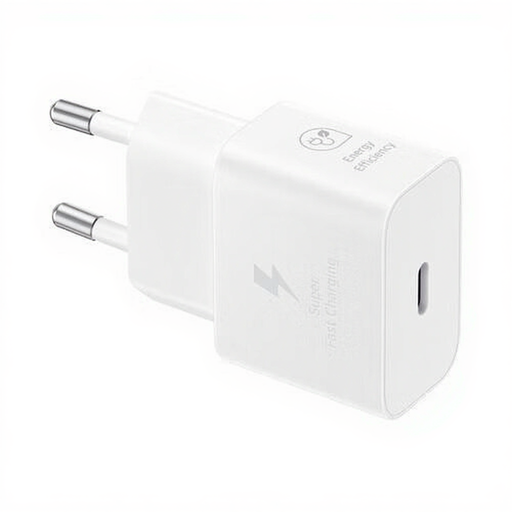
Samsung 25W Efficiency Adapter with 1 m USB-C cable, white

Samsung 25W Efficiency Adapter, with 1 m USB-C cable, white

A compact USB-C wall charger for a bike light that charges via USB-C; check that the cable and connector are compatible with your light.

The product information lists a USB-C output, an output power of 25 W and a 1 m cable included.

View at Joybuy

Neomounts DS22-840BL6 desk power strip with clamp and USB-C and USB-A ports

Neomounts DS22-840BL6 desk power strip

An option for a permanent desk setup if you want USB ports and mains sockets in one place.

The description lists two USB-C ports, one USB-A port and three Schuko sockets. The clamp is designed for fitting underneath a desktop; the cable is 1.4 m long.

View at Joybuy
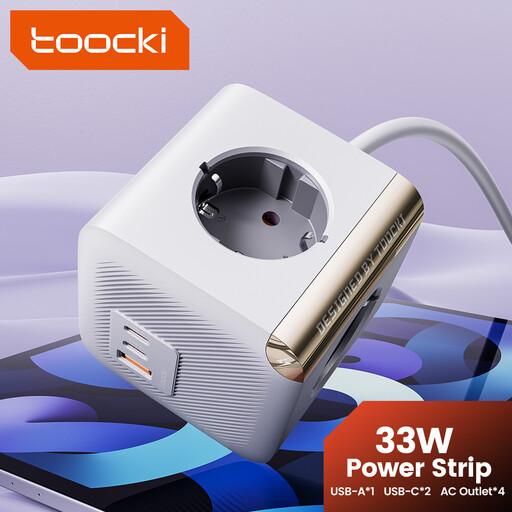
toocki PD33W power strip with four AC sockets and two USB-C ports

toocki PD33W power strip with 4 AC sockets and 2 USB-C ports

This power strip is an option if you’re looking for a shared charging spot with USB-C ports and extra mains sockets.

The product name lists four AC sockets and two USB-C ports. According to the product information, this model is for indoor use only; keep it away from water and don’t plug it into another power strip.

View at Joybuy

Frequently asked questions

Can I connect any USB bike light to a USB-C charging station?

No, check your light’s connector first. Bike lights may use a built-in USB-A plug, USB-C or Micro-USB, among other connections. Check the instructions to find out which cable you need.

How do I set up a shared charging spot?

Keep the charger uncovered and dry so heat can escape, and don’t use damaged cables. Follow the instructions for the light and charger, and leave enough room for other people using the workspace. The Netherlands Fire Service advises keeping chargers uncovered.

In the Netherlands, are charging stations always covered by just a two-year warranty?

No, statutory guarantees in the Netherlands don’t have a fixed time limit. According to the Government of the Netherlands, you’re entitled to a product that works as it should, depending on what you could reasonably expect. If a product is faulty, the retailer is your point of contact. A manufacturer’s warranty is separate.

Can I ride on the road in the Netherlands with a detachable bike light that’s fully charged?

Yes, detachable lights are permitted. The Government of the Netherlands states that you must have a suitable front and rear light on in the dark and when visibility is poor: the front light must be white or yellow and the rear light red; the lights must not flash. There are also rules about positioning and reflectors. Charging your light at work doesn’t change the rules of the road.

Does a CE mark alone prove that a charging station is safe?

No. The Netherlands Food and Consumer Product Safety Authority advises checking for the relevant CE mark and clear information from the seller, but also warns that unsafe products can be sold through European online shops or platforms. So check the product information and usage restrictions too.
