
Students who want to charge their recorder
They want to know whether USB charges the battery or only supplies power. Manuals from Zoom Corporation and TASCAM show that USB functionality can vary between recorder models.


First, check the exact recorder model: USB may charge a built-in battery, but on a recorder with replaceable batteries it may only provide power while the device is in use. Then choose a mains charger with the port, cable and power mode specified in the manual. Extra ports are especially useful if you want to connect another device to the same socket.
They want to know whether USB charges the battery or only supplies power. Manuals from Zoom Corporation and TASCAM show that USB functionality can vary between recorder models.
They want to connect their recorder and another device at the same time, so they check the number and type of ports and the power output per port. Belkin and UGREEN product information describes models with multiple connections.
They want to avoid an extra purchase without overlooking the right cable and power specifications. IKEA Netherlands, for example, states that the USB-C cable for the SJÖSS 606.097.40 is sold separately.
Choose this if: the manual confirms that the recorder supports USB power via a compatible USB-C cable and you don't need to connect a second device at the same time.
Bear in mind: the cable may be sold separately. A 20 W rating doesn't prove that the recorder needs that level of power or that USB will charge its battery.
Choose this if: you want to connect your recorder and another device at the same time, and have a suitable cable for each.
Bear in mind: check the connection type and power specifications for each port. Extra connections won't make an unsuitable cable compatible.
Choose this if: you already have a compatible mains charger and cable, or still need to find out whether USB can actually charge your battery.
Bear in mind: an external USB power supply may work while the recorder is in use, but it won't necessarily charge replaceable batteries.
| What to consider | What should you check? | Who should pay particular attention? |
|---|---|---|
| USB functionality and compatible power supply | Check the manual for your exact model to see whether USB charges the battery or only provides external power, and which power mode and cable are required. | If I want to charge the battery via USB, I'll first check exactly what my recorder model supports. Around 42% of consumers put compatibility first. |
| Mains charger safety | Check the CE marking, model designation and instructions for use; don't use a damaged charger. The Netherlands Food and Consumer Product Safety Authority classifies chargers as electrical appliances and states that CE marking is mandatory for electrical consumer products. | If I use a mains charger in my room, I want to be able to check the required product marking and instructions. Around 33% of consumers prioritise safety. |
| Number and type of ports | Check whether you need USB-A or USB-C, and whether the cables and power supply are suitable for the devices you want to connect at the same time. | If I want to use one socket for my recorder and another device, I'll look for multiple suitable connections. Around 17% of consumers prioritise using devices simultaneously. |
| Reusing a charger and cable | Check which charger and cable you already have, and what's included with the exact model you plan to buy. | If I want to avoid an unnecessary purchase, I'll first check whether my existing charger and cable meet the recorder's requirements. Around 8% of consumers prioritise reuse and keeping extra purchases to a minimum. |
A recorder may run on USB power without the connection charging its built-in battery or replaceable batteries.
Before buying, check which USB functions are listed in the manual for your exact recorder model.
A charger's maximum power rating doesn't prove that an unfamiliar recorder uses that much power or will charge faster with it.
Compare the recorder's required power mode and input specifications with the details of the charger you are considering.
A multi-port charger won't help if the cable doesn't connect to your recorder or the port you've chosen.
Check both ends of the cable and the port types on the exact charger model.
The examples below refer to specific models. Always check that the port, cable and power mode are suitable for your recorder.
The SJÖSS 606.097.40 is a 20 W mains charger with one USB-C port, for anyone looking for a single compatible connection.
According to Belkin, the BOOST↑CHARGE WCB002 has two USB-A ports for devices with compatible cables.
The Nexode 20 W PD charger with cable is a USB-C option for anyone who needs a compatible cable as part of the bundle.
These USB-C mains chargers are intended for situations where the connection and power mode match your recorder's manual. Some models also have extra ports.
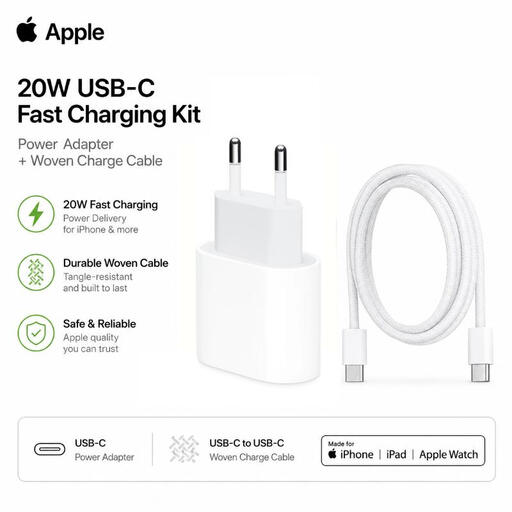 Image unavailable
Before choosing this set, check whether your recorder's manual confirms support for USB Power Delivery via USB-C.
The product title lists a 20 W adapter and a braided USB-C charging cable.
 Image unavailable
An option if your recorder supports compatible USB-C power and you want to use the cable mentioned in the title. Compare the required power mode with the manual.
The product title lists two USB-C ports and a retractable cable. According to the product information, this charger is for indoor use.
 Image unavailable
It may be suitable if your recorder and cable work with one of the listed port types. Also check the power specifications in the manual.
The product title lists two USB-C ports and one USB-A port. The product information states that it's for indoor use and warns against exposure to moisture and water.
 Image unavailable
A possible choice if your recorder supports one of these port types and the corresponding power mode. Make sure it meets the requirements in the manual for your exact model.
The product title lists one USB-C port and one USB-A port. According to the product information, the charger is for indoor use in dry conditions.
 Image unavailable
It may be suitable if your recorder uses a compatible USB-C or USB-A connection and power mode. Check the specifications for your exact model.
The product title lists one USB-C port and one USB-A port. According to the product information, this charger is for indoor use in a dry location.
No. Having a USB port doesn't necessarily mean it can charge the batteries. Zoom Corporation describes the H1essential as supporting external USB power, while TASCAM lists AA batteries as well as USB bus power for the DR-05X. If you want to know whether your recorder's internal battery charges via USB, check the manual for your exact model.
That depends on the model and the specified power mode. Zoom Corporation describes USB bus power for the H1essential. For the DR-05X, TASCAM warns that an interruption to the power supply may cause recordings and settings to be lost. Follow the manual and, if it warns against it, don't disconnect the power during a recording.
Check the packaging for the exact model. IKEA Netherlands states that the cable for the SJÖSS 606.097.40 is sold separately, while UGREEN lists a USB-C cable as included with the Nexode bundle mentioned above.
Yes. The Netherlands Food and Consumer Product Safety Authority classifies chargers as electrical appliances and states that CE marking is mandatory for electrical consumer products. The marking alone doesn't prove that every individual item has been independently tested.