
Make sure your recorder charges properly
You want to know whether USB charges your recorder’s battery or simply powers the device. The manuals for Sony’s ICD-UX570 and Zoom’s H1essential show that this varies by model.


First, check whether your exact recorder model charges its battery via USB or uses USB only for power: Sony describes USB charging for the ICD-UX570, while Zoom also describes using the H1essential with an external USB power supply. Then choose a charger with ports that suit your cables. A high total wattage alone doesn’t prove that the recorder is compatible or will charge faster.
You want to know whether USB charges your recorder’s battery or simply powers the device. The manuals for Sony’s ICD-UX570 and Zoom’s H1essential show that this varies by model.
You want to connect your recorder and other USB devices in one place, and need ports that suit your USB-A and USB-C cables. The specifications from Belkin, Anker and UGREEN show a range of port layouts.
You’re looking for a charging station that can power a suitable laptop as well as smaller USB devices. The output per port and how power is shared when several devices are connected at once both matter; Sitecom lists these port configurations for the CH-1105.
| What to consider | What should you check? | Who is this important for? |
|---|---|---|
| Charging or just powering | Check your exact model’s manual for information on charging versus external USB power. Compare the required connection and output with those of the charger. | If you want the battery to charge, rather than just recording while powered via USB, checking the specific model is essential; around 36% of consumers say this is their main concern when buying. |
| Ports and cables | Count your USB-A and USB-C cables and check which connection your recorder uses. Also make sure the cable length suits the distance to the socket. | If you want to connect your recorder and other devices together on your desk, ports that suit your cables are useful; around 29% of consumers prioritise this. |
| Power when using several devices at once | Compare the power available per port when your devices are connected together with the requirements of your recorder and any laptop or tablet. | If several devices need power at the same time, you’ll want to know how much each one actually gets; around 21% of consumers start by looking at how power is shared. |
| Safety and support if something goes wrong | For a mains-powered charger, check the applicable CE marking and seller details. Don’t use damaged equipment. | If you want reassurance about the marking and who to contact in the event of a fault, check these details in advance; around 14% of consumers cite this as their main concern when buying. |
A USB connection doesn’t automatically mean the recorder’s battery will charge. The guidance for the Sony ICD-UX570 and Zoom H1essential differs.
Check your exact model’s manual to see whether USB is intended for charging, external power or both.
If USB is for external power only, you’ll still need another solution to charge the battery.
With a multi-port charger, the power available per port can change when you connect more devices.
Check how power is shared across the combination of ports you actually plan to use at the same time. If you’re only charging a recorder, don’t automatically choose a charger with a high total wattage.
The model name and included accessories can be important when checking whether a charger is the version you’re looking for.
Before buying, check the model number and what’s included in the box.
A different version or a missing cable could mean having to adapt your set-up.
These brand specifications can help you compare port layouts and use cases; they don’t, on their own, tell you whether a specific recorder will charge.
The BOOST↑CHARGE WCB002 we looked at is a straightforward mains charger for a desk where two USB-A connections are enough.
The Anker 543 Charger (65W II), model A2046, is designed for a desk with both USB-C and USB-A devices.
According to UGREEN, the Nexode Desktop GaN Charger 65W is designed for a desk with mainly USB-C devices.
The CH-1105 is a desktop charger for a set-up where suitable laptops need power alongside smaller USB devices.
This selection includes extension leads and USB charging stations with USB-A and/or USB-C connections, for a desk where other devices may need power as well as a recorder. First, check your recorder’s manual and the connection it requires.
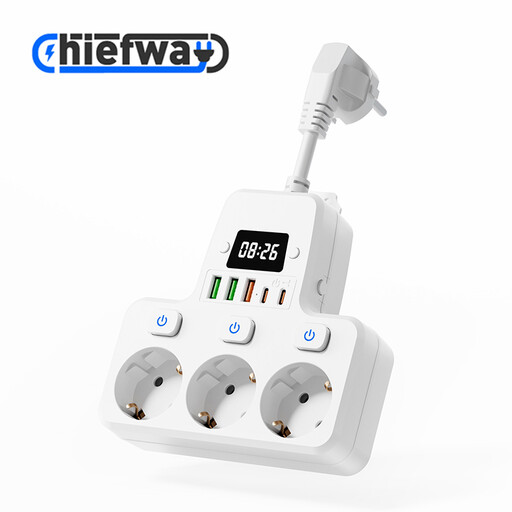 Image unavailable
Suited to a desk where you want to connect several devices using different USB cables.
The product name lists 3 sockets, 3 USB-A ports, 2 Type-C ports and individual switches. The cable is 10 cm long, so check that it will reach your socket.
 Image unavailable
A possible fit for a desk where devices with both USB-A and USB-C cables need connecting.
The product description lists 3 USB-A ports, 1 USB-C port and a 1.5 m cable.
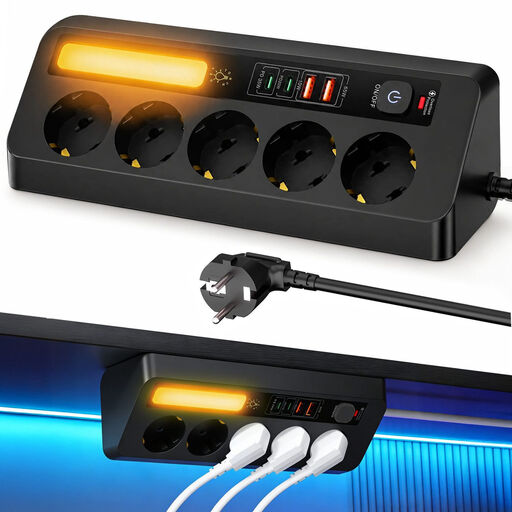 Image unavailable
An option if you want to connect USB devices and other plugs in one place.
The product description lists 2 USB-C ports, 2 USB-A ports, PD 35 W and a 2 m cable.
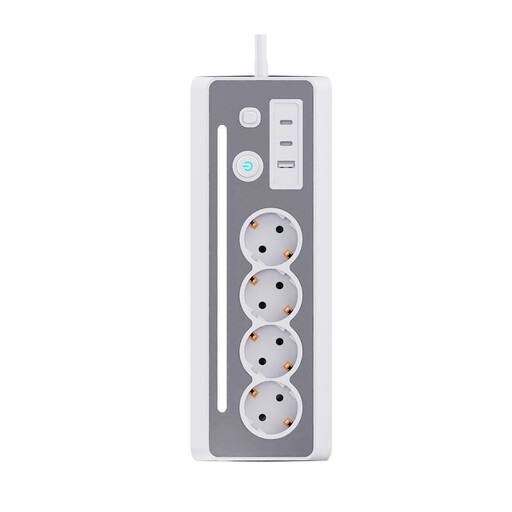 Image unavailable
Designed for a desk where you want to connect USB devices and other appliances in one place.
The product name lists 3 Schuko sockets and 3 USB charging ports. Check that the port types suit your cables.
 Image unavailable
Could suit a desk where several USB devices need power from one place.
The product name lists USB-A and USB-C connections. Check how the ports are configured and the output your recorder requires.
No. You can’t tell just by looking at whether it has a USB port. Sony describes USB charging for the ICD-UX570; for the H1essential, Zoom describes use with batteries or an external USB power supply. Check the manual for your exact model.
Not necessarily. A higher total wattage doesn’t prove that your recorder can use more power or will charge faster. Compare the recorder model’s requirements with the output of the port you’re using, including when other devices are connected at the same time.
CE marking is required for electrical products that fall under the relevant rules. The Netherlands Food and Consumer Product Safety Authority explains this requirement for products covered by those rules. Check the marking on the specific mains-powered charger; CE is a declaration by the manufacturer, not an independent product test in itself.
Follow the instructions for your recorder and charger, don’t use damaged equipment, and keep the charger away from moisture. The Netherlands Fire Service lists damage, short circuits and incorrect charging as possible fire risks.
Sony says charging won’t work when the computer is switched off or in sleep mode. If you have problems with the computer connection, Sony recommends connecting the recorder directly, without a USB hub or extension cable. This troubleshooting advice is specific to this model.