
Vandaag of morgen in huis

Kwaliteit gegarandeerd

Welkomstaanbiedingen ontgrendelen: GRATIS bezorging | Tot 80% korting | Gratis 30 dagen JoyPlus-proefperiode
Download de app
A US QWERTY keyboard can be useful for programming, gaming and working with English-language software. However, its layout is not always the same as a Dutch keyboard. Terms such as “mechanical”, “ergonomic” and “water-resistant” can also cause confusion. If you only look at RGB lighting or a low price, you could end up with an awkward layout, missing keys or limited compatibility.
This buying guide helps you compare specifications in practical terms. We look at layout, size, switches, connectivity and the features that make a difference in everyday use.
Don’t just check whether the title says “QWERTY”. Also look for US International, ANSI or ISO. A US layout has a different position for some punctuation marks and a different Enter key compared with many European ISO keyboards.
For programming, characters such as @, \, {} and [] are often important. So check that the physical keys and the selected keyboard language in Windows or macOS match. A keyboard with a US layout may behave differently on a computer set to Dutch than its key labels suggest.
Some models use membrane keys with a mechanical feel. This can make typing comfortable, but technically it is different from a mechanical keyboard with individual switches. A mechanical model is often easier to customise, but it can also be louder and require more space or maintenance.
Pay attention to the stated type: membrane, mechanical, optical switch or Hall Effect. With a hot-swappable keyboard, you can replace switches without soldering, but check whether the board is compatible with 3-pin, 5-pin or magnetic switches.
A compact keyboard with a 60% layout usually has 61 keys and no separate numeric keypad. The arrow keys, function keys and media controls then generally work via Fn combinations. This saves desk space, but can be less practical for spreadsheets, accounting or keyboard shortcuts in professional software.
A 75% or 65% model generally provides more keys, while a full-size keyboard retains the familiar layout with a numeric keypad.
Look for an explicit mention of US QWERTY, US International and preferably ANSI. Also check whether the keyboard works with your system. Some models only mention Windows, while others are suitable for PC and Mac, iOS, Android or ChromeOS.
On macOS, the Command and Option functions may work differently from those on Windows. With wireless models, it is also important to check whether Bluetooth is supported or whether only a USB receiver is included.
Use this layout as a practical guide:
A keyboard with a numeric keypad is useful for figures, invoices and spreadsheets. For gamers, the extra width may leave less room for large mouse movements.
Membrane keys are often low-profile and relatively quiet. Mechanical switches provide more feedback about the actuation point, but the sound varies by type. Linear switches generally feel smooth and consistent, while clicky switches produce a distinct clicking sound.
With optical or magnetic switches, brands may offer features such as adjustable actuation or Rapid Trigger. According to information provided by the relevant brands, these features are designed to make key registration faster or more flexible. Treat such performance figures as product specifications, not as a guarantee of better gaming results.
Also pay attention to the keycap material. PBT keycaps are often chosen for their resistance to wear, while ABS keycaps are more common on affordable models. An ergonomic wrist rest or adjustable feet can affect your working posture, but they are no substitute for setting up your desk properly or taking regular breaks.
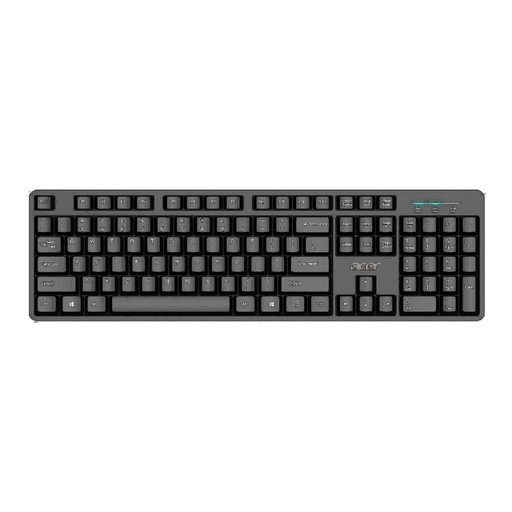
Why it suits this profile: This wired full-size keyboard is designed for straightforward home and office use. According to the product description, the USB connection is plug and play.
The product information states US International, ANSI, QWERTY and a numeric keypad, so you can check the layout before buying.
Full-size design, USB 2.0 connection, 1.45-metre cable and a water-resistant design according to the description.
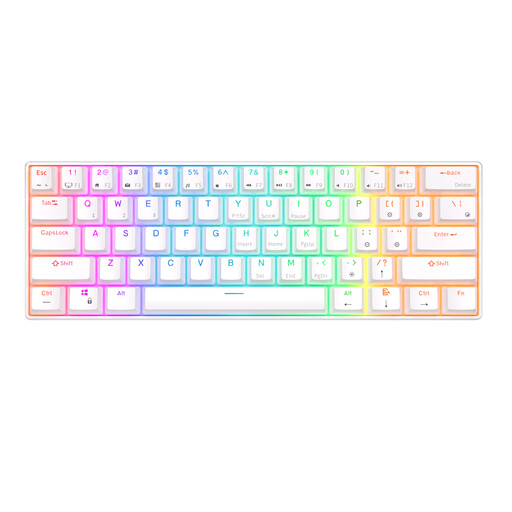
Why it suits this profile: This mechanical keyboard combines a compact design with Bluetooth and a detachable USB cable for use with multiple devices.
The specifications clearly state 61 keys, Bluetooth and the US QWERTY layout. This makes it clear that there is no numeric keypad.
Hot-swappable mechanical switches, RGB lighting and support for up to three Bluetooth devices according to the product information.
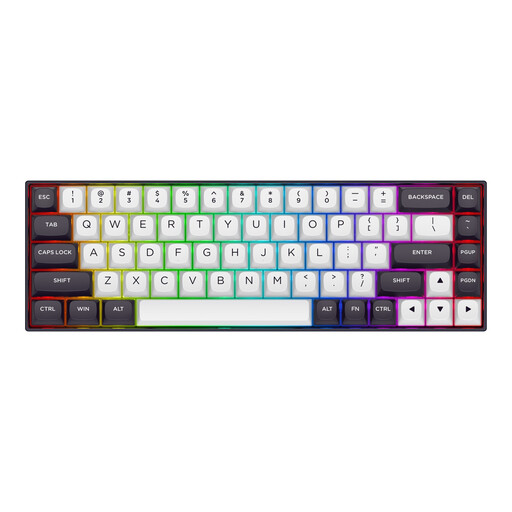
Why it suits this profile: This compact gaming keyboard is designed for players looking for features such as Hall Effect switches, Rapid Trigger and adjustable actuation.
The product information explicitly states 68 keys, a US layout and magnetic Hall Effect switches. This clearly distinguishes it from a standard mechanical keyboard.
According to the product description, the model offers adjustable actuation from 0.2 to 4.0 mm, Rapid Trigger, RGB and a polling rate of up to 8000 Hz.
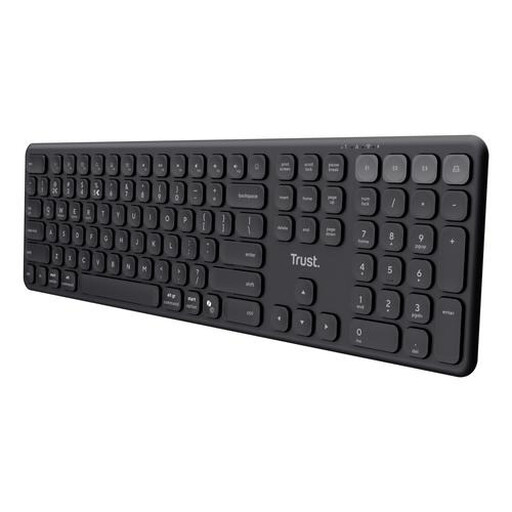
Why it suits this profile: This wireless keyboard is designed for users who need a numeric keypad and switch between a laptop, tablet and smartphone.
The description makes it clear that these are quiet scissor keys, not mechanical switches. US QWERTY and full-size are also explicitly mentioned.
Connection via USB receiver and three Bluetooth channels, a numeric keypad and a built-in rechargeable battery according to the product specifications.
We’ve put together a complete, up-to-date list of products that fully meet these strict selection criteria and the applicable European safety regulations.
Yes, in most cases. The USB or Bluetooth connection does not determine the language layout. Set the correct keyboard layout in Windows or macOS, such as US International. Then check a few punctuation marks and special characters.
With a wired keyboard, electricity costs are generally limited to the power used via USB. With a wireless model, you need to allow for batteries or recharging. Mechanical switches may be replaceable, particularly on a hot-swappable keyboard, but accessories and replacement switches involve additional costs.
The lifespan depends on usage, cleaning, liquid damage and the quality of the switches. Manufacturers sometimes specify a number of keystrokes, but this is a product specification under certain conditions, not a guarantee for every type of use. Keep the keyboard free from dust, avoid moisture and check the legal guarantee and returns policy before buying.
