
Vandaag of morgen in huis

Kwaliteit gegarandeerd

Welkomstaanbiedingen ontgrendelen: GRATIS bezorging | Tot 80% korting | Gratis 30 dagen JoyPlus-proefperiode
Download de app
A US QWERTY keyboard can be useful for gaming, programming, working from home or using an international computer setup. However, not every keyboard labelled “US” is the same. The wrong layout, missing keys or an unsuitable connection can become frustrating only after you have bought it.
As a Joybuy Product Recommendation Officer, I filter the key product specifications of popular models. This helps you see which features can be checked and which American keyboard suits the way you use it.
The physical layout and your computer’s language settings are not always identical. A keyboard may have a physical ANSI layout, while the product information states “US International”. Therefore, check:
\, |, @ and quotation marks.If you rely blindly on the term “QWERTY”, you could receive a keyboard that feels different from your current model.
A 60% keyboard usually has around 61 keys and omits the numeric keypad, function row and often the arrow keys. These functions are usually available via an Fn layer. A 75% keyboard more often retains the arrow keys and function row, but does not have a separate numeric keypad.
That is practical for small desks or gaming, but less convenient for bookkeeping, data entry or working quickly with spreadsheets. If you enter lots of numbers, it may be better to choose a keyboard with a numeric keypad or a full-size model.
Some affordable models use membrane keys with a mechanical feel. This is different from a genuine mechanical keyboard with individual switches. Check the product specification:
Keycaps, the case and sound-dampening materials also affect the noise level. RGB lighting says nothing about the type of switch.
Look for a clear mention of US QWERTY, ANSI or US International. Also check whether the keyboard is suitable for your operating system. Some models only mention Windows, while others also support macOS, ChromeOS, iOS or Android.
A keyboard for PC and Mac may work without all the function keys being recognised in the same way. Therefore, check whether Mac functions, software profiles or key combinations are available.
The most common choices are:
Measure your desk before ordering. Also consider the height of the keyboard and the space available for your mouse.
A wired model with USB provides a direct connection and does not need charging. With a wireless keyboard, check whether it works via Bluetooth, a USB receiver or both. A USB receiver occupies a port; Bluetooth is more convenient for laptops and tablets, but needs to be paired first.
For wireless models, look out for:
A battery-life claim such as “up to six months” is a stated maximum under specific usage conditions. Actual battery life depends partly on usage and lighting.
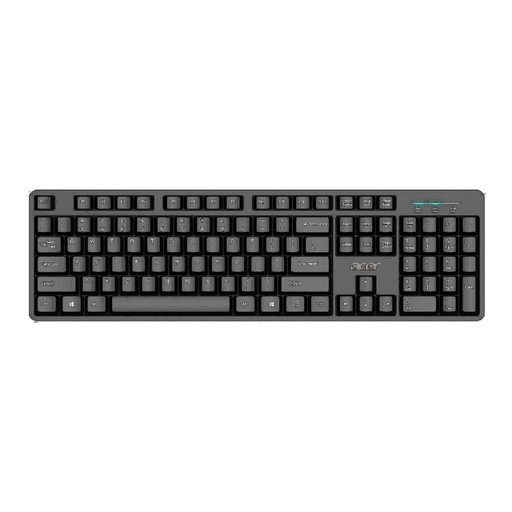
Why it suits this profile: This full-size model is designed for home and office use and connects via USB, with no additional installation required for basic use.
The specifications explicitly mention QWERTY US International, USB, full-size and a numeric keypad. This makes the format clear before you buy.
USB connection, 1,45-metre cable, full-size layout and water-resistant design according to the product description.
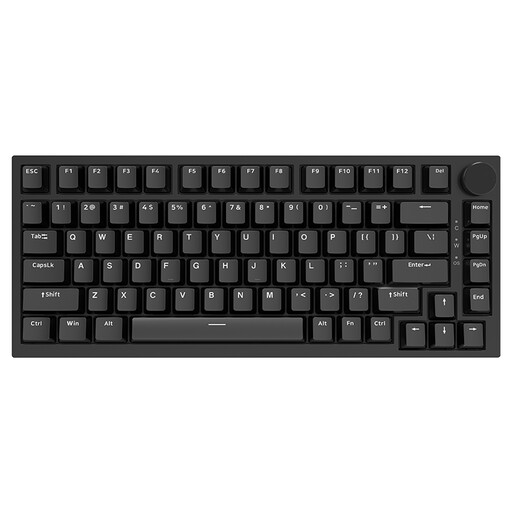
Why it suits this profile: The 75% layout combines a compact format with arrow keys and a function row, making it suitable for work and gaming.
The product states US QWERTY, 75%, 82 keys and a wired Type-C connection. The hot-swappable switches are listed in the product specifications.
PBT keycaps, RGB lighting, volume knob, gasket construction and compatibility with Windows and macOS according to the product information.
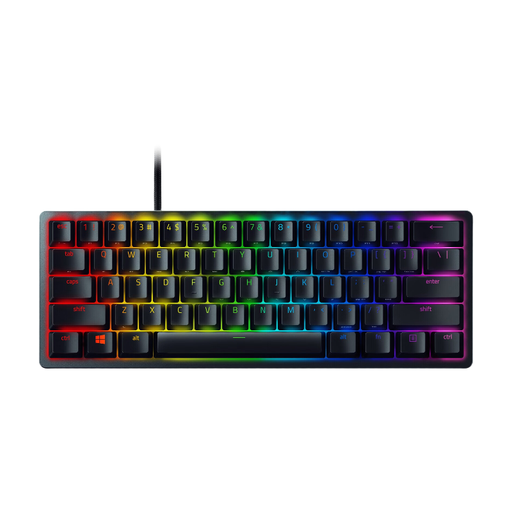
Why it suits this profile: The 60% layout and optical switches are designed for gamers who want to save desk space and are happy to access functions via shortcuts.
The format, number of keys and ANSI layout are stated. This tells you in advance that there is no numeric keypad or separate function row.
61 keys, RGB lighting, detachable USB-C cable, built-in memory for five profiles and N-key rollover according to the specifications.
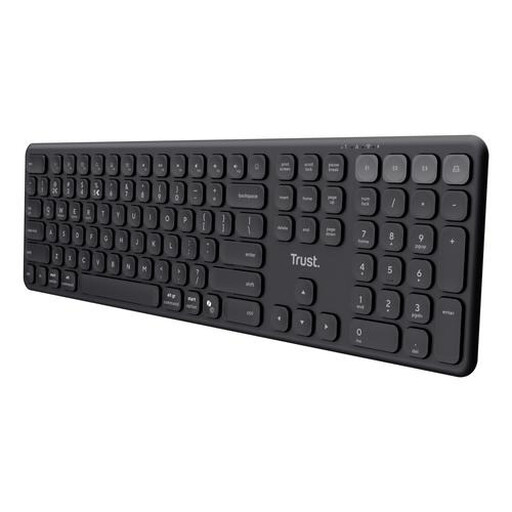
Why it suits this profile: This full-size wireless keyboard is designed for users who switch between a laptop, tablet and smartphone.
The US/QWERTY layout, numeric keypad and available connections are described separately. This means you do not have to rely solely on a marketing name.
USB receiver, three Bluetooth channels, rechargeable battery, scissor keys and support for Windows, macOS, iOS and Android.
We have put together a complete, up-to-date list of products that fully meet these strict selection criteria and the applicable European safety regulations.
Yes, usually. You can set your preferred keyboard layout in Windows or macOS. Do check the physical ANSI layout, however, and be aware of differences in punctuation, symbols and accents.
It depends on how you work. A 60% model can save space for gaming and on a compact desk. For spreadsheets, financial administration or frequent use of function keys, a full-size or 75% model is often more practical.
With a model that uses replaceable batteries, you will eventually need to pay for new ones. A model with a built-in rechargeable battery uses a USB cable for charging. The total cost of use depends on the battery type, charging frequency and whether lighting is present. So do not just check the purchase price; also look at the stated battery life and connection options.
