
Vandaag of morgen in huis

Kwaliteit gegarandeerd

Welkomstaanbiedingen ontgrendelen: GRATIS bezorging | Tot 80% korting | Gratis 30 dagen JoyPlus-proefperiode
Download de app
A US QWERTY keyboard can be useful for software development, gaming, international communication or if you’re used to the American keyboard layout. However, many models look much the same at first glance. The differences often come down to the layout, size, switches and how the keyboard connects.
You may only notice you’ve made the wrong choice after buying it: a missing numeric keypad, an awkward function layer or keys that are too noisy for a shared workspace. Use the checks below to avoid a disappointing purchase.
Always check whether the product page specifies US International, ANSI or another QWERTY variant. The physical position of certain keys can vary. Pay particular attention to:
@ and ".So a keyboard may be labelled “QWERTY” even though its physical layout isn’t quite what you expect. The US layout is explicitly stated in the product specifications or product name for the models in this article.
A 60% keyboard usually has no dedicated arrow keys, function keys or navigation block. These functions are often accessed using the Fn key. This is handy for a small workspace or gaming setup, but less suitable if you work with spreadsheets every day.
A 75% keyboard generally retains the arrow keys and some of the navigation keys. A full-size keyboard also has a numeric keypad. So measure the space available on your desk first.
An RGB keyboard may look appealing, but lighting doesn’t determine how comfortable or quiet it is to type on. Start by looking at the type of keys:
The layout determines how much desk space you’ll need and which functions are immediately available:
If you enter a lot of numbers, it’s worth choosing a full-size keyboard. A compact keyboard can give gamers more room for their mouse.
A wired model connects via USB and doesn’t need charging. It’s a straightforward option for a fixed PC setup. A wireless keyboard offers more flexibility, particularly if you switch between a laptop, tablet and smartphone. If so, check:
For some models, the stated battery life comes from the manufacturer. Treat it as a product specification based on certain usage conditions, not a guaranteed battery life for every user.
A quiet keyboard is important in a home office, during online meetings or in a shared space. Low-profile membrane or scissor keys are generally quieter than clicky switches. For example, the Razer Huntsman Mini uses Razer Clicky Optical Switches, which the product description says provide an audible click. That can be satisfying for feedback, but less suitable if you’re sitting near others.
A hot-swappable keyboard lets you replace compatible switches without soldering. Check in advance whether the board supports 3-pin, 5-pin or a specific switch format. Keycaps aren’t universal either, so check the ANSI layout and profile.
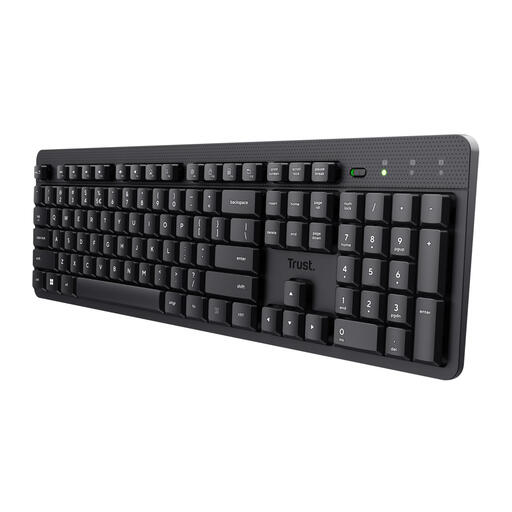
Why it suits this profile: The full-size layout, numeric keypad and wireless USB receiver make this a good choice for working from home, admin tasks and everyday typing.
The product information explicitly states US QWERTY, 104 keys, a numeric keypad and quiet membrane keys. It isn’t a mechanical gaming model, so you won’t pay for gaming features you don’t need.
Wireless USB connection, full-size layout, numeric keypad and a stated range of up to 8 metres.

Why it suits this profile: This model combines a compact 75% layout with mechanical switches, PBT keycaps and a volume dial.
The specifications list US QWERTY, 83 keys, a USB-C cable and hot-swappable support. This makes the size, connection and upgrade options clear from the outset.
Gasket construction according to the product description, PBT keycaps, RGB lighting, volume control and support for Windows and macOS.
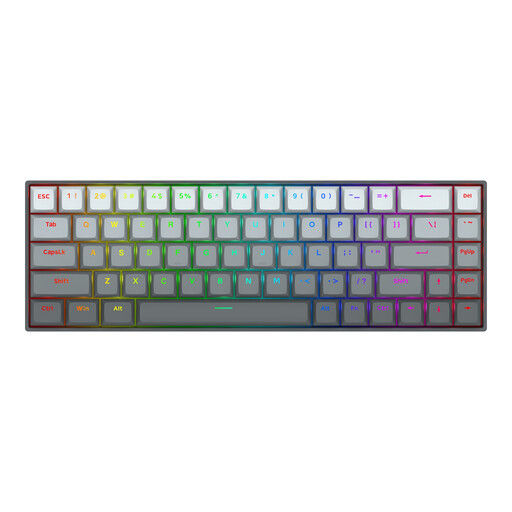
Why it suits this profile: Designed for gamers looking for a compact board with magnetic switches, adjustable actuation and a wired connection.
According to the manufacturer, the model supports adjustable actuation from 0.2 to 4.0 mm and Rapid Trigger. However, check in advance whether you’ll actually need the associated software features.
68 keys, an aluminium top plate according to the product description, RGB lighting, a USB-C cable and compatibility with Windows and macOS.
We’ve put together a complete, up-to-date list of products that meet these strict selection criteria and the applicable European safety regulations.
Go to Settings, select Time & language and open the Language & region settings. Add a US or US International keyboard layout, then select it from the language bar. Next, check the @, " and : characters in a text field.
It mainly depends on the switch. Clicky switches are deliberately louder. Linear or quiet switches are usually better suited to shared workspaces. A membrane or scissor-switch keyboard, such as some full-size models, is a practical choice if noise levels matter more to you than customisation.
Its lifespan depends on how you use it, how well you maintain it, its construction and the type of switch. Manufacturers sometimes state a number of keystrokes, but this is a product specification, not a guarantee for every usage scenario. Keep the keyboard dry, don’t pull on the cable and clean it with a soft, dry cloth. When buying, also check the statutory warranty and the seller’s terms and conditions.
